
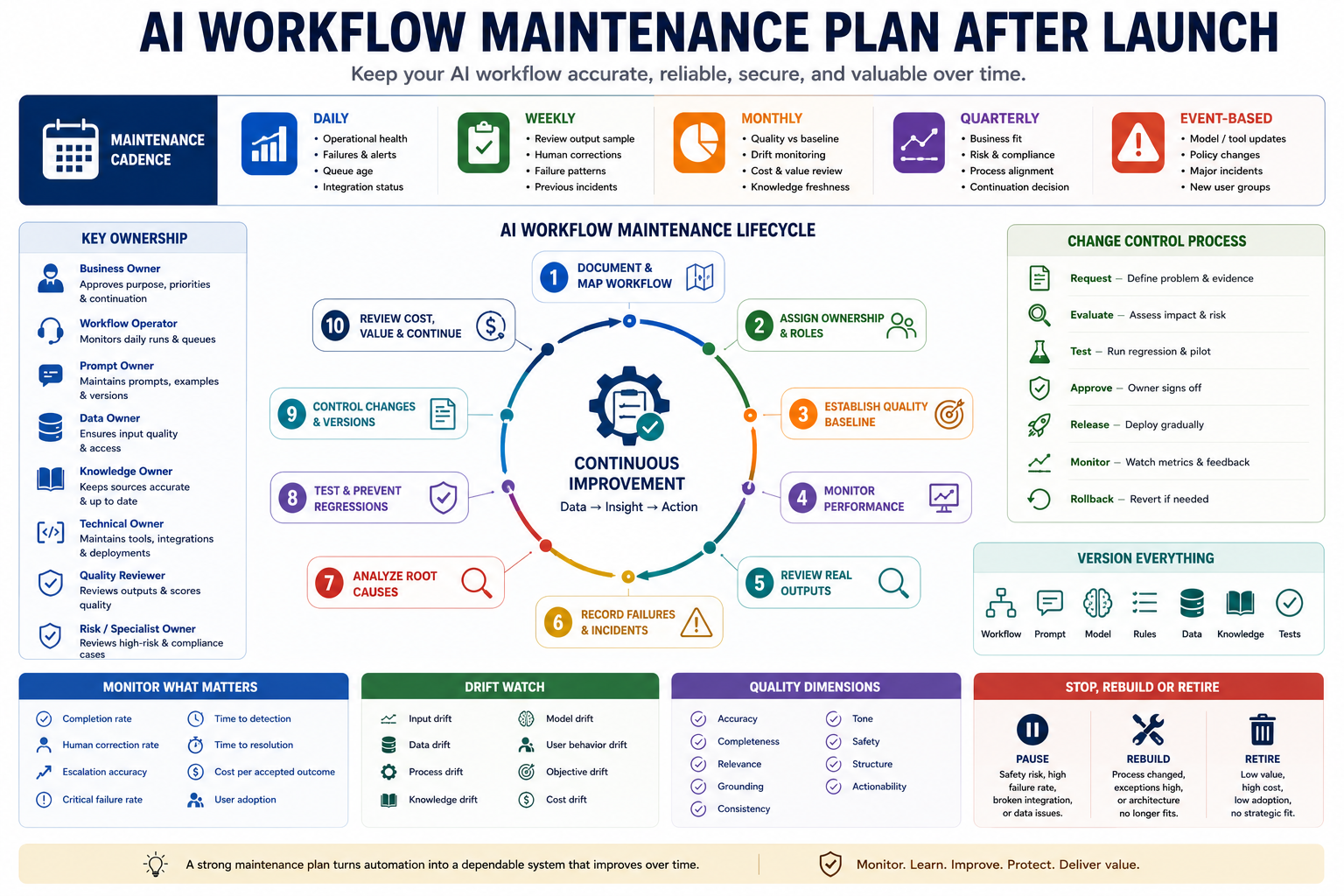
Launching an automation is only the beginning. A dependable AI workflow maintenance plan keeps a live system accurate, useful, secure, affordable, and aligned with the real process as prompts, models, tools, data, policies, and user needs change.
The goal is not to change the workflow whenever one output looks unusual. The goal is to create a controlled operating process that monitors real performance, records failures, verifies suspected causes, tests proposed changes, protects working behavior, and pauses or retires the automation when it no longer creates enough value.
Why AI workflows degrade after launch
A workflow can perform well during a pilot and still become unreliable in production. The system operates inside a changing environment, and many of those changes happen outside the prompt itself.
Common causes of degradation include:
- Users begin submitting different input types than the pilot included.
- Required fields become incomplete, inconsistent, or outdated.
- The business process changes but the prompt still describes the old process.
- A model, API, integration, or third-party tool changes behavior.
- Knowledge sources become stale or unavailable.
- New products, regions, policies, or customer groups enter the workflow.
- Human reviewers gradually apply different standards.
- Exceptions increase while the workflow continues treating them as routine.
- Costs rise because inputs become longer or retry rates increase.
- Teams stop recording corrections and failures.
- Prompt edits are made directly in production without testing.
- Several versions of the workflow begin operating at the same time.
- Success metrics remain fixed even though the business objective changes.
- The automated process survives only because nobody owns the decision to stop it.
A maintenance plan should help the team answer:
- Is the workflow still solving the original problem?
- Is the output quality stable across real cases?
- Which failures are increasing or repeating?
- Did the input data, business process, model, or tool change?
- Can proposed improvements pass the existing test suite?
- Is human review still proportionate to the value created?
- When should the workflow be restricted, paused, rebuilt, or retired?
Step 1: Document the live workflow
Maintenance becomes difficult when the team cannot describe exactly what is running. Create a current workflow record before defining monitoring rules.
| Workflow field | Required information |
|---|---|
| Workflow name | A unique and stable internal name |
| Business purpose | The problem and outcome the workflow supports |
| Users | People or teams submitting, reviewing, or receiving outputs |
| Trigger | The event that starts the workflow |
| Inputs | Required fields, files, messages, or source records |
| Rules | Deterministic validation, routing, and exclusion logic |
| AI tasks | Classification, extraction, comparison, drafting, or summarization |
| Knowledge sources | Policies, documents, databases, examples, or approved records |
| Human checkpoints | Where approval, correction, or escalation occurs |
| Outputs | Structured records, messages, reports, tasks, or decisions |
| Integrations | Models, APIs, databases, automation tools, and destination systems |
| Current version | The approved production release |
Create a dependency map
The workflow may fail even when its prompt remains unchanged. Record every external dependency and the effect of its failure.
| Dependency | Failure effect | Fallback |
|---|---|---|
| Input form | Required context may not reach the workflow | Reject incomplete submissions or route manually |
| Knowledge base | Answers may become unsupported or outdated | Pause factual drafting and request human review |
| AI model | Output structure or quality may change | Use an approved fallback model or manual process |
| CRM or project system | Owners, status, or history may be missing | Queue records until the system is restored |
| Automation platform | Steps may stop or execute more than once | Disable sends and preserve pending records |
| Notification service | Reviewers may not receive approval requests | Create a visible manual review queue |
Keep the workflow record synchronized with production. A diagram that describes an older version is not a reliable maintenance document.
Step 2: Assign maintenance ownership
An AI workflow should have one accountable business owner even when several specialists maintain individual components.
| Role | Responsibility |
|---|---|
| Business owner | Approves purpose, quality standards, risk tolerance, and continuation |
| Workflow operator | Monitors daily execution, queues, retries, and unresolved cases |
| Prompt owner | Maintains instructions, examples, output schema, and prompt versions |
| Data owner | Maintains input definitions, source quality, access, and retention |
| Knowledge owner | Reviews policies, documentation, examples, and source freshness |
| Technical owner | Maintains integrations, models, APIs, logging, and deployment |
| Quality reviewer | Scores sampled outputs and confirms serious failure patterns |
| Risk or specialist owner | Reviews privacy, security, legal, financial, or regulated cases |
One person may hold several roles in a small team. The responsibilities should still remain explicit so that failures do not sit between teams without an owner.
Define decision authority
- Who may approve a prompt change?
- Who may change the model or tool?
- Who may update the knowledge source?
- Who may reduce or remove human review?
- Who may pause production?
- Who may approve a rollback?
- Who decides that the workflow should be retired?
Step 3: Create a launch-quality baseline
Maintenance requires a comparison point. Preserve the approved performance of the launch version so later changes can be measured against it.
The baseline should include:
- Production workflow version
- Prompt and model versions
- Input schema
- Knowledge-source versions
- Approved test cases
- Expected outputs or scoring criteria
- Launch-period quality scores
- Human correction rate
- Escalation rate
- Processing time
- Estimated cost per completed case
- Known limitations
Define the quality dimensions
| Dimension | Evaluation question |
|---|---|
| Accuracy | Does the output match the approved source and input? |
| Completeness | Are all required fields and important facts included? |
| Relevance | Does the output address the real task? |
| Grounding | Can important statements be traced to evidence? |
| Consistency | Does similar input receive similar treatment? |
| Tone | Does the output match the approved communication standard? |
| Safety | Are sensitive or high-risk cases handled correctly? |
| Structure | Does the output match the required format and schema? |
| Actionability | Can the recipient understand and perform the next step? |
Do not use one overall score to hide a critical failure. A response that receives good tone and structure scores may still fail because it contains an unsupported factual claim.
Step 4: Monitor operational performance
Operational monitoring checks whether the workflow is running as expected before examining the quality of its language or reasoning.
| Operational metric | What it reveals |
|---|---|
| Workflow volume | How many cases entered the workflow |
| Completion rate | Percentage reaching the expected final state |
| Failure rate | Percentage stopped by an error |
| Retry rate | How often steps must be repeated |
| Queue age | How long cases wait before processing or review |
| Processing time | Time from trigger to usable output |
| Human-review time | Time spent waiting for or completing approval |
| Integration failure rate | How often external tools fail or return incomplete data |
| Duplicate execution rate | Whether the same case runs more than once unintentionally |
| Fallback rate | How often the workflow uses a backup or manual route |
Distinguish failed, incomplete, and rejected outputs
- Technical failure: A tool, API, or integration did not complete.
- Validation failure: The input did not meet required rules.
- Quality failure: The output did not meet the approved standard.
- Human rejection: A reviewer refused the output or required major changes.
- Escalation: The workflow correctly routed a case outside automation.
- Abandonment: The user stopped using the workflow before completion.
A correctly escalated case is not necessarily a failure. The maintenance report should separate safe routing from incorrect or unnecessary escalation.
Step 5: Review real outputs on a fixed cadence
Automated metrics cannot replace examination of real examples. Review a controlled sample of production outputs regularly.
Build a representative sample
- Random routine cases
- High-value or high-impact cases
- Low-confidence outputs
- Cases edited heavily by reviewers
- Escalated cases
- Different user groups or customer segments
- Different languages, regions, products, or channels
- New input formats
- Cases near important thresholds
- Previously known edge cases
A sample containing only successful routine cases will hide degradation. A sample containing only failures will exaggerate the problem. Document how the sample was selected.
Use a structured output-review record
| Review field | Purpose |
|---|---|
| Case ID | Links the review to the production record |
| Workflow version | Identifies the logic that produced the output |
| Input type | Shows which kind of case was processed |
| Expected behavior | States the approved result or quality standard |
| Actual output | Preserves what the system produced |
| Quality scores | Records accuracy, completeness, relevance, and other dimensions |
| Reviewer correction | Shows what changed before use |
| Failure category | Labels the main problem |
| Severity | Minor, important, blocking, or critical |
| Follow-up | Documents the investigation or improvement action |
Step 6: Create a failure and incident log
Every material failure should become structured evidence. Avoid keeping failure knowledge inside chat messages, individual memory, or an unorganized list of complaints.
| Incident field | Required information |
|---|---|
| Incident ID | Unique identifier |
| Detected date | When the problem was first observed |
| Workflow version | The production release involved |
| Affected cases | Known population or estimate |
| Observed failure | What happened |
| Expected behavior | What should have happened |
| Business impact | Effect on users, customers, cost, quality, or operations |
| Severity | Informational, minor, major, or critical |
| Containment | Immediate step used to limit impact |
| Suspected cause | Initial hypothesis |
| Confirmed cause | Verified reason after investigation |
| Corrective action | Change intended to resolve the problem |
| Prevention | Test, rule, monitoring, or process added afterward |
| Owner | Person responsible for closure |
Use consistent failure categories
- Input failure: Missing, malformed, or unsupported context.
- Data failure: Incorrect, stale, duplicated, or incomplete source information.
- Retrieval failure: Wrong or unavailable knowledge was selected.
- Instruction failure: The prompt did not define the required behavior clearly.
- Model failure: The output ignored evidence, format, or reasoning constraints.
- Rule failure: Deterministic logic routed or validated the case incorrectly.
- Integration failure: An API, tool, or destination system failed.
- Review failure: The human checkpoint missed or introduced an error.
- Process mismatch: The workflow no longer reflects the real operating process.
- Governance failure: Ownership, access, approval, or version control was unclear.
Do not record the suspected cause as confirmed merely because it seems plausible. Preserve the evidence used to verify the cause.
Step 7: Perform root-cause analysis
Changing the prompt is not the correct response to every failure. Investigate where the failure entered the workflow.
- Confirm that the reported output actually violates the quality standard.
- Review the original input and source records.
- Check deterministic validation and routing rules.
- Confirm which prompt, model, tool, and knowledge versions ran.
- Reproduce the failure in a controlled environment.
- Test whether the problem appears in similar cases.
- Identify the earliest stage where the result became incorrect.
- Choose the smallest safe correction.
- Add the case to the regression-test suite.
Match the fix to the cause
| Confirmed cause | Possible correction |
|---|---|
| Required field missing | Improve input validation or request clarification |
| Inconsistent category labels | Add deterministic normalization |
| Outdated policy source | Update and version the knowledge base |
| Ambiguous instruction | Clarify the prompt and add examples |
| High-risk case treated as routine | Add a routing rule and escalation test |
| Output schema changes | Add structured validation and retry rules |
| Model behavior changed | Adjust configuration, switch model, or strengthen tests |
| Reviewers use different standards | Clarify the rubric and calibrate reviewers |
| Workflow no longer matches operations | Redesign the process rather than extending the old prompt |
Step 8: Monitor several types of drift
Drift means that the live environment has moved away from the conditions under which the workflow was designed and approved.
| Drift type | Example | Possible signal |
|---|---|---|
| Input drift | Users begin submitting longer or less structured requests | More missing fields or clarification requests |
| Data drift | Category distribution or source quality changes | Higher unknown, blank, or unmatched rates |
| Process drift | The team changes approval or ownership rules | Outputs contain old owners or outdated steps |
| Knowledge drift | Policies, products, or documentation change | More factual corrections by reviewers |
| Model drift | Provider updates change style or structure | Regression cases begin failing without prompt edits |
| User-behavior drift | Users stop following the intended input process | More manual overrides or abandoned cases |
| Objective drift | The business now values a different outcome | High quality scores but low decision usefulness |
| Cost drift | Inputs, retries, or model prices increase | Higher cost per accepted result |
Use drift thresholds carefully
A change in one week may represent normal variation. Define the size, duration, minimum sample, and owner required before a drift alert is created.
| Drift rule field | Example |
|---|---|
| Signal | Human correction rate |
| Baseline | 12% during the approved launch period |
| Warning level | Above 18% for two review periods |
| Critical level | Above 25% or any unsupported high-risk claim |
| Minimum sample | At least 100 reviewed outputs |
| Owner | Workflow quality owner |
| Response | Review recent changes and expand manual approval |
Step 9: Maintain a regression-test suite
A regression test checks whether a proposed change fixes the intended problem without breaking behavior that already works.
The test suite should include:
- Common routine cases
- High-value cases
- Previously failed cases
- Ambiguous inputs
- Missing-information cases
- Conflicting evidence
- Low-confidence cases
- Required escalation cases
- Unsupported request cases
- Different languages, regions, products, or user groups
- Formatting and schema edge cases
- Long, short, noisy, and unusual inputs
Define each test case clearly
| Test field | Purpose |
|---|---|
| Test ID | Stable identifier |
| Scenario | The real situation represented |
| Input | The controlled test record |
| Required behavior | What the workflow must do |
| Forbidden behavior | What must never occur |
| Expected structure | Required fields and format |
| Scoring rubric | How the output is evaluated |
| Severity | Impact when the test fails |
| Origin | Launch requirement, incident, user report, or policy rule |
Every confirmed production failure should create or improve a regression test. Otherwise, the same failure may return after a later prompt, model, or tool change.
Do not compare wording only
AI outputs may use different wording while remaining correct. Evaluate required facts, classifications, evidence, structure, routing, and prohibited behaviors instead of expecting identical text.
Step 10: Use controlled change management
Do not edit the live prompt, replace the model, or change the knowledge source without recording and testing the change.
| Change-request field | Required information |
|---|---|
| Change ID | Unique request identifier |
| Problem | The verified issue or improvement need |
| Evidence | Incidents, metrics, examples, or user feedback |
| Proposed change | Prompt, rule, model, tool, data, knowledge, or review update |
| Expected benefit | The behavior intended to improve |
| Possible risk | Working behavior that may be affected |
| Test plan | Regression and pilot checks required |
| Approver | Person authorized to accept the change |
| Rollback plan | How the previous version will be restored |
Use a safe release sequence
- Create a separate candidate version.
- Run the full regression-test suite.
- Review critical failures manually.
- Compare the candidate with the production baseline.
- Run a limited pilot or shadow evaluation.
- Approve or reject the candidate.
- Deploy to a controlled percentage of live cases.
- Monitor quality, cost, and failure metrics.
- Expand gradually or roll back.
- Update the production record and change log.
Change one major variable at a time
Changing the prompt, model, retrieval logic, and output schema together makes failures difficult to diagnose. Separate major changes when practical so their effect can be measured.
Step 11: Version prompts, models, data, and knowledge
“The AI workflow” is not one component. Its behavior depends on several versions operating together.
- Workflow version
- Prompt version
- Model and configuration version
- Input-schema version
- Output-schema version
- Rule-set version
- Knowledge-base or document version
- Integration or API version
- Test-suite version
- Review-rubric version
Keep a release record
| Release field | Example |
|---|---|
| Release | Workflow 2.3.0 |
| Date | 15 September |
| Prompt | Prompt 4.2 |
| Model | Approved production model and configuration |
| Knowledge source | Policy library reviewed 10 September |
| Primary change | Added escalation for unsupported pricing requests |
| Tests | 142 passed, 0 critical failures |
| Approver | Business workflow owner |
| Rollback version | Workflow 2.2.1 |
Step 12: Maintain knowledge and reference sources
A correct prompt cannot compensate for outdated or contradictory knowledge. Review every source that the workflow uses to make factual statements or decisions.
| Knowledge field | Required information |
|---|---|
| Source name | Document, policy, database, or approved example |
| Owner | Person responsible for accuracy |
| Approved version | Current production version |
| Effective date | When the information became valid |
| Review date | When it was last checked |
| Next review | Scheduled freshness check |
| Scope | Products, plans, regions, users, or conditions covered |
| Superseded source | Older material that must no longer be used |
Remove or archive superseded information. Keeping current and outdated policies in the same retrieval collection can produce contradictory answers.
Step 13: Review human checkpoints
Human review should change only when evidence shows that a different level of control is appropriate.
Review whether the checkpoint works
- Do reviewers receive enough evidence and context?
- Can reviewers see the original input and source?
- Are approval criteria clear?
- Do different reviewers reach similar decisions?
- Are high-risk cases consistently identified?
- Are routine cases creating unnecessary review cost?
- Are reviewers approving outputs without reading them?
- Are corrections captured for later analysis?
- Does the reviewer have authority to reject or pause?
Calibrate reviewers
Periodically ask several reviewers to score the same cases independently. Compare their decisions and update the rubric when disagreement comes from unclear standards.
Do not reduce human review merely because the acceptance rate is high. Confirm that the test sample includes difficult and high-risk cases.
Step 14: Define a maintenance cadence
Use different review intervals for different maintenance tasks.
| Cadence | Recommended checks |
|---|---|
| Continuous or daily | Technical failures, queue age, critical alerts, integration health, and blocked cases |
| Weekly | Output sample, reviewer corrections, repeated failures, escalations, and unresolved incidents |
| Monthly | Quality trends, input drift, cost, adoption, knowledge freshness, and change requests |
| Quarterly | Business fit, ownership, risk level, review design, architecture, and continuation decision |
| Event-based | Model update, policy change, integration change, major incident, new product, or new user group |
The cadence should reflect workflow risk and usage. A high-volume customer-facing workflow needs more frequent checks than a low-volume internal drafting assistant.
Step 15: Review cost, adoption, and business value
A workflow can remain technically accurate while becoming economically or operationally pointless. Review whether the automation still saves enough time, improves enough quality, or reduces enough risk to justify its maintenance.
- Model and API cost
- Automation-platform cost
- Storage, logging, and monitoring cost
- Human-review time
- Incident investigation time
- Prompt and test maintenance time
- Time saved compared with the previous process
- Correction or rework avoided
- Response or completion speed improved
- Risk or missed follow-up reduced
- Users actively choosing the workflow
- Outputs accepted and used in real decisions
Calculate cost per accepted outcome
Cost per accepted outcome =
(model and tool cost
+ human review cost
+ maintenance cost
+ incident cost)
÷ accepted usable outcomes
A low cost per generated output may be misleading when many outputs require major correction or are never used.
Step 16: Maintain fallback and rollback procedures
The team should know how work continues when the AI workflow is unavailable or untrusted.
- Manual process or approved temporary template
- Fallback model or tool
- Queue for delayed processing
- Restricted mode that drafts but does not send
- Human-only review mode
- Previous stable workflow version
- Communication plan for affected users
- Method for identifying outputs created during the incident
Test the fallback
A fallback that has never been tested may fail during the incident. Run controlled exercises to confirm access, ownership, instructions, and data continuity.
Step 17: Define pause, rebuild, and retirement conditions
A maintenance plan should protect the team from keeping an ineffective automation merely because time has already been invested in it.
Possible pause conditions
- A critical unsupported claim or unsafe action occurs.
- The workflow exposes information outside approved access rules.
- Source data becomes unavailable or unreliable.
- The model or integration changes without successful testing.
- The correction rate exceeds the approved limit.
- High-risk cases fail to reach human review.
- The workflow sends messages or performs actions to the wrong destination.
- Several unresolved major incidents remain open.
Possible rebuild conditions
- The real business process has changed substantially.
- Exception handling is larger than the routine workflow.
- The input schema no longer fits current work.
- Several temporary prompt fixes have created contradictory instructions.
- The architecture cannot support required access, testing, or audit controls.
- The workflow depends on tools or sources that are being replaced.
Possible retirement conditions
- The original business problem no longer exists.
- Usage remains low despite training and workflow improvements.
- Human review costs more than the previous manual process.
- The automation does not improve speed, quality, risk, or outcomes.
- A simpler deterministic system now solves the problem better.
- The workflow creates unacceptable operational or compliance risk.
Create a retirement plan
- Stop new triggers safely.
- Complete, transfer, or close queued cases.
- Notify users and owners.
- Restore the approved replacement process.
- Preserve required logs, versions, and decisions.
- Remove access, credentials, webhooks, and unused integrations.
- Apply retention and deletion rules.
- Document lessons for future automation projects.
Recommended maintenance record
| Section | What to maintain |
|---|---|
| Workflow identity | Name, purpose, users, risk, and production version |
| Ownership | Business, technical, data, knowledge, quality, and risk owners |
| Baseline | Approved test results, quality, cost, and limitations |
| Monitoring | Operational, quality, drift, cost, and adoption metrics |
| Incidents | Failures, impact, causes, corrections, and preventive tests |
| Change log | Prompt, model, rule, data, knowledge, and integration changes |
| Test suite | Routine, edge, incident, and escalation cases |
| Review calendar | Daily, weekly, monthly, quarterly, and event-based checks |
| Continuity | Fallback, rollback, pause, rebuild, and retirement procedures |
Example monthly maintenance review
| Workflow | Customer question routing assistant |
|---|---|
| Production version | 3.1.2 |
| Monthly volume | 4,820 cases |
| Completion rate | 97.8% |
| Human correction rate | 14.6%, compared with a 12.1% baseline |
| Primary failure pattern | New billing questions are being routed to general support |
| Confirmed cause | The new billing category is missing from the routing rule and test suite |
| Immediate action | Require manual review for unrecognized billing topics |
| Permanent correction | Add the category, approved source, routing owner, and regression cases |
| Continuation decision | Continue with temporary expanded review |
Measure whether maintenance is effective
Maintenance success is not the number of prompt changes made. Measure whether the workflow remains stable, useful, and recoverable.
- Accepted-output rate: Percentage approved without major correction.
- Human correction rate: Percentage requiring edits before use.
- Critical failure rate: Percentage containing blocking or high-risk errors.
- Escalation accuracy: Percentage of cases routed to the correct human owner.
- False-escalation rate: Routine cases sent unnecessarily to specialists.
- Incident recurrence: Previously corrected failures appearing again.
- Time to detection: Time between failure and identification.
- Time to containment: Time required to limit the impact.
- Time to resolution: Time required to deploy a verified correction.
- Regression pass rate: Percentage of required tests passing before release.
- Rollback success: Whether the stable version can be restored safely.
- Knowledge freshness: Percentage of sources reviewed on schedule.
- Cost per accepted outcome: Total operating cost divided by usable outcomes.
- Business adoption: Percentage of intended users choosing the workflow.
- Outcome usefulness: Whether outputs support the intended work or decision.
Copy-and-use prompts
Maintenance-plan generation prompt
You are helping me create a maintenance plan for a live AI workflow.

Workflow name:
[NAME]

Business purpose:
[PURPOSE]

Users:
[USERS]

Current workflow map:
[STEPS]

Inputs and sources:
[INPUTS]

AI model and tools:
[MODEL AND TOOLS]

Human review points:
[REVIEW POINTS]

Current quality standard:
[STANDARD]

Known risks:
[RISKS]

Recent metrics and failures:
[METRICS AND FAILURES]

Create:

1. Ownership model
2. Production baseline
3. Daily operational checks
4. Weekly output-review process
5. Monthly quality and drift review
6. Quarterly continuation review
7. Incident and failure log structure
8. Regression-test plan
9. Prompt and model change-control process
10. Knowledge freshness checks
11. Cost and value metrics
12. Fallback and rollback procedures
13. Pause, rebuild, and retirement conditions
14. Missing information requiring human decisions

Rules:
- Do not assume every failure requires a prompt change
- Separate operational, quality, data, model, and process risks
- Give each action one accountable owner
- Preserve human approval for high-risk changes
- Do not remove safeguards merely to improve speed
Weekly output-review prompt
Review this sample of live AI workflow outputs.

Workflow purpose:
[PURPOSE]

Workflow version:
[VERSION]

Quality rubric:
[RUBRIC]

Sample-selection method:
[METHOD]

Production cases:
[PASTE INPUTS, OUTPUTS, SOURCES, AND HUMAN CORRECTIONS]

For each case, return:

1. Case ID
2. Input type
3. Expected behavior
4. Accuracy assessment
5. Completeness assessment
6. Relevance assessment
7. Evidence or grounding assessment
8. Structure assessment
9. Escalation assessment
10. Human correction required
11. Failure category
12. Severity
13. Suspected cause
14. Additional evidence needed

Then summarize:

- Repeated failure patterns
- New edge cases
- Changes from the baseline
- Cases to add to regression tests
- Immediate containment actions
- Proposed investigations
- Changes that should not be made yet

Rules:
- Do not infer a root cause from one example
- Separate verified failure from reviewer preference
- Do not hide conflicting evidence
- Treat serious unsupported claims as blocking
- Do not recommend production changes without a test plan
Incident-analysis prompt
Prepare this AI workflow incident for root-cause review.

Workflow version:
[VERSION]

Incident:
[DESCRIPTION]

Affected cases:
[CASES]

Expected behavior:
[EXPECTED]

Actual behavior:
[ACTUAL]

Inputs and source records:
[INPUTS]

Prompt, model, rule, data, and knowledge versions:
[VERSIONS]

Operational logs:
[LOGS]

Return:

1. Neutral incident summary
2. Confirmed impact
3. Known affected population
4. Immediate containment options
5. Evidence for the failure
6. Possible causes grouped by:
   - input
   - data
   - retrieval
   - prompt
   - model
   - rule
   - integration
   - human review
   - process
7. Evidence supporting or rejecting each cause
8. Reproduction steps
9. Confirmed root cause, only when supported
10. Corrective-action options
11. Risks of each correction
12. Regression tests to add
13. Rollback recommendation
14. Human approval required

Rules:
- Do not present a suspected cause as confirmed
- Do not blame a user or reviewer without evidence
- Prefer the smallest correction that addresses the verified cause
- Do not recommend returning to production before critical tests pass
Regression-test design prompt
Create regression-test cases for this AI workflow change.

Workflow purpose:
[PURPOSE]

Current quality rules:
[RULES]

Confirmed production failure:
[FAILURE]

Root cause:
[CAUSE]

Proposed change:
[CHANGE]

Existing test cases:
[TESTS]

Create test cases covering:

1. The confirmed failure
2. Similar routine cases
3. Boundary conditions
4. Missing information
5. Conflicting information
6. Required escalation
7. Unsupported requests
8. Output-schema requirements
9. Behaviors that must remain unchanged
10. New risks introduced by the change

For each test, provide:

- Test ID
- Scenario
- Input
- Required behavior
- Forbidden behavior
- Expected structure
- Scoring criteria
- Severity when failed
- Reason the test exists

Rules:
- Do not require identical wording
- Test facts, routing, evidence, structure, and prohibited behavior
- Include both normal and difficult cases
- Preserve existing protections
- Mark critical tests that must pass before deployment
Change-request review prompt
Review this proposed change to a live AI workflow.

Current production version:
[VERSION]

Verified problem:
[PROBLEM]

Evidence:
[EVIDENCE]

Proposed change:
[CHANGE]

Affected components:
[COMPONENTS]

Regression results:
[RESULTS]

Pilot results:
[PILOT]

Rollback plan:
[ROLLBACK]

Evaluate:

1. Whether the problem is sufficiently verified
2. Whether the proposed change addresses the confirmed cause
3. Benefits expected
4. Working behavior that may be affected
5. New operational or quality risks
6. Privacy, security, policy, or access implications
7. Test coverage
8. Pilot quality
9. Monitoring required after deployment
10. Rollback readiness
11. Required approvers
12. Release decision:
   - approve
   - approve for limited pilot
   - revise
   - reject
   - pause workflow

Do not approve a change merely because it improves one example.
Do not remove human review without representative evidence.
Monthly maintenance-review prompt
Create a monthly maintenance review for this AI workflow.

Workflow version:
[VERSION]

Baseline:
[BASELINE]

Operational metrics:
[OPERATIONS]

Quality metrics:
[QUALITY]

Human-review metrics:
[REVIEW]

Cost metrics:
[COST]

Incidents:
[INCIDENTS]

Changes released:
[CHANGES]

Drift signals:
[DRIFT]

Knowledge-source status:
[KNOWLEDGE]

User feedback:
[FEEDBACK]

Create:

1. Executive maintenance summary
2. Operational health
3. Quality versus baseline
4. Main failure patterns
5. Open incidents
6. Drift findings
7. Knowledge and data freshness
8. Human-review effectiveness
9. Cost and value assessment
10. Released changes and results
11. Proposed maintenance actions
12. Actions with owners and dates
13. Continuation decision:
   - continue
   - continue with expanded review
   - restrict
   - pause
   - rebuild
   - retire

Rules:
- Separate normal variation from sustained deterioration
- Include sample sizes and review coverage
- Do not hide unresolved critical failures
- Do not recommend continuation based on usage alone
- Make every action traceable to evidence
Maintenance quality-control prompt
Review this AI workflow maintenance plan before approval.

Workflow documentation:
[DOCUMENTATION]

Quality baseline:
[BASELINE]

Risk standard:
[RISK]

Maintenance plan:
[PLAN]

Check for:

1. Missing business or technical owner
2. Workflow components not documented
3. No production-quality baseline
4. Monitoring without thresholds or owners
5. Output review using an unrepresentative sample
6. Failure logs without verified causes
7. Prompt changes without regression tests
8. Model or tool changes without rollback plans
9. Knowledge sources without freshness owners
10. High-risk cases without human escalation
11. Cost tracking without accepted-outcome measurement
12. Missing pause or retirement conditions
13. Fallback procedures that have not been tested
14. Review cadence that does not match workflow risk
15. Changes allowed directly in production
16. Metrics that hide critical failures inside averages

Return:
- Blocking corrections
- Important corrections
- Missing ownership
- Missing monitoring controls
- Missing tests
- Missing stop conditions
- Final decision:
  - ready
  - minor revision
  - major revision
  - additional discovery required
  - do not approve

Do not approve a plan merely because it includes frequent reviews.
AI workflow maintenance plan checklist
- The live workflow and every dependency are documented.
- One accountable business owner is assigned.
- Prompt, data, knowledge, technical, and quality responsibilities are clear.
- The approved launch baseline is preserved.
- Quality dimensions and critical failures are defined separately.
- Operational health is monitored continuously or daily.
- Real production outputs are reviewed on a fixed cadence.
- The review sample includes routine, difficult, and high-risk cases.
- Human corrections are recorded.
- Failures use consistent categories.
- Suspected and confirmed causes are stored separately.
- Every serious failure creates or improves a regression test.
- Input, data, process, knowledge, model, objective, and cost drift are monitored.
- Prompt and model changes are tested outside production.
- Every release has an approver and rollback plan.
- Workflow, prompt, model, rules, knowledge, and test versions are preserved.
- Outdated knowledge sources are removed or archived.
- Human reviewers use one approved rubric.
- Review cadence matches the workflow’s volume and risk.
- Cost is measured per accepted usable outcome.
- Fallback and rollback procedures are documented and tested.
- Pause conditions are explicit.
- Rebuild and retirement conditions are explicit.
- Queued work and stored data have a retirement plan.
- Continuation decisions are reviewed regularly.
Common mistakes to avoid
- Changing the prompt first: Verify whether the cause is input, data, rules, knowledge, tools, or process.
- Reviewing only failures: Use representative samples to measure overall quality.
- Reviewing only successful outputs: Include corrections, escalations, and edge cases.
- Editing production directly: Test a separate candidate version and preserve rollback.
- Using identical-text tests: Evaluate required facts, behavior, routing, and structure.
- Ignoring knowledge freshness: Version and review every factual source.
- Removing human review too early: Confirm performance across high-risk and unusual cases.
- Tracking generated-output cost: Measure cost per accepted usable outcome.
- Keeping temporary fixes forever: Rebuild when the original design no longer fits the process.
- Maintaining without stop rules: Pause or retire workflows that no longer create enough value.
Final guidance
A dependable AI workflow maintenance plan treats automation as a living operational system rather than a prompt that was finished at launch. It preserves the approved baseline, monitors real outputs, learns from failures, tests every change, keeps knowledge current, and makes continuation a deliberate business decision.
Use AI to organize incidents, compare metrics, draft tests, and prepare maintenance reports. Keep root-cause confirmation, production changes, risk decisions, human-review levels, pause conditions, and retirement approval under human control.
Related guides
- Build an AI Prompt Evaluation Workflow
- Build an AI Risk Register for Automation Projects
- Build an AI Privacy Review Checklist for Automation Projects
- Build an AI Tool Audit Workflow Before Buying Software
- Browse Practical AI Workflow Guides