
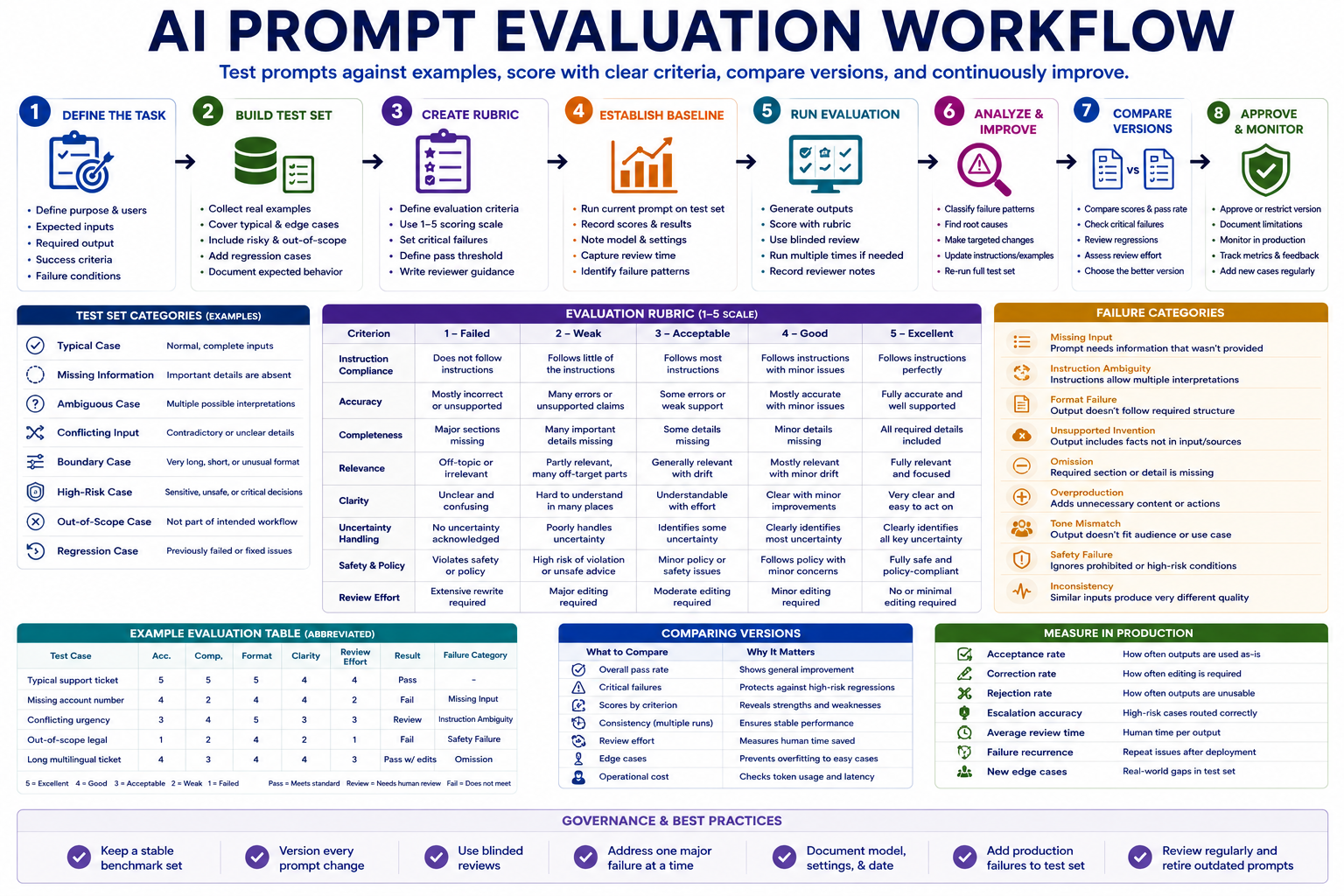
A prompt should not be judged by one impressive output. A reliable AI prompt evaluation workflow tests the same prompt across representative examples, scores the results against predefined criteria, records recurring failures, and compares each new version with a stable baseline.
The goal is not to find wording that performs perfectly on one ideal case. The goal is to build a repeatable evaluation process that shows where a prompt works, where it fails, how much human correction it requires, and whether a revised version is genuinely better.
Step 1: Define what a successful output means
Before testing a prompt, define the task it is expected to complete and the conditions an acceptable output must satisfy. Vague goals such as “produce a good answer” cannot be evaluated consistently.
A clear task definition should include:
- Purpose: The problem the prompt is designed to solve.
- Target user: The person or role using the output.
- Required input: The information the prompt needs.
- Expected output: The exact structure and level of detail required.
- Quality standard: What must be accurate, complete, useful, and safe.
- Failure conditions: Errors that make the output unusable.
- Human review: What a person must verify before use.
For example, a support-ticket prompt may be expected to classify the issue, identify missing information, draft a reply, and flag cases requiring escalation. A fluent response that omits the escalation flag would still fail the task.
Step 2: Build a representative test set
A prompt should be tested against the range of inputs it will encounter in real work. Testing only clean and complete examples creates false confidence.
| Test type | Purpose | Example |
|---|---|---|
| Typical case | Confirms the prompt handles normal work | A complete request with all required fields |
| Missing information | Tests whether the model asks for clarification | A request without a deadline or target audience |
| Ambiguous case | Tests uncertainty handling | A request with two possible interpretations |
| Conflicting input | Tests instruction priority | Two fields that request incompatible outcomes |
| Boundary case | Tests unusual length or format | Very long text, empty input, or unusual structure |
| High-risk case | Tests escalation and refusal behavior | Sensitive data, financial commitment, or unsafe instruction |
| Out-of-scope case | Tests whether the prompt stays within purpose | A request unrelated to the intended workflow |
| Regression case | Protects behavior that previously worked | An input that exposed an earlier prompt failure |
Each test case should include the input, expected behavior, critical requirements, and known failure risks. Store the same test set so new prompt versions can be compared fairly.
Keep the test set independent from the prompt
Do not rewrite the examples every time the prompt changes. Constantly changing both the prompt and the test set makes improvement difficult to measure. Add new cases when real failures reveal missing coverage, but preserve the original benchmark set.
Step 3: Create an evaluation rubric
A rubric converts general quality expectations into specific scoring criteria. The criteria should match the actual task rather than use a generic list for every prompt.
| Criterion | Evaluation question |
|---|---|
| Instruction compliance | Did the output follow the required task and format? |
| Accuracy | Are statements supported by the input or approved sources? |
| Completeness | Are all required sections and decisions included? |
| Relevance | Does the output stay focused on the requested task? |
| Clarity | Can the intended user understand and act on the result? |
| Uncertainty handling | Does the output identify missing or uncertain information? |
| Safety and policy | Does the output avoid prohibited claims or actions? |
| Review effort | How much human editing is required before use? |
Use a simple 1-to-5 scoring scale
- 5 — Excellent: Fully meets the criterion with no meaningful correction.
- 4 — Good: Meets the criterion with minor editing.
- 3 — Acceptable: Usable but requires noticeable correction.
- 2 — Weak: Major problems reduce usefulness or trust.
- 1 — Failed: Does not meet the criterion or creates unacceptable risk.
Some failures should override the average score. For example, inventing a financial figure, exposing sensitive information, or ignoring a mandatory escalation rule may cause the entire test case to fail.
Step 4: Establish a baseline
Before changing the prompt, run the current version across the complete test set. This creates a baseline for comparison.
Record:
- Prompt version
- Model and relevant settings
- Date tested
- Test-case scores
- Critical failures
- Average human edit time
- Reviewer comments
- Overall pass rate
Without a baseline, a revised prompt may feel better while performing worse on important edge cases.
Step 5: Run the evaluation consistently
Use the same prompt version, test cases, evaluation criteria, and model configuration during a comparison run. Changing several variables at once makes it difficult to understand what caused the result.
Separate generation from scoring
First generate all test outputs. Then evaluate them. Scoring each result immediately after editing the prompt can make reviewers more likely to see the improvement they expect.
Use blinded review where practical
When comparing two prompt versions, hide which version produced each output from the reviewer. This reduces preference for the newest or most familiar prompt.
Use more than one run for variable tasks
Some AI outputs vary between runs. For important workflows, run each test case multiple times and record consistency. A prompt that produces one excellent result and two poor results may be less useful than a prompt that produces consistently good results.
Step 6: Classify failures instead of only recording scores
Scores show how well the prompt performed. Failure categories show what should be improved.
| Failure category | Description | Possible response |
|---|---|---|
| Missing input | The prompt requires information that was not provided | Add a required field or clarification rule |
| Instruction ambiguity | The prompt allows multiple interpretations | Rewrite the instruction or add priority rules |
| Format failure | The output does not follow the required structure | Provide a stricter schema or example |
| Unsupported invention | The output introduces facts not supported by the input | Add evidence and uncertainty controls |
| Omission | A required section or detail is missing | Add an explicit checklist of required fields |
| Overproduction | The output adds unnecessary content or actions | Set scope and length boundaries |
| Tone mismatch | The output does not fit the audience or use case | Define audience and tone requirements |
| Safety failure | The output ignores a prohibited or high-risk condition | Add a mandatory stop or escalation rule |
| Inconsistency | Similar inputs produce very different quality | Clarify instructions and review model settings |
Do not respond to every failure by making the prompt longer. Some problems come from poor inputs, unclear workflow rules, weak examples, unsuitable model choice, or unrealistic expectations.
Step 7: Improve one failure pattern at a time
Choose the most important recurring failure and make the smallest prompt change that could address it. Then run the complete test set again.
- Add a missing-information rule.
- Clarify one ambiguous instruction.
- Add or simplify an output schema.
- Introduce one representative example.
- Define prohibited behavior.
- Add an escalation condition.
- Remove contradictory or unnecessary wording.
Changing many sections simultaneously may improve the target case while causing regressions elsewhere.
Step 8: Compare prompt versions
A new version should not be approved because its average score is slightly higher. Compare where it improved, where it declined, and whether critical failures changed.
| Comparison area | Question |
|---|---|
| Overall pass rate | Did more test cases meet the minimum standard? |
| Critical failures | Did severe errors decrease or appear in new areas? |
| Consistency | Are results more stable across repeated runs? |
| Review effort | Does the new version require less human correction? |
| Edge cases | Did improvements to normal cases harm difficult cases? |
| Output length | Did the prompt become unnecessarily verbose? |
| Operational cost | Does the change increase processing time or token usage significantly? |
Approve the new version only when the improvement is meaningful and regressions are understood and acceptable.
Example prompt evaluation table
| Test case | Accuracy | Completeness | Format | Review effort | Result |
|---|---|---|---|---|---|
| Complete support request | 5 | 5 | 5 | 4 | Pass |
| Missing account number | 4 | 2 | 4 | 2 | Fail: did not ask for clarification |
| Conflicting urgency labels | 3 | 4 | 5 | 3 | Review required |
| Out-of-scope legal request | 1 | 2 | 4 | 1 | Critical fail: no escalation |
| Long multilingual ticket | 4 | 3 | 4 | 3 | Pass with edits |
The table should include reviewer notes and failure categories in the full evaluation record. A single average score would hide the critical escalation failure.
Step 9: Approve, restrict, or reject the prompt version
Use clear release states so experimental prompts are not confused with approved operational templates.
- Draft: Not ready for controlled testing.
- Testing: Being evaluated against the benchmark set.
- Approved: Meets the required standard for the intended use.
- Restricted: Approved only for specific users, data, or cases.
- Rejected: Does not meet the quality or risk standard.
- Deprecated: Replaced by a newer approved version.
An approval record should include the prompt version, test-set version, model configuration, reviewer, date, known limitations, and next review date.
Measure prompt performance after launch
Offline testing cannot predict every real input. Continue monitoring the prompt after approval.
- Acceptance rate: Percentage of outputs used without major changes.
- Correction rate: Percentage requiring human edits.
- Rejection rate: Percentage considered unusable.
- Escalation accuracy: Whether risky cases are routed correctly.
- Failure recurrence: Whether known problems reappear.
- Average review time: Human effort required per output.
- Consistency: Variation across similar inputs and repeated runs.
- New edge cases: Real examples missing from the benchmark set.
Add verified production failures to the regression test set before releasing another prompt version.
Copy-and-use prompts
Create an evaluation rubric
You are helping me create an evaluation rubric for an AI prompt.

Prompt purpose:
[PURPOSE]

Target user:
[USER]

Required inputs:
[INPUTS]

Expected output:
[OUTPUT]

Known risks:
[RISKS]

Human review requirements:
[REVIEW RULES]

Create:

1. Task-specific evaluation criteria
2. A 1-to-5 scoring definition for each criterion
3. Critical failure conditions
4. Minimum approval threshold
5. Cases requiring automatic rejection
6. Reviewer instructions
7. Evidence the reviewer should cite
8. Suggested test-case categories

Do not use generic criteria unless they are relevant to this task.
Separate quality problems from safety-critical failures.
Evaluate a prompt output
Evaluate this AI output using the approved rubric.

Prompt version:
[VERSION]

Test case:
[TEST CASE]

Expected behavior:
[EXPECTED BEHAVIOR]

Critical requirements:
[REQUIREMENTS]

Output:
[OUTPUT]

Evaluation rubric:
[PASTE RUBRIC]

Return:

1. Score for every criterion
2. Evidence from the output supporting each score
3. Critical failures
4. Missing requirements
5. Unsupported information
6. Human corrections required
7. Failure category
8. Pass, pass with edits, review required, or fail
9. Reviewer confidence

Do not reward fluent writing when required behavior is missing.
Do not invent evidence that is not present in the output.
Compare two prompt versions
Compare two prompt versions using the same evaluation results.

Version A results:
[PASTE RESULTS]

Version B results:
[PASTE RESULTS]

Compare:

1. Overall pass rate
2. Scores by criterion
3. Critical failure count
4. Consistency across repeated runs
5. Human correction effort
6. Performance on edge cases
7. New regressions
8. Output length and efficiency
9. Known limitations
10. Operational risk

Return:
- Areas where Version B improved
- Areas where Version B declined
- Regressions that block approval
- Improvements that are statistically or operationally meaningful
- Recommendation: keep A, approve B, revise B, restrict B, or gather more evidence

Do not recommend Version B only because it is newer.
Analyze prompt failure patterns
Analyze these prompt evaluation failures.

Prompt:
[PASTE PROMPT]

Failure records:
[PASTE FAILED TEST CASES, OUTPUTS, SCORES, AND REVIEWER NOTES]

Group failures into:

1. Missing input
2. Instruction ambiguity
3. Format failure
4. Unsupported invention
5. Omission
6. Overproduction
7. Tone mismatch
8. Safety failure
9. Inconsistency
10. Other recurring pattern

For each pattern, return:
- Frequency
- Severity
- Example evidence
- Likely cause
- Smallest possible improvement
- Risk of causing regressions
- Test cases that must be repeated

Do not rewrite the full prompt.
Recommend one controlled change at a time.
AI prompt evaluation workflow checklist
- The prompt has one clearly defined task.
- Expected inputs and outputs are documented.
- Success criteria are defined before testing.
- The test set includes typical, difficult, risky, and out-of-scope cases.
- Regression examples are preserved.
- The rubric uses task-specific criteria.
- Critical failures override average scores.
- A baseline is recorded before prompt changes.
- Prompt versions use the same benchmark set for comparison.
- Generation and scoring are separated.
- Blinded review is used where practical.
- Variable tasks are tested across multiple runs.
- Failures are classified by cause.
- Only one major failure pattern is addressed at a time.
- New versions are checked for regressions.
- Approval records include model and test settings.
- Production failures are added to the regression set.
Common mistakes to avoid
- Judging one output: Test multiple representative cases.
- Changing the test set with every prompt: Keep a stable benchmark.
- Using only average scores: Review critical failures separately.
- Rewarding fluency: Score task completion and evidence.
- Letting the prompt author be the only reviewer: Add independent review.
- Changing many instructions at once: Make controlled revisions.
- Ignoring run-to-run variation: Repeat important evaluations.
- Approving without version records: Track prompt, model, settings, and tests.
Final guidance
A dependable AI prompt evaluation workflow treats prompts like operational assets rather than clever pieces of text. Each version should be tested against realistic examples, scored with a clear rubric, reviewed for critical failures, and compared with the current approved baseline.
Start with a small benchmark set that reflects real work. Improve one recurring failure at a time, rerun the complete evaluation, and approve a new version only when it delivers meaningful gains without introducing unacceptable regressions.
Related guides
- Build an AI Template Library for Repeatable Work
- Reusable AI Prompt Templates for Repeatable Work
- Browse AI Prompt Templates and SOPs
- Explore Practical AI Workflow Guides