
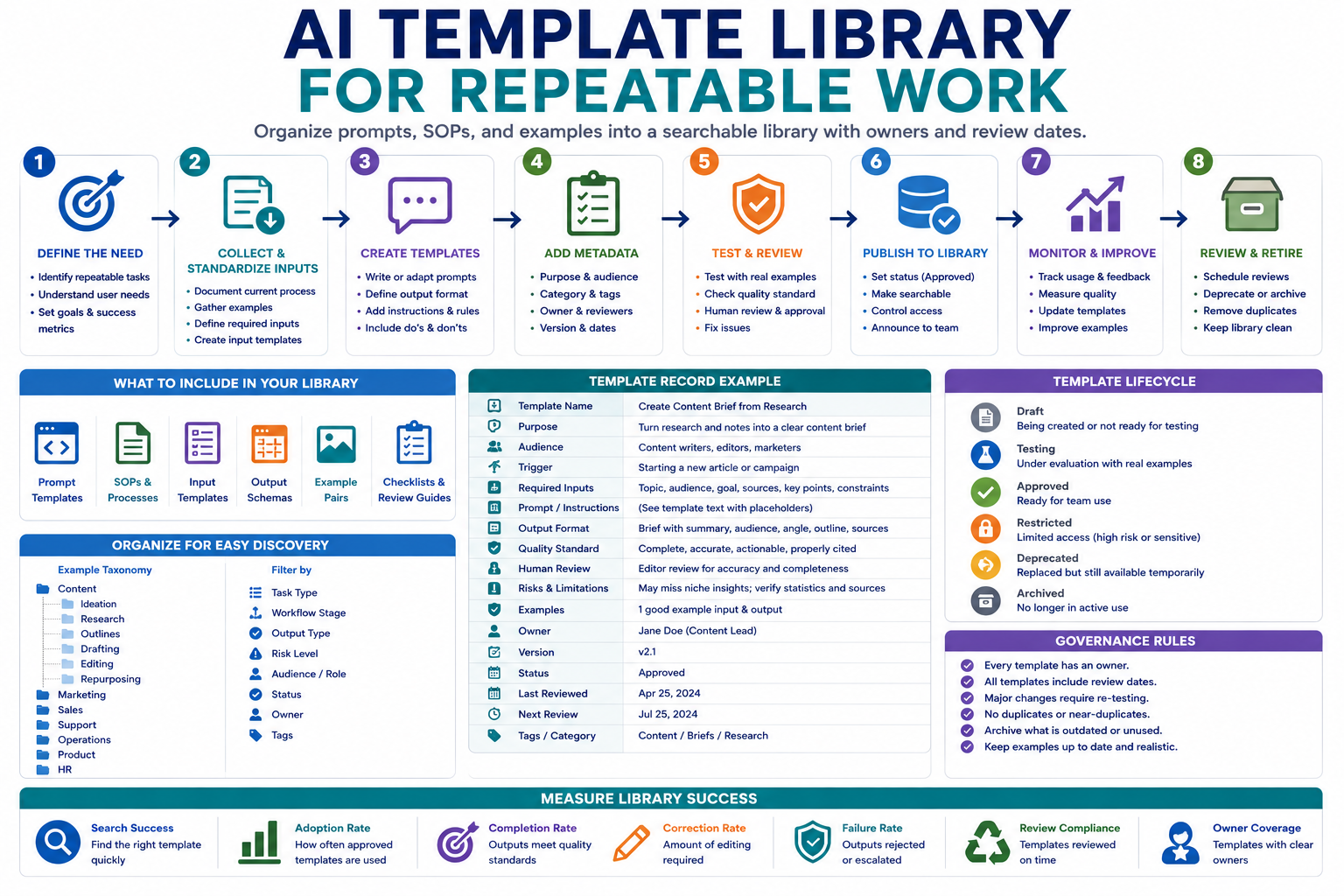
Reusable prompts, SOPs, examples, and output formats often become scattered across documents, chat histories, personal notes, and project tools. An AI template library turns these disconnected assets into a controlled system where teams can find the right template, understand when to use it, and know who is responsible for keeping it accurate.
The goal is not to collect every prompt the team has ever written. The goal is to maintain a smaller library of tested, searchable, and clearly owned templates that support repeatable work without creating template sprawl.
What belongs in an AI template library
A template library should contain assets that support repeatable work. A saved prompt becomes a useful template only when another person can understand its purpose, provide the correct input, evaluate the output, and know when human review is required.
| Template type | Purpose | Example |
|---|---|---|
| Prompt template | Produces a repeatable AI output from structured input | Turn meeting notes into decisions and action items |
| Review prompt | Checks a draft or AI output against defined standards | Review an article for unsupported claims and weak links |
| SOP | Explains the full process around the AI step | Draft, review, approve, and publish a client report |
| Input form | Standardizes the information required before the template runs | Content brief with audience, goal, sources, and constraints |
| Output schema | Defines the required structure of the result | Summary, risks, next actions, owner, and due date |
| Example pair | Shows a good input and approved output | Support ticket and reviewed response draft |
| Checklist | Helps a person verify the final result | Accuracy, tone, privacy, completeness, and escalation checks |
Avoid saving temporary experiments, duplicate prompts, unreviewed outputs, or templates that depend on missing context. These create search noise and reduce trust in the library.
Step 1: Design a standard template record
Every library item should follow the same metadata structure. This makes templates easier to search, compare, maintain, and retire.
| Field | What it should contain |
|---|---|
| Template name | A clear action-oriented title |
| Purpose | The specific problem the template solves |
| Audience | The role or team expected to use it |
| Trigger | When the template should be used |
| Required inputs | The information needed before the template runs |
| Instructions | The reusable prompt or process steps |
| Output format | The required structure of the result |
| Quality standard | What an acceptable output must contain |
| Human review | Who reviews the result and what they check |
| Risks | Known failure cases, sensitive inputs, and prohibited uses |
| Examples | Approved input and output examples |
| Owner | The person responsible for maintenance |
| Version | The current approved version number |
| Last reviewed | The date of the most recent quality review |
| Next review | The scheduled date for re-evaluation |
| Status | Draft, testing, approved, deprecated, or archived |
The prompt text is only one part of the record. Without purpose, inputs, examples, ownership, and review rules, the library becomes a folder of unexplained instructions.
Step 2: Organize the library for retrieval
Users should be able to find a template by task, role, workflow stage, or output type. A long unstructured list will become difficult to use even when every item is technically searchable.
Useful organization dimensions include:
- Team: Marketing, operations, support, sales, product, or engineering.
- Task: Summarize, classify, draft, review, extract, compare, or plan.
- Workflow stage: Intake, analysis, production, approval, or reporting.
- Output type: Email, brief, checklist, table, report, task list, or structured data.
- Risk level: Low, medium, or high review requirement.
- Status: Draft, approved, deprecated, or archived.
Use controlled categories rather than allowing every contributor to invent new labels. Similar tags such as “content,” “content writing,” “writer,” and “writing prompt” make search inconsistent.
Use clear naming conventions
Template names should describe the action and output. Compare these examples:
| Weak name | Better name |
|---|---|
| Marketing prompt | Create a Content Brief from Research Notes |
| Email helper | Draft a Client Follow-Up Email from Meeting Notes |
| Review prompt v2 | Review a Published Article for Accuracy and Broken Links |
| Support AI | Classify a Support Ticket and Draft a Reviewable Reply |
Step 3: Convert successful work into reusable templates
Do not create templates only from theoretical instructions. Start with a process or prompt that has already produced a useful result, then document what made it successful.
Use the following conversion process:
- Choose a task that occurs repeatedly.
- Collect several real examples of the task.
- Identify the inputs shared across successful cases.
- Separate fixed instructions from task-specific information.
- Define the required output structure.
- Document prohibited behavior and escalation rules.
- Add one approved example input and output.
- Assign an owner and testing status.
Use placeholders consistently
Placeholders should be obvious and reusable. Use one format throughout the library, such as:
[TARGET AUDIENCE]
[BUSINESS GOAL]
[SOURCE MATERIAL]
[REQUIRED OUTPUT]
[QUALITY STANDARD]
[CONSTRAINTS]
[HUMAN REVIEWER]
Avoid placeholders such as “insert details here” when users need to know what kind of detail is required.
Step 4: Define the quality standard
Every template should explain how a reviewer decides whether the result is acceptable. Without a quality standard, users may treat any fluent output as successful.
- The result follows the required structure.
- Important facts are supported by the provided input.
- Missing information is identified rather than invented.
- Names, numbers, dates, and technical terms are preserved accurately.
- The tone matches the target audience.
- Prohibited claims or actions are avoided.
- Uncertainty and risks are clearly labeled.
- The next action is practical and assigned when required.
Step 5: Test templates before approval
A template should not be labeled approved after one successful run. Test it with normal cases, missing information, unusual formatting, conflicting instructions, and inputs outside its intended scope.
| Test case | What it reveals |
|---|---|
| Complete normal input | Whether the template produces the intended output |
| Missing required field | Whether the model asks for clarification or invents information |
| Very long input | Whether key information is omitted or distorted |
| Conflicting instructions | Whether priority rules are clear |
| Out-of-scope request | Whether the template refuses or escalates correctly |
| Sensitive information | Whether prohibited data-handling risks are visible |
| Different user | Whether someone other than the creator can use the template successfully |
Record the test input, expected result, actual result, reviewer comments, and required correction. Approval should be based on evidence, not only the creator’s opinion.
Step 6: Add approval and publishing states
The library should distinguish experimental templates from those approved for regular use.
- Draft: The record is incomplete and should not be used operationally.
- Testing: The template is being evaluated with controlled examples.
- Approved: The template passed review and is available for its intended use.
- Restricted: Only approved roles may use it because of data or decision risk.
- Deprecated: A replacement exists, but the record remains temporarily visible.
- Archived: The template should no longer be used.
Only approved templates should appear in the default search view used by most team members.
Step 7: Manage versions and changes
Prompts and SOPs change as tools, policies, workflows, and quality standards evolve. Version history helps the team understand what changed and restore a previous version when necessary.
For each update, record:
- Version number
- Date changed
- Person who made the change
- Reason for the change
- Sections changed
- Tests repeated
- Reviewer approval
- Replacement or rollback notes
Use simple version rules
- Minor update: Wording, formatting, examples, or metadata change without changing the intended output.
- Major update: Input requirements, output schema, risk controls, or workflow purpose changes.
- Emergency update: A safety, privacy, accuracy, or policy issue requires immediate correction.
Major changes should trigger a new test cycle rather than inheriting approval automatically.
Step 8: Review, consolidate, and retire templates
Template libraries become less useful when old items accumulate. Schedule regular reviews based on risk and usage.
- High-risk templates may require monthly or quarterly review.
- Frequently used templates should be reviewed using real correction data.
- Low-risk stable templates may use a longer review cycle.
- Unused templates should be investigated, improved, merged, or retired.
Archive a template when:
- The related workflow no longer exists.
- A newer template replaces it.
- The required tool or model is no longer approved.
- The output cannot meet the current quality standard.
- The template creates repeated errors or excessive review work.
- No owner is available to maintain it.
Example AI template library record
| Field | Example |
|---|---|
| Template name | Create Action Items from Meeting Notes |
| Purpose | Convert approved meeting notes into a structured action list |
| Audience | Project managers and operations coordinators |
| Required inputs | Meeting title, participants, notes, project name, and review owner |
| Output | Decision summary, action, owner, due date, dependency, and open question |
| Human review | Meeting organizer verifies every decision and owner |
| Risk | The model may assign an owner or due date that was not stated |
| Status | Approved |
| Owner | Operations lead |
| Version | 2.1 |
| Next review | Quarterly or after three reported failures |
Measure whether the library is useful
The number of stored templates is not a useful success metric by itself. Measure whether the library helps people produce reliable work more efficiently.
- Search success: Whether users find an appropriate template quickly.
- Adoption rate: How often approved templates are used.
- Completion rate: How often a template produces a usable result.
- Correction rate: How much human editing is required.
- Failure rate: How often outputs are rejected or escalated.
- Duplication rate: Number of templates solving the same task.
- Review compliance: Percentage reviewed before their due date.
- Owner coverage: Percentage with an active responsible owner.
- Retirement rate: Whether obsolete templates are removed consistently.
Review search queries that produce no useful result. They may reveal missing templates, weak naming, poor categories, or language that does not match how team members describe their work.
Copy-and-use prompts
Convert a successful prompt into a library template
You are helping me convert a successful AI prompt into a reusable team template.

Original prompt:
[PASTE PROMPT]

Example input:
[PASTE INPUT]

Approved output:
[PASTE OUTPUT]

Workflow context:
[DESCRIBE WHEN AND WHY IT IS USED]

Create a template record containing:

1. Clear template name
2. Purpose
3. Intended audience
4. Trigger
5. Required inputs
6. Reusable prompt with consistent placeholders
7. Required output structure
8. Quality standard
9. Human review steps
10. Known risks and failure cases
11. Prohibited uses
12. Example input
13. Example output
14. Suggested category and tags
15. Suggested owner
16. Suggested review frequency

Do not remove important controls from the original workflow.
Do not invent requirements that are not supported by the example.
Template quality review prompt
Review this AI template before it is approved for team use.

Template record:
[PASTE RECORD]

Evaluate:

1. Is the purpose specific?
2. Is the intended user clear?
3. Are all required inputs defined?
4. Are placeholders understandable?
5. Is the output structure reviewable?
6. Are missing-information rules included?
7. Are risks and prohibited uses visible?
8. Is human review assigned correctly?
9. Can another person use the template without the creator?
10. Are the examples representative?
11. Does the template duplicate an existing item?
12. Does it require restricted or sensitive data?

Return:
- Approval decision: draft, testing, approved, restricted, or reject
- Blocking issues
- Required corrections
- Test cases
- Suggested owner
- Suggested review date

Do not approve the template only because the prompt is well written.
Library cleanup prompt
Review this AI template inventory for duplication and maintenance problems.

Inventory:
[PASTE TEMPLATE NAMES, PURPOSES, OWNERS, STATUSES, USAGE, VERSIONS, AND REVIEW DATES]

Identify:

1. Duplicate templates
2. Templates with overlapping purposes
3. Templates without owners
4. Overdue reviews
5. Deprecated tools or instructions
6. Templates with low usage
7. Templates with high correction or failure rates
8. Missing categories or inconsistent labels
9. Items that should be merged
10. Items that should be archived

Return:
- Keep
- Update
- Merge
- Restrict
- Deprecate
- Archive

Explain the evidence for every recommendation.
Do not recommend deletion based only on low usage without considering business importance.
AI template library checklist
- Every item solves a repeatable task.
- Each record has a clear purpose and audience.
- Required inputs and placeholders are documented.
- The output format is structured and reviewable.
- Quality standards and prohibited uses are visible.
- Human review responsibilities are assigned.
- Approved examples are included.
- Every template has an owner.
- Versions and change history are recorded.
- Draft and approved templates are clearly separated.
- Major changes trigger new testing.
- Review dates are assigned by risk and usage.
- Duplicate templates are consolidated.
- Deprecated templates point users to a replacement.
- Archived templates are removed from normal search results.
Common mistakes to avoid
- Saving prompts without context: Add purpose, inputs, output, and review rules.
- Collecting every experiment: Keep the approved library focused.
- Allowing uncontrolled tags: Use a consistent taxonomy.
- Approving after one test: Include normal and difficult cases.
- Leaving templates ownerless: Assign maintenance responsibility.
- Editing without versions: Record changes and retest major updates.
- Keeping obsolete templates visible: Deprecate and archive them.
- Measuring library size: Measure adoption, quality, correction, and search success.
Final guidance
A dependable AI template library is not a large prompt collection. It is a maintained operating resource where each template has a defined purpose, clear inputs, tested instructions, review standards, ownership, and a lifecycle.
Start with a small group of high-value templates. Standardize the records, test them with real users, measure corrections, and retire duplicates before expanding the library.
Related guides
- Reusable AI Prompt Templates for Repeatable Work
- How to Build an AI Automation Workflow for Repetitive Tasks
- Browse AI Prompt Templates and SOPs
- Explore Practical AI Workflow Guides