
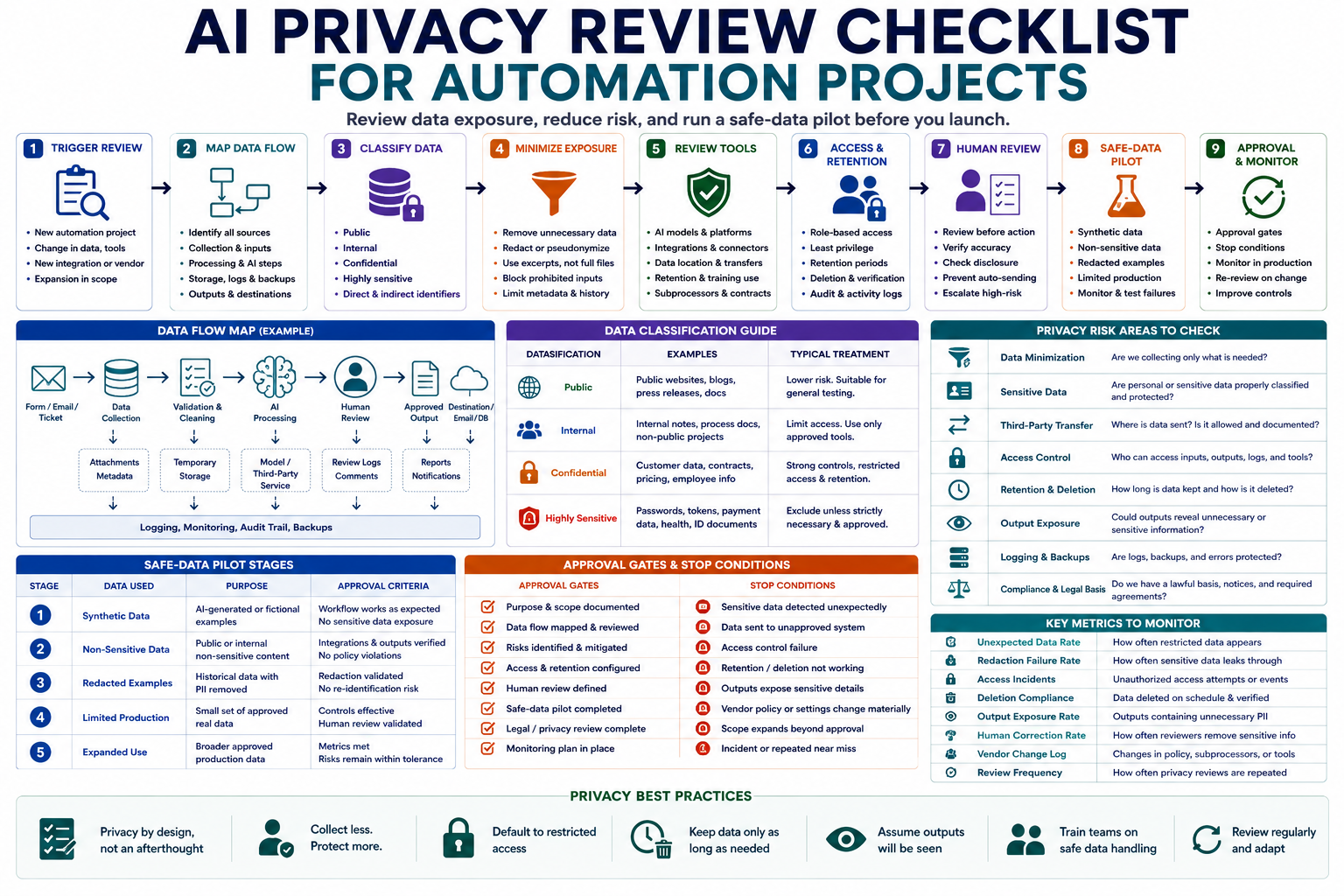
Automation projects can expose more data than teams expect. A workflow may collect information from forms, emails, documents, databases, customer records, or connected applications before sending it to an AI model or another third-party service. An AI privacy review checklist helps teams map this data flow, identify unnecessary exposure, and design a safer pilot before launch.
The goal is not to replace legal, security, or privacy specialists. The goal is to give operators a practical review process that reveals what data enters the workflow, where it travels, who can access it, how long it remains available, and what controls are required before real information is processed.
When an automation project needs a privacy review
A privacy review should happen before a workflow begins processing real operational or customer data. It should also be repeated when the workflow, data source, model, vendor, integration, or intended use changes.
Run a review when the automation:
- Processes customer, employee, applicant, student, patient, or account information.
- Reads emails, documents, transcripts, support tickets, or form submissions.
- Connects to a CRM, help desk, cloud drive, database, calendar, or messaging system.
- Sends information to an AI model, automation platform, API, or external vendor.
- Creates profiles, classifications, scores, recommendations, or decisions about people.
- Stores prompts, outputs, logs, attachments, or conversation history.
- Handles financial, legal, authentication, location, identity, or health-related information.
- Changes from a manual draft workflow to automatic sending or publishing.
- Expands from a small pilot to broader production use.
Do not assume that a workflow is low risk because its final output looks harmless. The input, temporary files, logs, error messages, and connected systems may still contain sensitive information.
Step 1: Map the complete data flow
Start by documenting every point where information enters, moves through, and leaves the workflow. A data-flow map should show more than the main AI step.
| Stage | Questions to answer |
|---|---|
| Trigger | What event starts the workflow? |
| Source | Which system, person, file, or form provides the data? |
| Collection | Which exact fields, attachments, and metadata are collected? |
| Transformation | Is the data cleaned, summarized, merged, redacted, or reformatted? |
| AI processing | Which information is sent to the model, and for what purpose? |
| Storage | Where are prompts, files, outputs, logs, and backups stored? |
| Human review | Who can open, edit, approve, or export the information? |
| Destination | Where is the final output sent or saved? |
| Deletion | When and how is temporary and stored data removed? |
Include hidden or secondary data flows such as debug logs, browser extensions, integration histories, failed-run records, notification messages, backups, and exported reports.
Step 2: Classify the information processed
Not all information creates the same level of risk. Classify data before deciding what controls the workflow requires.
| Classification | Examples | Typical treatment |
|---|---|---|
| Public | Published articles, public product pages, public documentation | May be suitable for lower-risk testing |
| Internal | Process notes, internal drafts, non-public project information | Limit access and confirm approved tools |
| Confidential | Contracts, pricing, strategy, customer records, employee data | Require stronger approval and data controls |
| Highly sensitive | Passwords, authentication tokens, payment details, medical information, identity documents | Exclude unless a specialist-approved system and process exists |
Also record whether the information can identify a person directly or indirectly. Names may be obvious identifiers, but combinations of job title, location, account history, device information, or unique events can also identify someone.
Separate required data from convenient data
For every field, ask whether the workflow truly needs it to complete the task. A support-summary workflow may need the issue description but not the customer’s full address, account number, or unrelated conversation history.
Step 3: Minimize data before AI processing
Data minimization reduces risk by limiting what the workflow collects, sends, stores, and exposes to reviewers.
- Remove fields unrelated to the task.
- Replace names and identifiers with placeholders when identity is unnecessary.
- Exclude passwords, tokens, payment details, and authentication information.
- Send excerpts instead of entire documents when possible.
- Summarize source material locally before sending it to another system.
- Remove metadata that does not support the workflow.
- Limit historical context to the period required for the task.
- Prevent users from adding unrestricted attachments without review.
Use redaction carefully
Redaction should remove or replace sensitive values before external processing. However, simply deleting a name may not be enough when the remaining context can still identify the person.
Test the redaction process with realistic examples and confirm that removed information does not reappear in logs, filenames, metadata, outputs, or error messages.
Step 4: Review every tool and vendor in the workflow
A workflow may use several services even when users see only one interface. Review the AI provider, automation platform, connectors, storage system, analytics tools, plugins, and notification services.
For each service, document:
- Service name and purpose
- Data sent to the service
- Data location or processing region when relevant
- Retention behavior
- Whether submitted data may be used to improve models or services
- Access controls and administrator roles
- Encryption and security documentation
- Subprocessors or connected third parties
- Export and deletion capabilities
- Contract, policy, or account setting relied upon
- Person responsible for approving the service
Do not rely only on marketing descriptions. Confirm the settings and documentation that apply to the actual account, plan, region, and product configuration being used.
Step 5: Review the purpose and permitted use
The same data may create different risks depending on how it is used. Summarizing a support ticket for an agent is different from scoring a customer, making an employment recommendation, or sending an automatic response.
Document:
- The exact business purpose
- The expected benefit
- The people affected
- The decisions or actions influenced
- Whether individuals would reasonably expect this use
- Whether consent, notice, contract, policy, or another approved basis is required
- Whether the output may create a significant effect on a person
- Whether a human can correct or challenge the result
Questions about legal basis, required notices, individual rights, or regulated uses should be reviewed by a qualified privacy or legal professional.
Step 6: Define access, retention, and deletion
Privacy risk increases when too many people can access information or when data remains available longer than needed.
Access controls
- Assign access by role rather than convenience.
- Limit administrator permissions.
- Separate template editing from operational use where possible.
- Remove access when a person changes role or leaves the team.
- Use individual accounts rather than shared credentials.
- Record who can view inputs, prompts, outputs, and logs.
- Require stronger controls for confidential or highly sensitive data.
Retention controls
- Define how long source data is needed.
- Set separate retention periods for prompts, outputs, logs, and backups.
- Delete temporary files after the workflow completes.
- Avoid keeping full source documents when only a structured result is required.
- Confirm whether deletion also removes vendor-side copies and logs.
- Document exceptions required for audit, legal, security, or operational reasons.
A statement such as “we delete data when it is no longer needed” is not operationally useful. Define a specific trigger, period, owner, and deletion method.
Step 7: Review outputs and downstream exposure
The output may expose sensitive information even when the AI system processed it correctly. Check what the workflow includes in emails, tasks, reports, notifications, dashboards, and chat messages.
- Does the output repeat unnecessary personal information?
- Could a notification reveal confidential details on a lock screen?
- Are outputs copied into systems with broader access?
- Can exported reports be downloaded without restrictions?
- Does the workflow create permanent records from temporary inputs?
- Could generated summaries contain incorrect or sensitive inferences?
- Are users able to edit or correct the output before it is shared?
Human review should confirm both accuracy and appropriate disclosure. A fact may be accurate but still unnecessary to include in the final output.
Step 8: Run a safe-data pilot
Do not begin testing with full production data. Start with information that creates the lowest practical exposure while still representing the workflow.
Safe pilot stages
| Stage | Data used | Purpose |
|---|---|---|
| Stage 1 | Synthetic examples | Test basic workflow logic without real personal data |
| Stage 2 | Public or non-sensitive content | Test integrations, formatting, and output routing |
| Stage 3 | Redacted historical examples | Test realistic variation and privacy controls |
| Stage 4 | Limited approved production data | Validate the workflow under controlled access |
| Stage 5 | Broader approved use | Expand only after review conditions are met |
Each stage should have an owner, test cases, approval conditions, and a rollback plan. Do not advance simply because the automation runs successfully.
Test failure cases
- A user pastes confidential information into an unrestricted field.
- An attachment contains hidden personal information.
- The AI output repeats a sensitive identifier.
- A workflow error stores the full input in a log.
- A notification is sent to the wrong channel.
- A user without permission opens the result.
- A deletion process fails or removes only the visible copy.
- A connected vendor changes its retention or processing settings.
Step 9: Set approval gates and stop conditions
The privacy review should end with a clear decision rather than a general list of concerns.
- Approve: The workflow uses permitted data with documented controls.
- Approve with conditions: Launch only after specific controls are completed.
- Restricted pilot: Use only approved data, users, and scenarios.
- Specialist review required: Privacy, legal, security, or compliance questions remain unresolved.
- Do not launch: The workflow creates unacceptable exposure or lacks required controls.
Stop the workflow when:
- Unexpected sensitive data is detected.
- An unapproved system receives information.
- Access controls fail.
- Deletion or retention controls do not work.
- The output exposes unnecessary personal details.
- A vendor setting or policy changes materially.
- The workflow begins influencing higher-risk decisions beyond its approved scope.
- A serious incident, complaint, or repeated near miss occurs.
Example privacy review record
Assume a small company wants to summarize customer support tickets and draft replies for agent review.
| Review field | Example |
|---|---|
| Purpose | Prepare a support summary and a draft reply for human review |
| Source | Help-desk ticket text and approved account context |
| Excluded data | Passwords, payment details, identity documents, and unrelated history |
| AI action | Classify the issue, summarize the request, and draft a response |
| Human review | Support agent verifies accuracy, disclosure, tone, and escalation |
| Automatic action | None; replies cannot be sent without approval |
| Retention | Temporary workflow copies deleted after the approved operational period |
| Pilot data | Synthetic and redacted tickets before limited production use |
| Stop condition | Sensitive identifiers appear in prompts, logs, or unauthorized outputs |
Monitor privacy after launch
Privacy review is not a one-time document. The workflow should be monitored for changes in data, tools, behavior, and scope.
- Unexpected-data rate: How often prohibited or unnecessary data enters the workflow.
- Redaction failure rate: How often sensitive values remain after filtering.
- Access incidents: Attempts or events involving unauthorized access.
- Deletion compliance: Whether data is removed according to the schedule.
- Output exposure: Whether results include unnecessary personal information.
- Human correction rate: How often reviewers remove or correct sensitive content.
- Vendor changes: Updates to settings, contracts, subprocessors, or retention behavior.
- Scope expansion: New uses, teams, data sources, or automated actions.
Schedule a new review whenever a material change occurs rather than waiting only for a fixed annual date.
Copy-and-use prompts
Data-flow mapping prompt
You are helping me document the data flow of an automation project.

Workflow purpose:
[PURPOSE]

Trigger:
[TRIGGER]

Source systems:
[SOURCES]

Input fields and files:
[INPUTS]

AI or automation tools:
[TOOLS]

Human reviewers:
[ROLES]

Final destinations:
[DESTINATIONS]

Known storage and retention:
[DETAILS]

Create a data-flow map containing:

1. Every collection point
2. Every system receiving data
3. Data fields transferred at each step
4. Transformations and redactions
5. Temporary and permanent storage
6. Logs, backups, and error records
7. Human access
8. Final outputs
9. Deletion points
10. Unknown or undocumented flows

Do not assume that missing controls exist.
Clearly label unknowns requiring technical verification.
Privacy review prompt
Review this proposed AI automation workflow for privacy risks.

Workflow:
[DESCRIBE WORKFLOW]

Data-flow map:
[PASTE MAP]

Data classifications:
[PUBLIC, INTERNAL, CONFIDENTIAL, HIGHLY SENSITIVE]

Tools and vendors:
[LIST TOOLS]

Intended users:
[USERS]

Human review:
[REVIEW PROCESS]

Retention:
[RETENTION RULES]

Evaluate:

1. Unnecessary data collection
2. Personal or sensitive information
3. Unapproved third-party transfers
4. Weak redaction
5. Excessive access
6. Unclear retention
7. Missing deletion controls
8. Sensitive information in outputs
9. Logging and backup exposure
10. Scope beyond user expectations
11. Automated decisions affecting people
12. Missing legal, security, or privacy review

For each issue, return:
- Risk
- Exact workflow stage
- Data involved
- Likelihood
- Impact
- Recommended control
- Owner
- Verification required
- Launch blocker: yes or no

Do not provide legal approval.
Mark issues that require a qualified specialist.
Safe-data pilot prompt
Create a safe-data pilot plan for this automation.

Workflow:
[WORKFLOW]

Intended production data:
[DATA]

Known privacy risks:
[RISKS]

Available test data:
[TEST DATA]

Create:

1. Synthetic test stage
2. Public or non-sensitive test stage
3. Redacted historical test stage
4. Limited production pilot
5. Approval criteria for each stage
6. Prohibited data
7. Access restrictions
8. Retention and deletion rules
9. Monitoring metrics
10. Stop conditions
11. Incident escalation owner
12. Rollback plan

Use the least sensitive data necessary at every stage.
Do not recommend production use until unresolved risks are addressed.
Privacy review validation prompt
Review this completed privacy checklist as a skeptical operator.

Checklist:
[PASTE CHECKLIST]

Workflow documentation:
[PASTE DOCUMENTATION]

Check for:

1. Missing systems or data flows
2. Unclassified data
3. Assumed vendor protections
4. Undefined access permissions
5. Vague retention language
6. Missing deletion verification
7. Incomplete redaction testing
8. Sensitive output exposure
9. Unclear approval ownership
10. Missing stop conditions
11. Scope changes not covered by the review
12. Issues requiring specialist review

Return:
- Blocking gaps
- Important corrections
- Unknowns requiring verification
- Safe pilot limitations
- Approval recommendation: approve, approve with conditions, restricted pilot, specialist review, or do not launch

Do not treat incomplete information as approval.
AI privacy review checklist
- The workflow purpose and approved scope are documented.
- Every source, system, integration, and destination is mapped.
- Collected fields, files, metadata, and logs are listed.
- Public, internal, confidential, and highly sensitive data are separated.
- Unnecessary fields are removed before processing.
- Redaction and pseudonymization controls are tested.
- Passwords, tokens, payment data, and other prohibited inputs are blocked.
- Every vendor and subprocessor is reviewed for the actual account configuration.
- Data use, retention, model-training behavior, export, and deletion are documented.
- Access is limited by role.
- Human review occurs before sensitive output is sent or published.
- Outputs do not reveal unnecessary personal information.
- Retention periods include prompts, outputs, logs, files, and backups.
- Deletion can be verified.
- The pilot begins with synthetic or non-sensitive data.
- Each pilot stage has approval criteria.
- Stop conditions and rollback steps are documented.
- Specialist review is requested for unresolved legal, privacy, or security questions.
- Material workflow changes trigger a new review.
Common mistakes to avoid
- Reviewing only the prompt: Map the full workflow, including logs and destinations.
- Collecting everything available: Use only the data required for the task.
- Assuming names are the only identifiers: Context can identify people indirectly.
- Trusting vendor defaults: Confirm the settings applied to the real account.
- Using production data for the first test: Begin with synthetic and redacted examples.
- Writing vague retention rules: Define periods, owners, and deletion methods.
- Ignoring output exposure: Review notifications, exports, emails, and downstream systems.
- Treating the checklist as legal approval: Escalate specialist questions appropriately.
Final guidance
A dependable AI privacy review checklist makes data exposure visible before automation reaches production. It shows what information is collected, where it travels, which systems receive it, who can access it, how long it remains available, and what happens when something goes wrong.
Start with the smallest useful dataset, test with synthetic and redacted examples, require human approval for sensitive outputs, and stop the project when privacy controls cannot be verified. Legal or regulatory conclusions should be reviewed by a qualified professional familiar with the organization and jurisdiction.
Related guides
- Build an AI Risk Register for Automation Projects
- How to Build an AI Automation Workflow for Repetitive Tasks
- Browse Practical AI Workflow Guides
- Explore Writoria’s AI Automation Guides