
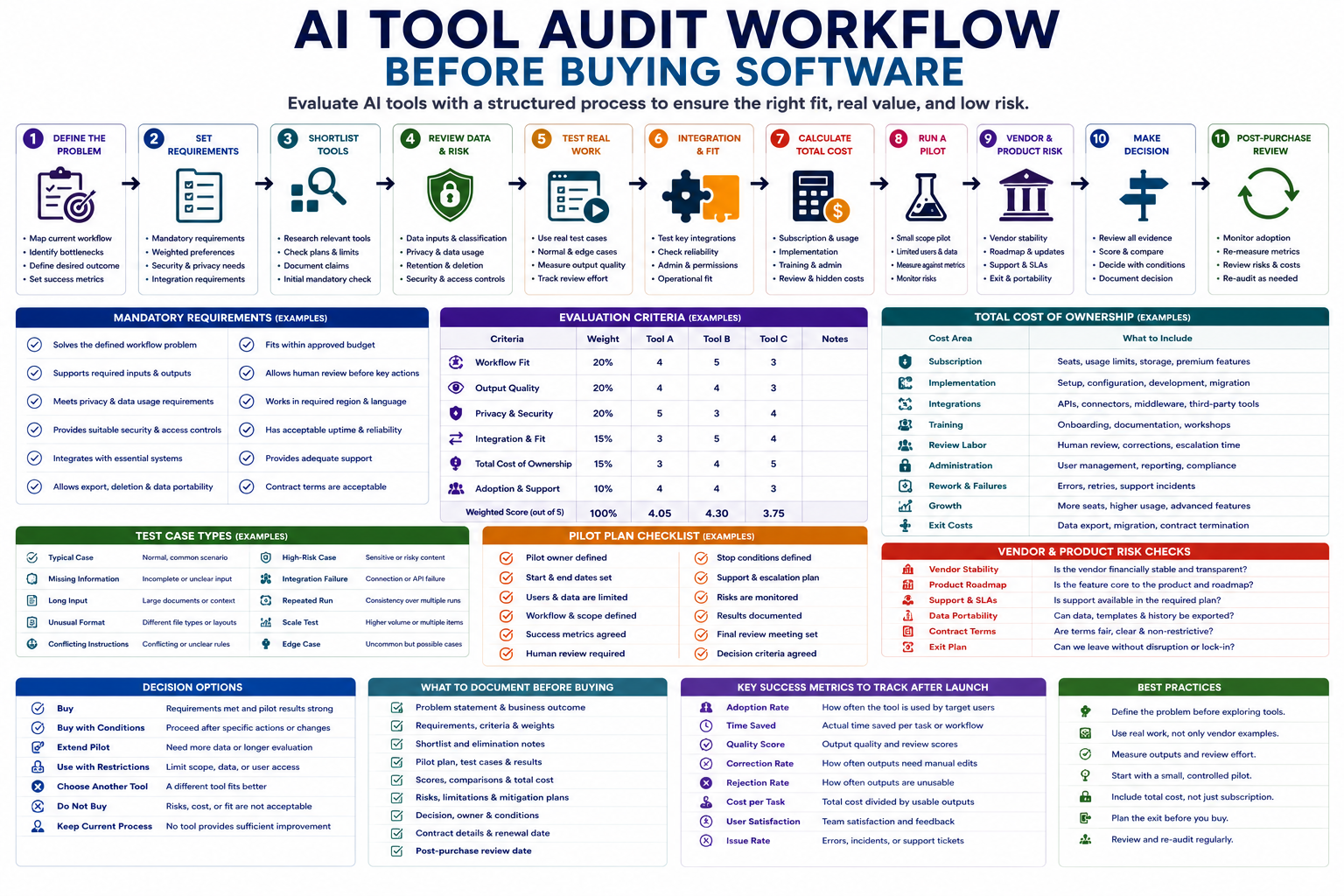
AI software is easy to buy and difficult to evaluate. Product demos often show ideal examples, while real teams must deal with incomplete data, existing tools, security requirements, recurring costs, user adoption, and outputs that still need human review. An AI tool audit workflow helps a team test these realities before signing a contract or moving important work into a new platform.
The goal is not to find the tool with the longest feature list. The goal is to determine whether a product solves a specific workflow problem, works with the team’s data and systems, produces reviewable results, fits the real budget, and can be removed without disrupting operations.
Step 1: Define the workflow problem before reviewing tools
Do not begin with a vendor list. Begin with the work that needs improvement. A tool cannot be evaluated fairly when the team has not defined the current process, its bottleneck, and the result it expects.
Document the current workflow using these fields:
- Trigger: What starts the work?
- Inputs: Which files, messages, records, or fields are required?
- Current steps: What does the team do manually?
- Bottleneck: Where is time lost or quality reduced?
- Output: What usable result must be produced?
- Reviewer: Who checks or approves the result?
- Volume: How often does the task occur?
- Current cost: How much time, money, or rework does it require?
- Risk: What happens when the process fails?
For example, “we need an AI writing tool” is not a useful buying requirement. A stronger problem statement is:
The content team needs to turn approved research notes into structured first drafts while preserving sources, following the editorial template, and keeping human approval before publication.
Step 2: Separate mandatory requirements from preferences
Teams often select tools using attractive features instead of operational requirements. Create two lists before comparing products.
Mandatory requirements
A product that fails a mandatory requirement should not continue merely because it performs well elsewhere.
- Supports the required input and output formats.
- Works with the team’s approved data types.
- Meets required privacy and security conditions.
- Provides suitable access controls.
- Fits the maximum approved budget.
- Connects to essential systems or supports a realistic workaround.
- Allows human review before important actions.
- Provides acceptable export and deletion capabilities.
- Works in the required region, language, or operating environment.
Weighted preferences
- Ease of use
- Setup speed
- Output quality
- Customization
- Reporting
- Template support
- Vendor support
- Administrative controls
- Future scalability
| Requirement type | How to use it | Example |
|---|---|---|
| Mandatory gate | Reject the tool when it fails | Must not use submitted content for model training under the approved configuration |
| Weighted criterion | Compare acceptable tools | Ease of use weighted at 15% |
| Operational preference | Use as supporting context | Team prefers an interface similar to its existing tools |
Step 3: Define the success metrics
A successful product demo is not the same as a successful operational tool. Define how the team will measure value during the pilot.
- Processing time: Time required to produce the first usable output.
- Review time: Human effort required to verify the result.
- Correction rate: Percentage of outputs requiring edits.
- Rejection rate: Percentage considered unusable.
- Task completion: Whether the workflow reaches the intended final result.
- Error rate: Frequency and severity of important mistakes.
- Adoption: Whether intended users choose to use the product.
- Time saved: Previous effort minus tool and review time.
- Cost per completed task: Total cost divided by usable outputs.
A tool that saves drafting time but doubles review time may not improve the workflow.
Step 4: Build a small and relevant shortlist
Do not compare every product in the market. Select a small number that appear capable of meeting the mandatory requirements.
Create a shortlist record containing:
- Tool and vendor name
- Primary use case
- Relevant plan
- Required add-ons
- Key integrations
- Mandatory requirements passed or failed
- Known data restrictions
- Trial or pilot availability
- Source of each claim
- Open questions for the vendor
Use documentation for the exact product and plan under review. A feature may exist only in an enterprise plan, a specific region, or a separate product.
Step 5: Review data, privacy, and security
An AI product audit must examine what information the tool receives, how it is processed, and what controls apply to the real account configuration.
| Review area | Questions |
|---|---|
| Data inputs | Which files, fields, messages, and metadata will be submitted? |
| Model training | Can submitted data be used to improve models or services? |
| Retention | How long are prompts, files, outputs, and logs stored? |
| Deletion | Can the team delete data and verify removal? |
| Access | Which users, administrators, vendor staff, or subprocessors can access the data? |
| Storage location | Where is information processed and stored? |
| Security controls | Which authentication, encryption, logging, and administrative controls exist? |
| Subprocessors | Which other providers participate in processing? |
| Incident handling | How are security or data incidents reported? |
| Account configuration | Which protections require manual settings or a higher plan? |
Begin testing with synthetic, public, or redacted data. Confidential or personal information should not enter the tool until the appropriate privacy, security, and organizational reviews are complete.
Step 6: Review integration and operational fit
A tool may produce strong outputs while creating an awkward or unreliable workflow. Test how it fits into the systems people already use.
- Does the product connect to the required source and destination systems?
- Are integrations native, API-based, or dependent on another platform?
- Which permissions does each connection require?
- How are failed runs retried or recovered?
- Can users see what happened during a workflow run?
- Can administrators control templates, users, and access?
- Can outputs be exported in a usable format?
- Does the product create duplicate data or manual cleanup?
- Who will maintain integrations after launch?
- What happens when the vendor changes an API or feature?
Identify hidden dependencies
The advertised tool may depend on additional services such as an automation platform, cloud storage, email delivery, external models, premium connectors, or developer support. Include these in the audit and cost calculation.
Step 7: Test the tool with real workflow cases
Vendor examples are designed to show the product at its best. Use your own controlled test set to evaluate normal work and difficult cases.
| Test type | What it reveals |
|---|---|
| Typical case | Whether the tool handles normal work correctly |
| Missing information | Whether it asks for clarification or invents details |
| Long input | Whether important context is lost |
| Unusual format | Whether files and fields are handled reliably |
| Conflicting instructions | Whether the system follows the correct priority |
| High-risk case | Whether it stops, warns, or escalates appropriately |
| Integration failure | Whether partial or failed runs can be recovered |
| Repeated run | Whether output quality remains consistent |
Record the exact input, output, human edits, processing time, error, and reviewer decision. Do not rely on memory or general impressions.
Step 8: Score output quality and review effort
Use the same rubric for every shortlisted tool.
- Accuracy: Does the result remain supported by the input?
- Completeness: Are all required elements present?
- Instruction compliance: Does it follow the workflow rules?
- Format: Is the output structured correctly?
- Uncertainty handling: Does it identify missing information?
- Consistency: Do similar inputs produce similar quality?
- Review effort: How much correction is needed?
- Risk handling: Does it flag or stop unsafe cases?
One severe failure should not disappear inside a strong average score. Track critical errors separately.
Step 9: Calculate the total cost of ownership
The monthly subscription is only one part of the cost. Estimate the full cost over the expected evaluation period.
| Cost area | Examples |
|---|---|
| Subscription | Seats, usage tiers, storage, model access |
| Implementation | Setup, configuration, development, migration |
| Integrations | Premium connectors, APIs, middleware |
| Training | Documentation, onboarding, workshops |
| Review labor | Human checking, correction, escalation |
| Administration | User access, templates, reporting, audits |
| Failure and rework | Incorrect outputs, recovery, support incidents |
| Growth | Higher usage, more seats, premium features |
| Exit | Data export, migration, replacement, contract termination |
Calculate cost per usable task, not only cost per user. A cheap tool that requires heavy correction may cost more operationally than a higher-priced alternative.
Step 10: Review vendor and product risk
The audit should consider whether the vendor and product are likely to remain usable throughout the intended adoption period.
- Is the feature central to the product or an experimental add-on?
- Can pricing, limits, or features change without practical alternatives?
- Does the vendor depend heavily on another provider?
- Is customer support available for the selected plan?
- Can the team export its data, templates, and history?
- Can accounts and stored information be deleted?
- Does the contract create an unwanted long-term commitment?
- Are service limits and availability documented?
- Is there a realistic replacement if the product is discontinued?
Create an exit plan before purchase
- List the data and configurations that must be exported.
- Document the format of the export.
- Identify workflows that would stop without the tool.
- Define a temporary manual fallback.
- Estimate migration time and cost.
- Record cancellation and data-deletion steps.
Step 11: Run a limited pilot
A pilot should test one defined workflow with a small group of users and controlled data. It should not become an unplanned production rollout.
Define:
- Pilot owner
- Start and end dates
- Approved users
- Approved data
- Workflow in scope
- Required human review
- Success metrics
- Stop conditions
- Support and escalation process
- Final review meeting
Useful stop conditions include unexpected sensitive data exposure, repeated critical errors, inability to export results, failed access controls, unacceptable correction rates, or costs above the approved threshold.
Example AI tool audit scorecard
| Evaluation area | Weight | Tool A | Tool B | Tool C |
|---|---|---|---|---|
| Workflow fit | 20% | 4 | 5 | 3 |
| Output quality | 20% | 4 | 4 | 3 |
| Privacy and security | 20% | 5 | 3 | 4 |
| Integration fit | 15% | 3 | 5 | 4 |
| Total cost | 15% | 3 | 4 | 5 |
| Adoption and support | 10% | 4 | 4 | 3 |
The scorecard should be used only after mandatory gates are checked. A product that fails a required privacy, security, legal, or technical condition should not win through weighted scoring.
Step 12: Make and document the buying decision
The final audit should produce a clear recommendation supported by evidence.
- Buy: Mandatory requirements are met and pilot results support adoption.
- Buy with conditions: Proceed after specific controls or contract changes.
- Extend the pilot: More evidence is needed for defined questions.
- Use a restricted version: Limit the product to approved users, data, or workflows.
- Choose another tool: A different product fits the workflow better.
- Do not buy: Value, risk, cost, or operational fit is unacceptable.
- Keep the current process: The available tools do not create sufficient improvement.
Record the decision owner, evidence reviewed, conditions, known limitations, approved budget, contract period, renewal date, and post-purchase review date.
Copy-and-use prompts
AI tool requirements prompt
You are helping me define requirements before evaluating AI software.

Current workflow:
[DESCRIBE WORKFLOW]

Main bottleneck:
[BOTTLENECK]

Inputs:
[DATA AND FILES]

Required output:
[OUTPUT]

Users:
[USERS]

Existing tools:
[SYSTEMS]

Budget limit:
[BUDGET]

Privacy, security, or policy constraints:
[CONSTRAINTS]

Create:

1. Clear problem statement
2. Required business outcome
3. Mandatory requirements
4. Weighted evaluation criteria
5. Prohibited uses
6. Required integrations
7. Human review requirements
8. Pilot success metrics
9. Stop conditions
10. Questions that must be answered before purchase

Do not recommend products.
Do not convert preferences into mandatory requirements without evidence.
Vendor documentation audit prompt
Review the following AI product documentation against our approved requirements.

Requirements:
[PASTE REQUIREMENTS]

Product and plan:
[PRODUCT AND PLAN]

Documentation:
[PASTE DOCUMENTATION OR VERIFIED NOTES]

Return:

1. Mandatory requirements passed
2. Mandatory requirements failed
3. Requirements with insufficient evidence
4. Features available only on another plan
5. Data handling and retention findings
6. Security and access-control findings
7. Integration findings
8. Pricing and usage limitations
9. Export, deletion, and exit limitations
10. Questions for the vendor
11. Claims requiring independent verification

For every conclusion, cite the supporting documentation section provided.
Do not assume an undocumented feature exists.
Do not treat marketing language as technical confirmation.
Pilot evaluation prompt
Evaluate the results of an AI software pilot.

Workflow:
[WORKFLOW]

Success metrics:
[METRICS]

Mandatory requirements:
[REQUIREMENTS]

Test cases and outputs:
[PASTE RESULTS]

User feedback:
[FEEDBACK]

Costs:
[COSTS]

Incidents and failures:
[FAILURES]

Return:

1. Mandatory requirements passed or failed
2. Output quality by test case
3. Human correction effort
4. Time saved
5. Adoption and usability findings
6. Privacy and security findings
7. Integration reliability
8. Total expected cost
9. Critical risks
10. Known limitations
11. Exit and dependency concerns
12. Recommendation: buy, buy with conditions, extend pilot, restrict use, choose another tool, or do not buy

Separate verified evidence from estimates and user opinions.
Do not recommend purchase because users liked the interface alone.
Tool comparison prompt
Compare these shortlisted AI tools using the same approved criteria.

Mandatory requirements:
[REQUIREMENTS]

Weighted criteria:
[CRITERIA AND WEIGHTS]

Tool audit records:
[PASTE RECORDS]

Compare:

1. Workflow fit
2. Output quality
3. Human review effort
4. Privacy and security
5. Integrations
6. Reliability
7. Administration
8. Total cost of ownership
9. Vendor dependency
10. Export and exit options
11. Pilot evidence
12. Critical failures

Return:
- Tools that fail mandatory requirements
- Weighted comparison of remaining tools
- Strongest option
- Important trade-offs
- Missing evidence
- Conditions required before purchase
- Recommendation confidence

Do not allow a high weighted score to override a failed mandatory requirement.
AI tool audit workflow checklist
- The workflow problem is defined before products are shortlisted.
- The current process, cost, bottleneck, and expected output are documented.
- Mandatory requirements are separated from preferences.
- Pilot success metrics are defined before testing.
- Only relevant products and plans are compared.
- Every product claim is connected to documentation or test evidence.
- Data inputs and classifications are documented.
- Privacy, retention, model-training, access, and deletion conditions are reviewed.
- Security and specialist questions are escalated appropriately.
- Required integrations are tested with realistic cases.
- Normal, missing, risky, and failure cases are included.
- Output quality and human correction effort are measured.
- Critical failures are tracked separately from average scores.
- Total cost includes setup, integrations, training, review, and exit.
- Vendor dependency and product continuity are reviewed.
- An export, fallback, and cancellation plan exists.
- The pilot uses limited users, data, and scope.
- Stop conditions are documented.
- The buying decision and conditions are recorded.
- A post-purchase review date is scheduled.
Common mistakes to avoid
- Starting with product features: Define the workflow problem first.
- Testing only vendor examples: Use your own real cases.
- Ignoring review effort: Measure how much human correction is required.
- Comparing different plans: Evaluate the exact plans the team could purchase.
- Using production data too early: Begin with synthetic or redacted examples.
- Looking only at subscription price: Calculate the total cost of ownership.
- Ignoring integration failures: Test recovery and operational maintenance.
- Buying without an exit plan: Confirm export, deletion, and replacement options.
Final guidance
A dependable AI tool audit workflow evaluates software in the context of real work. It begins with a defined problem, tests products against consistent requirements, measures output and review effort, examines data and integration risk, and calculates the full cost of adoption.
Use a limited pilot before committing the whole team. Buy only when the evidence shows that the tool improves the workflow without creating unacceptable cost, data exposure, dependency, or correction work.
Related guides
- Build an AI Privacy Review Checklist for Automation Projects
- Build an AI Risk Register for Automation Projects
- Browse AI Tool Guides and Evaluations
- Explore Practical AI Workflow Guides