
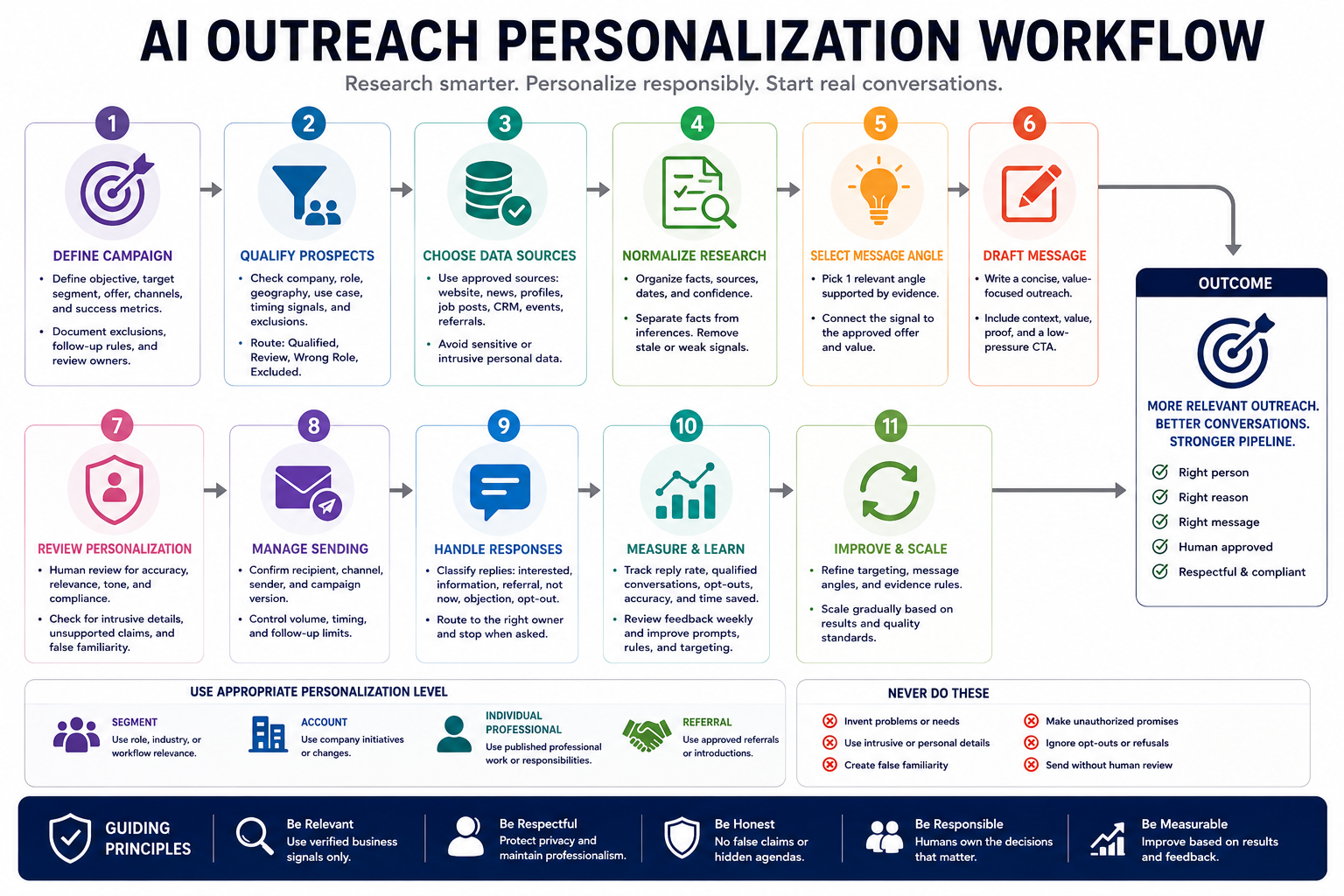
An effective AI outreach personalization workflow does not generate hundreds of messages from a name, job title, and company website. It helps a sales team identify a legitimate reason to contact a prospect, verify the evidence behind that reason, match the message with an approved offer, and prepare a concise draft that a responsible person can review before sending.
The goal is not to make automated outreach look secretly human or to mention personal details that feel invasive. The goal is to reduce repetitive research and drafting while preserving accuracy, relevance, privacy, respectful communication, and human accountability.
Why AI-personalized outreach fails
AI outreach often fails because the workflow begins with message generation instead of qualification and evidence. The result may sound polished but still be irrelevant, inaccurate, overly familiar, or impossible to trust.
Common failure patterns include:
- Contacting people who do not match the approved customer profile.
- Using a generic company description as though it were meaningful research.
- Mentioning personal information that has no legitimate business relevance.
- Inventing a recent achievement, challenge, priority, or technology.
- Assuming a prospect has a problem without supporting evidence.
- Using compliments that could apply to anyone.
- Copying private or sensitive information into an AI tool.
- Making pricing, performance, or implementation promises without approval.
- Creating fake familiarity with phrases such as “I have been following your work.”
- Sending messages automatically without checking the final recipient and context.
- Continuing outreach after a clear refusal or opt-out request.
- Optimizing only for message volume instead of qualified conversations.
A dependable workflow should answer five questions before drafting:
- Why is this prospect a reasonable fit for the campaign?
- What verified business signal makes contact relevant now?
- Which approved offer or resource matches that signal?
- What information may safely and appropriately be mentioned?
- Who is responsible for approving and sending the message?
Step 1: Define the outreach campaign
Do not ask AI to research or write messages until the campaign has a clear audience, offer, purpose, and communication standard.
| Campaign field | Question to define |
|---|---|
| Campaign objective | What legitimate business outcome should the outreach support? |
| Target segment | Which company, role, situation, or need is in scope? |
| Approved offer | Which product, service, audit, guide, or conversation may be offered? |
| Value proposition | What verified problem or goal can the offer support? |
| Proof | Which approved examples, capabilities, or results may be referenced? |
| Channel | Email, professional network, referral introduction, or another approved channel? |
| Sender | Which real person or approved account sends the message? |
| Review owner | Who approves research, claims, tone, and final wording? |
| Exclusion rules | Which companies, people, regions, or situations must not be contacted? |
| Follow-up policy | How many attempts are allowed and when must contact stop? |
The workflow should use the campaign definition as a control document. AI must not change the target segment, invent a new offer, add unsupported proof, or expand the contact list beyond the approved scope.
Define what a successful conversation means
A successful message does not always produce an immediate meeting. Depending on the campaign, success may mean:
- A relevant person confirms interest.
- The prospect refers the sender to the correct owner.
- The prospect requests more information.
- The team learns that the account is not currently a fit.
- A clear objection improves future targeting.
- The recipient asks not to be contacted again and the request is respected.
Step 2: Qualify prospects before personalization
Personalization cannot fix poor targeting. The workflow should first determine whether the prospect and account match the approved campaign criteria.
| Qualification field | Example question |
|---|---|
| Company fit | Does the organization match the approved industry, size, model, or situation? |
| Role fit | Is the person likely to own, influence, or understand the relevant problem? |
| Geographic fit | Can the offer be delivered in the prospect’s location? |
| Use-case fit | Does the account show a need the approved offer can reasonably support? |
| Timing signal | Is there verified evidence that makes contact relevant now? |
| Commercial fit | Does the account fit the approved pricing or engagement model? |
| Exclusion status | Is the person or company excluded because of an existing relationship, opt-out, conflict, or policy? |
| Contactability | Is the selected channel and address approved for use? |
Use qualification gates
| Condition | Workflow result |
|---|---|
| Strong account and role fit with verified signal | Continue to research and drafting |
| Strong company fit but wrong role | Identify the appropriate business owner before drafting |
| Fit is possible but evidence is incomplete | Send for human research or place in a lower-confidence queue |
| No legitimate relevance | Exclude from the campaign |
| Existing customer, partner, or active opportunity | Route to the account owner instead of cold outreach |
| Previous refusal or opt-out | Do not contact |
| Unverified contact identity | Do not draft or send until verified |
Do not create a priority score that hides an exclusion. A person who has opted out or does not fit the campaign should not remain eligible because other factors receive high scores.
Step 3: Choose approved research sources
The workflow should define which sources may be used and which categories of information are prohibited or require specialist review.
| Source | Useful business evidence | Risk to check |
|---|---|---|
| Official company website | Products, services, locations, positioning, and published priorities | Pages may be outdated or written for marketing rather than operations |
| Official company announcements | Launches, expansions, partnerships, leadership changes, and approved news | The announcement may not relate to the offer |
| Public professional profile | Current role, responsibilities, and professional topics | Role information may be old or incomplete |
| Public job postings | Capabilities the company is actively building | A job post does not prove a current buying need |
| Public case studies or reports | Approved business initiatives and measurable priorities | Past projects may no longer reflect current priorities |
| CRM records | Previous conversations, ownership, consent status, and account history | Records may be incomplete, duplicated, or restricted |
| Referral notes | Introductions, shared context, and known interests | The referrer may not have approved every detail for reuse |
| Event or webinar registration | Topic interest and engagement with approved content | Registration does not automatically justify unrelated outreach |
Do not use sensitive or intrusive information
The workflow should exclude personal information that is unnecessary for the business purpose, even when it appears publicly available.
- Health or medical information
- Family or relationship details
- Religion, ethnicity, or political views
- Personal financial information
- Private addresses or location patterns
- Personal photographs unrelated to professional work
- Information about children or relatives
- Speculation about employment insecurity or personal circumstances
- Details taken from restricted, private, or improperly accessed sources
Follow the organization’s privacy, security, data-retention, and outreach rules, along with the requirements that apply to the selected channel and region.
Step 4: Normalize prospect research
Raw research should be converted into a structured evidence record before it is used to personalize a message.
| Research field | Purpose |
|---|---|
| Prospect name | Verified name of the intended recipient |
| Current role | Verified current title and responsibility |
| Company | Verified organization |
| Fit reason | Why the account and role match the campaign |
| Business signal | Verified event, priority, change, or challenge relevant to the offer |
| Source | Public page, CRM record, referral note, or approved document |
| Publication date | When the source information was published or recorded |
| Approved inference | A cautious interpretation supported by the evidence |
| Offer match | How the approved offer relates to the verified signal |
| Confidence | Confirmed, likely, unclear, or conflicting |
| Use permission | Safe to mention, internal context only, or requires review |
Keep facts and inferences separate. For example, “The company is hiring three data engineers” may be a verified fact. “The company needs our automation service” is an inference that requires more evidence.
Remove stale and weak signals
- Old job titles that no longer match the prospect’s current role
- Announcements outside the campaign’s acceptable time window
- Generic statements used by most companies in the industry
- Unverified claims copied from third-party databases
- Signals that have no clear connection with the approved offer
- Information that would feel unnecessarily personal when mentioned
Step 5: Select the personalization level
Not every prospect requires deep personalization. Use the smallest amount of personalization needed to make the business reason clear.
| Level | Use case | Message basis |
|---|---|---|
| Segment personalization | Prospects share a verified role, industry, or workflow problem | Approved segment insight and role relevance |
| Account personalization | A company has a relevant public initiative or change | Verified company signal and offer connection |
| Individual professional personalization | The person has published relevant professional work | Verified role, article, talk, or professional responsibility |
| Referral personalization | A trusted person has made or approved an introduction | Approved referral context |
Use individual personalization only when it improves the professional relevance of the message. Do not add a personal detail merely to prove that research was performed.
Step 6: Select a message angle supported by evidence
The message angle explains why this recipient, why this offer, and why now. It should connect one verified signal with one approved value proposition.
| Angle type | Example signal | Appropriate approach |
|---|---|---|
| Growth signal | The company announced expansion into a new market | Offer a relevant process, capacity, or implementation resource |
| Hiring signal | The company is hiring for a capability related to the offer | Share a resource that may support the team while capability is being built |
| Technology signal | The company publicly documented a workflow or platform change | Explain a relevant integration, audit, or operating improvement |
| Content signal | The prospect published a professional opinion or operational challenge | Respond to the published idea and connect it with a useful resource |
| Referral signal | A mutual contact recommended the conversation | State the referral accurately and explain the proposed topic |
| Existing engagement signal | The prospect attended an approved event or requested a resource | Continue the same topic without assuming buying intent |
Reject weak message angles
- “I noticed your company is doing great work.”
- “As a leader in your industry, you must care about growth.”
- “I saw that you recently viewed our website.”
- “You are probably struggling with automation.”
- “Congratulations on your impressive career.”
- “I have been following your work for a long time.”
These lines are generic, invasive, unsupported, or falsely familiar. Replace them with a specific and verifiable business reason or remove the personalization entirely.
Step 7: Draft a concise outreach message
The draft should make the relevance clear without forcing the recipient to read a long sales explanation.
A practical first-message structure is:
- Relevant context: One verified professional or company signal.
- Connection: Why that signal relates to the approved offer.
- Value: A useful resource, observation, question, or small next step.
- Proof: One approved capability or example when necessary.
- Call to action: A low-pressure and specific response option.
- Sender identity: A truthful name, company, and role.
Example structure
Hi [Name] — I saw that [Company] recently [verified business signal]. Teams working through that change often need to [relevant operational task], especially when [specific constraint].
We have a short [approved resource or offer] that shows how teams can [realistic value] without [relevant trade-off]. Would it be useful for me to send it?
[Sender name]
[Role and company]
The final message should reflect the real offer and evidence. Do not use the example as a universal template without adapting it to the campaign.
Keep claims controlled
| Risky claim | Safer alternative |
|---|---|
| We will double your conversion rate | We help teams test and improve the workflow that supports conversion |
| Your current process is inefficient | Your expansion may create additional coordination work across the process |
| Companies like yours always struggle with this | This is a common constraint in teams managing similar workflows |
| We are the leading solution | We focus specifically on [approved capability] |
| This takes only one day | Timing depends on scope, access, and review requirements |
Step 8: Create follow-up rules
A follow-up should add clarity or value rather than repeat the first message with greater pressure.
- Confirm that the recipient still matches the campaign before each follow-up.
- Stop when the person declines or asks not to be contacted.
- Do not switch channels to bypass silence or a refusal.
- Do not create artificial urgency.
- Do not claim that a previous message was missed.
- Add one useful detail, resource, clarification, or closing option.
- Use the approved maximum number of attempts.
- Record the final outcome in the CRM or campaign system.
Example follow-up purposes
- Share the promised resource.
- Clarify the relevance in one sentence.
- Ask whether another person owns the topic.
- Provide a concise example connected to the original signal.
- Close the conversation respectfully.
Step 9: Run a human personalization review
A responsible person should review the prospect record and final message before sending, especially during the pilot stage or when the message contains account-specific claims.
- The recipient’s name, company, and current role are correct.
- The person matches the approved campaign.
- The contact is not excluded, opted out, or owned by another team.
- The personalization comes from an approved source.
- The source is recent enough for the campaign.
- The message distinguishes facts from assumptions.
- No sensitive or intrusive personal information is included.
- The business signal is genuinely relevant to the offer.
- The draft does not imply false familiarity.
- The message does not invent a pain point.
- Claims, examples, and proof are approved.
- No unauthorized pricing, deadline, or performance promise appears.
- The call to action is clear and low pressure.
- The sender identity is truthful.
- The message follows the campaign’s channel and follow-up rules.
Use a personalization comfort check
Before approval, ask:
- Would the recipient reasonably understand how we learned this information?
- Is the detail professionally relevant to the message?
- Would mentioning it feel appropriate in a real business conversation?
- Does the message remain useful when the personalized line is removed?
- Are we using the detail to clarify relevance rather than create surprise?
When the answer is uncertain, remove the personal detail and use account- or segment-level relevance instead.
Step 10: Control sending and campaign state
The sending step should use the approved recipient, channel, sender identity, schedule, and campaign version. Do not let the AI system choose these details freely.
| Send-control field | Purpose |
|---|---|
| Prospect ID | Connects the message to the correct CRM record |
| Verified destination | Prevents messages from going to the wrong recipient |
| Sender identity | Ensures the real approved person or account is used |
| Campaign version | Records the approved message and offer rules |
| Approval status | Confirms required human review occurred |
| Send time | Uses an approved schedule rather than uncontrolled sending |
| Attempt count | Prevents excessive follow-ups |
| Opt-out state | Prevents contact after a refusal or removal request |
| Owner | Identifies who is responsible for the conversation |
Begin with a small pilot. Review the messages, replies, objections, corrections, and opt-out requests before increasing volume.
Step 11: Classify responses and route them correctly
The workflow should not stop after the message is sent. Responses need clear ownership and routing rules.
| Response type | Recommended action |
|---|---|
| Interested | Route to the responsible salesperson with the complete context |
| Requests information | Send only approved materials or draft a reviewed reply |
| Referral to another person | Record the referral and verify the new contact before outreach |
| Not now | Record the timing and stop follow-ups unless permission is given |
| Not relevant | Close the sequence and use the feedback to improve qualification |
| Objection | Route to a human for an accurate and appropriate response |
| Opt-out or refusal | Stop contact and update the suppression record |
| Automatic reply | Apply the campaign’s approved waiting or routing rule |
| Unclear or sensitive response | Do not automate; route to a responsible person |
AI may classify straightforward responses, but it should not negotiate terms, handle complaints, make commitments, or answer sensitive questions without human review.
Measure whether the workflow improves outreach
Open rates and message volume do not show whether the workflow creates useful conversations. Measure quality, accuracy, relevance, and recipient response.
- Qualification acceptance rate: Percentage of AI-qualified prospects approved by reviewers.
- Research correction rate: Percentage of prospect records containing inaccurate or stale information.
- Draft approval rate: Percentage of messages approved without major revision.
- Personalization rejection rate: Percentage rejected because the detail was irrelevant, intrusive, or unsupported.
- Positive reply rate: Percentage producing relevant interest or referral.
- Negative reply rate: Percentage producing rejection or criticism.
- Opt-out rate: Percentage asking not to be contacted.
- Qualified conversation rate: Percentage creating a useful business conversation.
- Meeting quality: Percentage of meetings matching the intended use case.
- Wrong-person rate: Percentage sent to people who do not own the topic.
- Preparation time: Time required to research and approve each prospect.
- Response-handling time: Time required to classify and route replies.
Review qualitative feedback as well. A small number of complaints about inaccurate or uncomfortable personalization can reveal a serious workflow problem even when response metrics appear strong.
Copy-and-use prompts
Prospect qualification prompt
You are helping me qualify prospects for an approved outreach campaign.

Campaign:
[CAMPAIGN NAME]

Target company criteria:
[CRITERIA]

Target roles:
[ROLES]

Approved use cases:
[USE CASES]

Approved offer:
[OFFER]

Exclusion rules:
[EXCLUSIONS]

Prospect records:
[PASTE PROSPECT RECORDS]

For each prospect, return:

1. Prospect name
2. Current role
3. Company
4. Company-fit assessment
5. Role-fit assessment
6. Verified business signal
7. Signal source
8. Signal date
9. Offer relevance
10. Exclusion check
11. Qualification result:
   - qualified
   - qualified with review
   - wrong role
   - insufficient evidence
   - excluded
12. Missing information
13. Human review required
14. Reason for the result

Rules:
- Do not invent roles, signals, needs, or contact details
- Do not treat a generic company description as a buying signal
- Do not override exclusions
- Do not use sensitive personal information
- Keep facts and inferences separate
- Mark stale or conflicting information clearly
Prospect research normalization prompt
Organize this prospect research for responsible outreach personalization.

Prospect:
[NAME]

Company:
[COMPANY]

Approved campaign:
[CAMPAIGN]

Approved offer:
[OFFER]

Research sources:
[PASTE PUBLIC AND APPROVED SOURCE RECORDS]

Return:

1. Verified professional role
2. Verified company facts
3. Relevant business signals
4. Source for each fact
5. Publication or record date
6. Approved inference
7. Offer connection
8. Confidence:
   - confirmed
   - likely
   - unclear
   - conflicting
9. Use classification:
   - safe to mention
   - internal context only
   - requires review
   - do not use
10. Stale information
11. Missing evidence
12. Personalization comfort risk

Rules:
- Do not add personal or sensitive information
- Do not invent pain points
- Do not imply private knowledge
- Do not claim that a public signal proves buying intent
- Reject information unrelated to the professional reason for contact
- Preserve the original source wording accurately
Message-angle selection prompt
Select a responsible message angle for this prospect.

Campaign objective:
[OBJECTIVE]

Approved offer:
[OFFER]

Approved value propositions:
[VALUE PROPOSITIONS]

Approved proof:
[PROOF]

Qualified prospect record:
[PROSPECT RECORD]

Verified research:
[RESEARCH]

Return up to three possible angles.

For each angle, provide:

1. Verified signal used
2. Source
3. Why the signal is relevant
4. Approved offer connection
5. Value for the recipient
6. Evidence strength
7. Personalization level:
   - segment
   - account
   - individual professional
   - referral
8. Risk of sounding generic
9. Risk of sounding intrusive
10. Recommended decision:
   - use
   - revise
   - reject

Rules:
- Use only verified information
- Do not create false familiarity
- Do not invent a problem or buying need
- Do not use sensitive personal details
- Do not recommend an angle that depends on weak or stale evidence
- Prefer the least intrusive angle that still explains relevance
Outreach drafting prompt
Draft a concise outreach message for human review.

Recipient:
[NAME AND ROLE]

Company:
[COMPANY]

Channel:
[CHANNEL]

Verified business signal:
[SIGNAL]

Approved message angle:
[ANGLE]

Approved offer:
[OFFER]

Approved proof:
[PROOF]

Sender:
[REAL NAME, ROLE, AND COMPANY]

Call to action:
[APPROVED CTA]

Create:

1. Subject line when required
2. First message
3. One optional follow-up
4. Evidence used
5. Claims used
6. Statements requiring human verification

Writing rules:
- Be clear, direct, and respectful
- Use one relevant personalization point
- Do not pretend to know the recipient personally
- Do not mention private, sensitive, or intrusive details
- Do not invent pain points, results, customers, or capabilities
- Do not create false urgency
- Do not make unauthorized pricing, timing, or performance promises
- Keep the call to action low pressure
- Do not hide the sender’s identity
- Make the message useful even if the recipient does not buy
Outreach quality-control prompt
Review this outreach message before it is sent.

Campaign rules:
[PASTE CAMPAIGN, OFFER, TARGET, EXCLUSIONS, AND FOLLOW-UP RULES]

Prospect record:
[PASTE VERIFIED PROSPECT RECORD]

Research evidence:
[PASTE SOURCES]

Draft message:
[PASTE MESSAGE]

Check for:

1. Incorrect name, role, company, or recipient
2. Prospect outside the approved campaign
3. Previous refusal, opt-out, conflict, or account ownership
4. Unsupported or stale personalization
5. Sensitive or intrusive information
6. False familiarity
7. Invented pain points
8. Unsupported claims
9. Unauthorized proof, pricing, timing, or promises
10. Irrelevant offer connection
11. Aggressive or misleading urgency
12. Unclear sender identity
13. Excessive length
14. Pressure-based call to action
15. Channel or follow-up rule violations

Return:
- Blocking corrections
- Important corrections
- Statements requiring verification
- Personalization comfort assessment
- Final approval checklist
- Send decision:
  - approved
  - minor revision
  - major revision
  - do not send

Do not approve a message merely because it sounds natural or persuasive.
AI outreach personalization workflow checklist
- The campaign objective and approved offer are defined.
- The target company and role criteria are documented.
- Exclusion and opt-out rules are applied before research.
- The prospect has a legitimate business fit.
- The contact identity and current role are verified.
- The business signal comes from an approved source.
- The signal is recent enough to remain relevant.
- Facts and inferences are stored separately.
- Sensitive and intrusive information is excluded.
- The personalization level matches the available evidence.
- The message uses one clear and relevant angle.
- The offer connection is reasonable and approved.
- The draft does not invent a problem or buying intent.
- The draft does not imply false familiarity.
- Claims and proof are approved.
- No unauthorized promise appears.
- The call to action is specific and low pressure.
- The real sender identity is visible.
- A human reviews the message before sending.
- The recipient, channel, and campaign version are confirmed.
- The workflow respects refusals and opt-out requests.
- Responses are routed to a responsible owner.
- Outcomes and corrections are recorded.
- The pilot is reviewed before increasing volume.
Common mistakes to avoid
- Personalizing before qualifying: Confirm fit and relevance first.
- Using generic compliments: Use a verified business signal or remove the line.
- Inventing the problem: Present a relevant possibility without claiming private knowledge.
- Using too much personal detail: Keep personalization professional and necessary.
- Trusting outdated profiles: Verify current roles and source dates.
- Hiding automation: Use truthful sender identities and communication practices.
- Automating every reply: Route objections, complaints, negotiations, and sensitive responses to people.
- Measuring volume only: Track qualified conversations, accuracy, complaints, and opt-outs.
Final guidance
A dependable AI outreach personalization workflow begins with qualification, not message generation. It verifies the prospect, gathers only appropriate business evidence, chooses a relevant angle, drafts a concise message, and requires human approval before contact.
Use AI to organize research, compare fit, identify missing context, and prepare drafts. Keep targeting decisions, privacy boundaries, claims, offers, sending approval, and response ownership under human control.
Related guides
- Build an AI Client Report Workflow for Agencies
- Build an AI Task Prioritization Workflow
- Build an AI Decision Brief Workflow for Managers
- Browse Practical AI Workflow Guides