
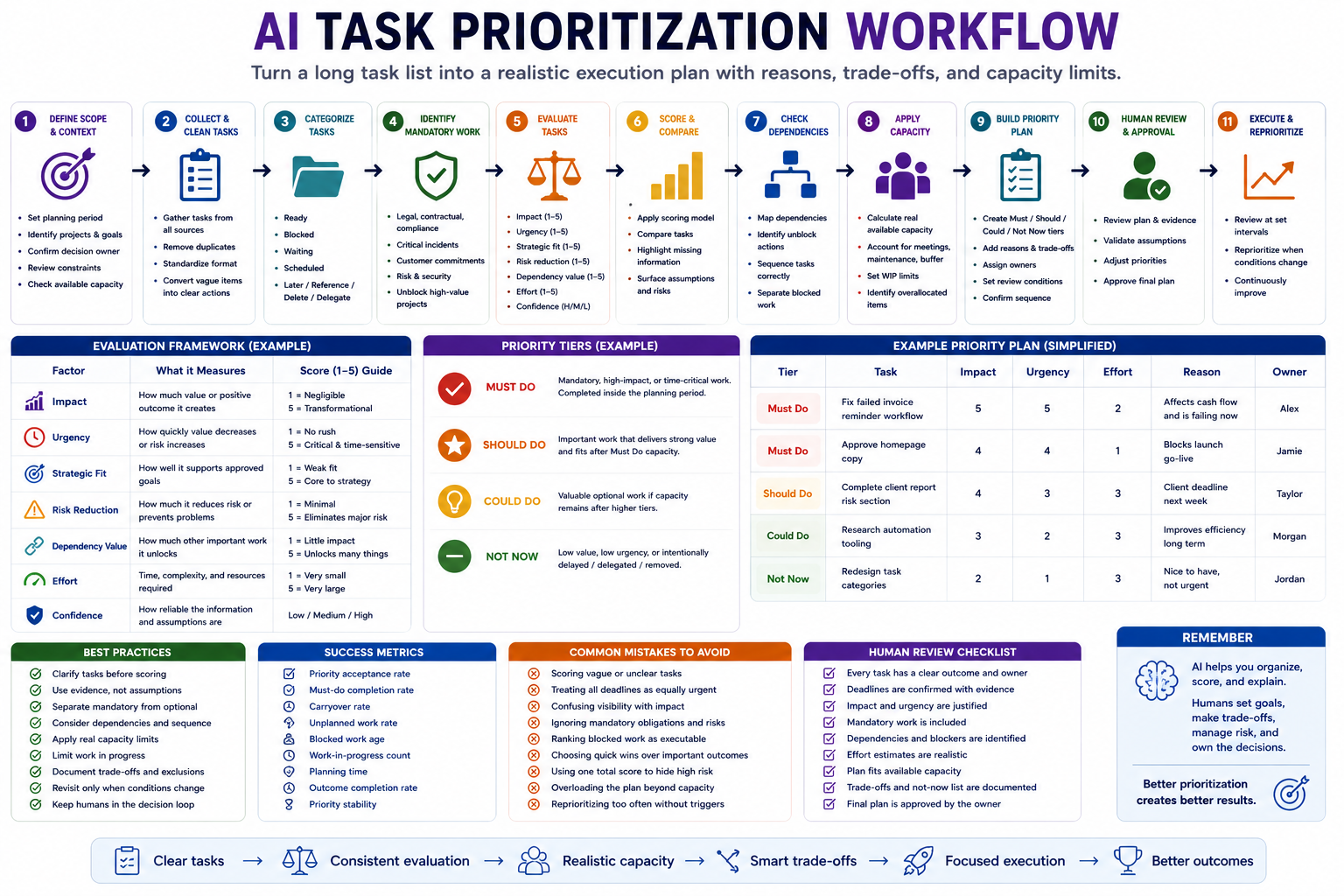
A long task list does not show what should happen first. It mixes urgent requests, important projects, maintenance work, blocked items, ideas, and low-value activity in one place. An AI task prioritization workflow helps teams and solo builders turn that list into a realistic execution plan with clear reasons, dependencies, trade-offs, and capacity limits.
The goal is not to let AI decide what matters. The goal is to use AI to clarify incomplete tasks, compare them consistently, expose missing context, and prepare a recommended order that a responsible person can review before commitments are made.
Why task prioritization fails
Prioritization fails when tasks are ranked without enough context. A short message from an important person may appear urgent, while a quieter task may prevent a serious future problem. A high-impact project may also be impossible to start because a dependency is missing.
Common problems include:
- Ranking vague tasks before clarifying the expected result.
- Treating every deadline as equally urgent.
- Confusing stakeholder pressure with business impact.
- Ignoring tasks required by contracts, policy, safety, or compliance.
- Scoring blocked work as though it can start immediately.
- Choosing quick tasks because they create visible progress.
- Planning more work than the available capacity supports.
- Using one average score to hide severe risks.
- Letting AI invent deadlines, owners, or benefits.
- Moving unfinished work forward without reconsidering its value.
A useful prioritization workflow should answer:
- What must happen because of a real commitment or risk?
- Which tasks create the most meaningful value?
- Which work unlocks other important work?
- What can realistically fit within the available capacity?
- What should be delayed, delegated, reduced, or removed?
Step 1: Define the prioritization scope
Do not rank every task in the organization at once. Define the period, team, projects, and decision owner before collecting tasks.
| Scope field | Question |
|---|---|
| Planning period | Are we planning today, this week, this sprint, or this month? |
| People | Whose work and capacity are included? |
| Projects | Which projects and responsibilities are in scope? |
| Decision owner | Who approves the final priority order? |
| Capacity | How much focused and maintenance time is available? |
| Constraints | Which deadlines, policies, budgets, or dependencies limit the plan? |
| Required output | Daily focus list, weekly plan, sprint backlog, or project queue? |
A task may be important but still remain outside the current planning scope. Keeping scope clear prevents the prioritization session from becoming a review of the entire backlog.
Step 2: Clean and clarify the task list
AI cannot prioritize unclear work reliably. Normalize every task into a consistent record before scoring it.
| Task field | Purpose |
|---|---|
| Task | A specific action beginning with a visible verb |
| Expected outcome | The result created when the task is completed |
| Related project | The larger outcome the task supports |
| Owner | The person responsible for moving it forward |
| Real deadline | A confirmed date, not an assumed preference |
| Estimated effort | Time or complexity required |
| Dependencies | People, approvals, data, or systems required first |
| Impact | The value or consequence of completing the task |
| Risk of delay | What happens when the task does not move |
| Evidence | Source supporting the deadline, impact, or requirement |
| Status | Ready, blocked, waiting, scheduled, active, or unclear |
Convert vague items into executable tasks
| Vague item | Clarified task | Expected outcome |
|---|---|---|
| Homepage | Approve the final homepage copy | Copy is ready for publishing |
| Client report | Complete the report’s risk section | The draft is ready for client review |
| Fix automation | Identify why failed invoices are not entering the reminder workflow | The failure cause is documented |
| Marketing | Select the campaign concept for the August launch | The production team has one approved direction |
| Research tools | Compare three approved tools against the audit scorecard | A documented shortlist is available |
Remove duplicate tasks and merge items that describe the same outcome. A task should not receive a priority score until its meaning is clear enough for another person to understand.
Step 3: Remove items that should not be prioritized
Not every captured item deserves a position in the active queue. Before scoring, assign each item to the correct destination.
- Ready: Can be started within the planning period.
- Blocked: Cannot start until a dependency is resolved.
- Waiting: Another person owns the current next step.
- Scheduled: Must happen at a specific future time.
- Later: Worth preserving but outside the current period.
- Reference: Information with no action required.
- Delegate: Better owned by another person.
- Delete: No longer creates enough value.
Blocked and waiting tasks should remain visible, but they should not compete directly with executable work. Prioritize the action that resolves the dependency instead.
Step 4: Identify mandatory work before scoring
Some tasks should not be ranked through a weighted score. They must be completed because they protect a confirmed obligation or prevent unacceptable harm.
Possible mandatory work includes:
- Legal, contractual, policy, or compliance obligations
- Security, privacy, or safety incidents
- Payroll, tax, billing, or financial-control deadlines
- Customer commitments already approved
- Production failures affecting active users
- Tasks required to unblock several high-value projects
- Time-sensitive renewals, cancellations, or submissions
- Actions needed to prevent irreversible damage
Mandatory does not mean “someone asked loudly.” Require evidence such as a contract, incident record, approved deadline, policy, customer commitment, or documented dependency.
Use priority gates
| Gate | Result |
|---|---|
| Confirmed critical incident | Escalate immediately |
| Real deadline inside the planning period | Reserve capacity before optional work |
| Mandatory obligation | Include unless the owner renegotiates it |
| Unresolved high-impact dependency | Prioritize the unblock action |
| Missing owner or unclear outcome | Return for clarification before ranking |
| Blocked with no available resolution | Move out of the executable queue |
Step 5: Evaluate the remaining tasks consistently
After mandatory work is separated, compare the remaining executable tasks using a small set of clearly defined factors.
| Factor | Evaluation question |
|---|---|
| Impact | How much meaningful value or harm reduction will this create? |
| Urgency | How quickly does the value decrease or consequence increase? |
| Strategic fit | How closely does it support an approved objective? |
| Risk reduction | Does it reduce a significant operational, financial, security, or customer risk? |
| Dependency value | How much other important work becomes possible afterward? |
| Effort | How much focused time, coordination, or specialist work is required? |
| Confidence | How reliable are the assumptions about value, effort, and timing? |
Impact is not the same as visibility
A task may receive attention because it is visible to leadership or customers, but visibility alone does not prove impact. Define impact using observable outcomes.
- Revenue protected or created
- Customer problem resolved
- Important project unblocked
- Risk reduced
- Time saved repeatedly
- Quality or reliability improved
- Strategic capability created
- Required commitment fulfilled
Urgency is not the same as emotional pressure
A task is urgent when waiting changes the outcome. Common urgency signals include:
- A confirmed deadline is approaching.
- The cost of delay increases over time.
- A customer, launch, or team remains blocked.
- A time-limited opportunity will disappear.
- A known risk is actively worsening.
- Another scheduled commitment depends on completion.
Messages marked “urgent” should still be checked against these conditions.
Step 6: Use a transparent scoring rubric
A simple 1-to-5 scale is usually enough. The meaning of each score should be defined before tasks are evaluated.
| Score | Impact example | Urgency example |
|---|---|---|
| 5 | Major business, customer, or risk outcome | Serious consequence inside the planning period |
| 4 | Strong value for an important objective | Meaningful cost from delaying soon |
| 3 | Useful but limited or indirect value | Should move, but delay remains manageable |
| 2 | Minor improvement or convenience | Little near-term consequence |
| 1 | Unclear or negligible value | No current time pressure |
Effort can use a separate scale:
- 1: Very small task with minimal coordination.
- 2: Short task that can fit into one focused session.
- 3: Moderate task requiring several steps or reviewers.
- 4: Large task requiring substantial focus or coordination.
- 5: Major project-sized effort that should be broken down further.
A high effort score is not automatically negative. Some high-impact work deserves substantial capacity. The score should expose the trade-off rather than eliminate difficult work.
Step 7: Calculate a recommendation without hiding judgment
A weighted score can support comparison, but it should not become an automatic decision. One possible structure is:
Priority value =
(Impact × 3)
+ (Urgency × 2)
+ (Strategic fit × 2)
+ (Risk reduction × 2)
+ (Dependency value × 2)
- Effort
The exact formula matters less than using the same definitions consistently. Keep the individual factor scores visible so reviewers can understand why a task ranked highly.
Do not use a formula when:
- The task is mandatory.
- The risk is severe enough to require specialist escalation.
- The outcome or owner remains unclear.
- The task cannot start because of a dependency.
- The evidence behind impact or urgency is missing.
- The task affects people in a high-stakes or regulated context.
Step 8: Check dependencies and sequencing
The highest-scoring task may not be the correct first task. Review the sequence required to make important work executable.
| Dependency type | Example | Response |
|---|---|---|
| Approval | Budget approval required before purchase | Prioritize the approval brief |
| Information | Requirements missing before implementation | Prioritize the clarification task |
| Person | Another owner must provide a file or decision | Create and track a follow-up |
| Technical | API access required before testing | Resolve access first |
| Sequence | Research must finish before writing | Order the tasks explicitly |
| Capacity | Specialist unavailable until next week | Delay or assign an alternative owner |
Record both the high-value outcome and its immediate unblock action. This prevents the active list from showing only large goals that cannot yet begin.
Step 9: Apply real capacity limits
A ranked list is not yet an execution plan. Compare the recommended tasks with the time, people, energy, and specialist capacity available during the planning period.
Calculate capacity after accounting for:
- Meetings and fixed calendar commitments
- Maintenance and operational responsibilities
- Existing work already in progress
- Expected support or customer interruptions
- Review and approval time
- Known absences
- Buffer for unplanned work
Limit work in progress
Starting many high-priority tasks at once can reduce completion. Set a limit on how many tasks or projects may remain active simultaneously.
- Ready: Approved and available to start.
- Active: Currently receiving focused work.
- Review: Waiting for verification or approval.
- Blocked: Cannot move because of a dependency.
- Done: The expected outcome has been accepted.
A task should not be started merely because it ranks highly. Start it when capacity exists and the current work-in-progress limit allows it.
Step 10: Build the final priority plan
The final output should explain more than task order. It should make the reasoning and trade-offs visible.
| Plan field | Purpose |
|---|---|
| Priority tier | Must, should, could, or not now |
| Task | The clarified executable action |
| Expected outcome | The result created |
| Reason | Why the task belongs in this tier |
| Owner | The accountable person |
| Effort | Expected time or complexity |
| Dependencies | Requirements that affect timing |
| Evidence | Support for impact, urgency, or obligation |
| Trade-off | What is delayed or excluded to make room |
| Review condition | When the priority should be reconsidered |
Use four priority tiers
- Must do: Mandatory work or high-impact outcomes requiring movement now.
- Should do: Important work that fits after must-do capacity is protected.
- Could do: Valuable optional work when capacity remains.
- Not now: Work intentionally delayed, delegated, paused, or removed.
The not-now list is part of the plan. Prioritization is incomplete until the team states what will not receive attention.
Example task prioritization table
| Task | Impact | Urgency | Risk reduction | Effort | Decision |
|---|---|---|---|---|---|
| Fix failed invoice reminder workflow | 5 | 5 | 5 | 2 | Must do |
| Approve homepage copy | 4 | 4 | 2 | 1 | Must do |
| Complete client report risk section | 4 | 3 | 3 | 3 | Should do |
| Test a new notes application | 1 | 1 | 1 | 2 | Not now |
| Redesign task categories | 2 | 1 | 1 | 3 | Not now |
The table alone is not enough. The review record should explain that invoice reminders affect cash flow and are actively failing, while the notes application creates no urgent or confirmed improvement.
Step 11: Run a human priority review
A responsible person should review the AI recommendation before work is assigned or scheduled.
- Every task has a clear outcome and owner.
- Deadlines are confirmed rather than invented.
- Mandatory work has supporting evidence.
- Urgency is based on consequences rather than pressure.
- Impact is tied to an approved outcome.
- Blocked work is separated from executable work.
- Dependencies and unblock actions are visible.
- Effort estimates are realistic.
- High-risk issues are escalated appropriately.
- The selected work fits available capacity.
- One owner is accountable for each active task.
- The plan states what is intentionally excluded.
Step 12: Reprioritize only when meaningful conditions change
Constant reprioritization destroys focus. Reopen the priority plan when one of these conditions changes:
- A real deadline changes.
- A critical incident or customer issue appears.
- A dependency becomes available or fails.
- Capacity changes materially.
- New evidence changes expected impact or risk.
- An approved business objective changes.
- A selected task becomes unnecessary.
- Work requires significantly more effort than estimated.
Do not rerun the full prioritization process every time a new low-impact request arrives. Place new requests in the intake queue until the next planned review unless they pass a mandatory escalation gate.
Measure whether prioritization improves execution
The number of scored tasks is not a useful success metric. Track whether the selected work produces better outcomes with less confusion and switching.
- Priority acceptance rate: Percentage of AI recommendations approved by reviewers.
- Re-ranking rate: Percentage whose tier changes during human review.
- Must-do completion rate: Percentage of selected must-do work completed.
- Carryover rate: Percentage repeatedly moved into another planning period.
- Unplanned-work rate: Capacity consumed by unexpected requests.
- Blocked-work age: Time important work remains blocked.
- Work-in-progress count: Number of simultaneously active tasks.
- Planning time: Time required to create and approve priorities.
- Priority stability: How often the plan changes during execution.
- Outcome completion: Whether selected work produces the intended result.
Copy-and-use prompts
Task clarification prompt
You are helping me prepare a task list for prioritization.

Planning period:
[PERIOD]

Projects and goals:
[PROJECTS AND GOALS]

Raw tasks:
[PASTE TASKS]

Known owners:
[OWNERS]

Known deadlines:
[DEADLINES]

For each item, return:

1. Original item
2. Clarified task
3. Expected outcome
4. Related project or goal
5. Owner
6. Confirmed deadline
7. Estimated effort
8. Dependencies
9. Status:
   - ready
   - blocked
   - waiting
   - scheduled
   - later
   - reference
   - delete
10. Missing information
11. Human clarification required

Rules:
- Do not invent owners or deadlines
- Do not convert ideas into commitments automatically
- Merge obvious duplicates
- Separate projects from next actions
- Mark vague items as unclear rather than guessing
Task prioritization prompt
You are helping me prepare a recommended task priority plan.

Planning period:
[PERIOD]

Approved goals:
[GOALS]

Available capacity:
[CAPACITY]

Mandatory obligations:
[OBLIGATIONS]

Clarified executable tasks:
[PASTE TASKS]

Evaluate each task using:

- Impact: 1 to 5
- Urgency: 1 to 5
- Strategic fit: 1 to 5
- Risk reduction: 1 to 5
- Dependency value: 1 to 5
- Effort: 1 to 5
- Confidence: high, medium, or low

For each task, return:

1. Factor scores
2. Evidence supporting each score
3. Missing evidence
4. Dependencies
5. Recommended tier:
   - must do
   - should do
   - could do
   - not now
6. Reason for the tier
7. Trade-off
8. Recommended owner
9. Review condition
10. Human decision required

Rules:
- Do not use stakeholder pressure as proof of urgency
- Do not rank blocked tasks as executable
- Do not allow a weighted score to override mandatory obligations
- Do not invent business impact
- Do not fit more work than the available capacity
- Include a not-now list
Capacity review prompt
Review this proposed priority plan against available capacity.

Priority plan:
[PASTE PLAN]

People and available hours:
[CAPACITY]

Fixed commitments:
[CALENDAR AND MAINTENANCE]

Current work in progress:
[ACTIVE WORK]

Known interruptions:
[INTERRUPTIONS]

Return:

1. Total estimated effort by person
2. Available execution capacity
3. Overallocated people or periods
4. Tasks that cannot fit
5. Tasks that should be delayed, delegated, reduced, or divided
6. Required review and approval time
7. Recommended work-in-progress limits
8. Suggested execution sequence
9. Buffer remaining
10. Final must, should, could, and not-now plan

Do not assume every available hour can be used for focused work.
Preserve reasonable buffer for unplanned work.
Priority quality-control prompt
Review this AI-generated task priority plan before approval.

Priority plan:
[PASTE PLAN]

Source task records:
[PASTE RECORDS]

Goals, obligations, and capacity:
[PASTE CONTEXT]

Check for:

1. Vague tasks
2. Invented owners or deadlines
3. Unsupported impact claims
4. Urgency based only on pressure
5. Mandatory work treated as optional
6. Blocked tasks ranked as executable
7. Missing dependencies
8. High-risk work hidden by average scores
9. Unrealistic effort estimates
10. Work exceeding available capacity
11. Too many must-do tasks
12. Missing not-now decisions

Return:
- Blocking corrections
- Tasks to clarify
- Tasks to re-rank
- Capacity conflicts
- Risks requiring escalation
- Final approval checklist
- Decision:
  - ready
  - minor revision
  - major revision
  - do not use

Do not approve a task merely because it has a high numerical score.
AI task prioritization workflow checklist
- The planning period and decision owner are defined.
- Tasks are clarified before scoring.
- Every active task has an expected outcome.
- Owners and deadlines come from confirmed information.
- Duplicate and obsolete tasks are removed.
- Blocked and waiting work is separated from executable work.
- Mandatory obligations are checked before weighted scoring.
- Impact and urgency use clear definitions.
- Stakeholder pressure is not treated as evidence.
- Dependencies and unblock actions are visible.
- Effort and review time are included.
- Critical risks are reviewed separately from average scores.
- The final plan fits available capacity.
- Work-in-progress limits are defined.
- Every selected task has one accountable owner.
- Trade-offs and excluded work are documented.
- A human approves the final priority plan.
- Reprioritization occurs only when meaningful conditions change.
Common mistakes to avoid
- Scoring vague tasks: Clarify the expected outcome first.
- Ranking everything: Remove blocked, duplicate, later, and reference items.
- Using urgency labels blindly: Check the actual consequence of delay.
- Choosing quick work first: Protect capacity for meaningful outcomes.
- Ignoring dependencies: Prioritize the action that unlocks important work.
- Trusting one total score: Keep factor scores and critical risks visible.
- Overloading the plan: Apply real capacity and work-in-progress limits.
- Reprioritizing constantly: Use planned review points and escalation gates.
Final guidance
A dependable AI task prioritization workflow does not produce a magical ranking from an unstructured backlog. It clarifies the work, separates obligations from options, compares tasks using consistent evidence, exposes dependencies, and tests the proposed plan against real capacity.
Use AI to organize, score, explain, and detect missing context. Keep goals, trade-offs, commitments, risk decisions, and final priority approval under human control.
Related guides
- Build an AI Personal Productivity System That Avoids Busywork
- Build an AI Weekly Review Workflow for Operators
- Build an AI Decision Brief Workflow for Managers
- Browse Practical AI Workflow Guides