
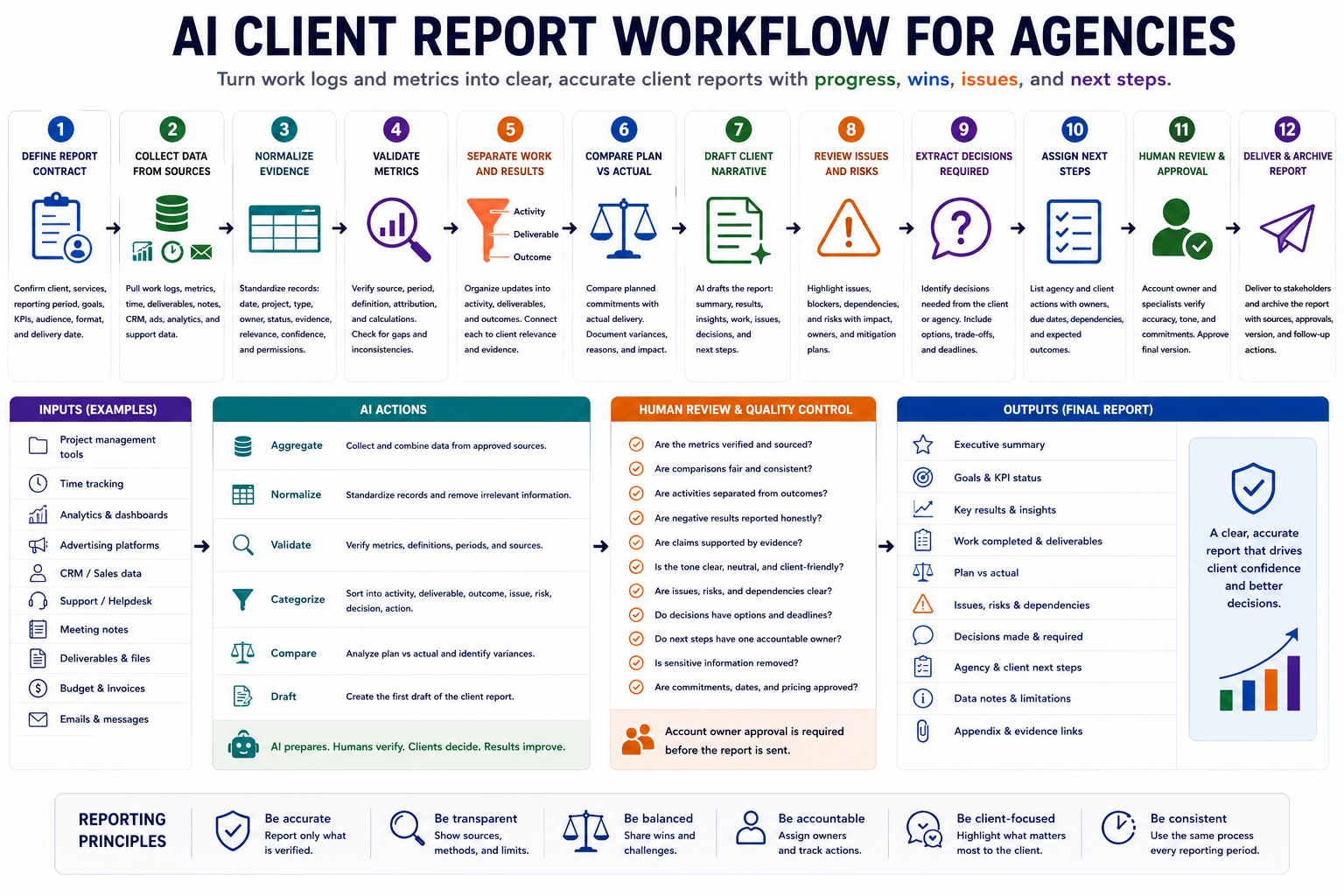
Client reports often take hours to prepare because account managers must collect project updates, campaign metrics, work logs, meeting notes, deliverables, and open questions from several tools. An AI client report workflow can reduce that preparation time by organizing evidence, comparing results with goals, drafting a clear narrative, and identifying missing information before the report reaches the client.
The goal is not to let AI exaggerate progress, explain performance without evidence, or make commitments on behalf of the agency. The goal is to create a repeatable reporting process in which AI prepares the draft while account owners verify the numbers, approve the interpretation, protect confidential information, and confirm every client-facing promise.
Why agency client reports become unreliable
A polished report is not automatically a useful report. Many agency reports contain attractive charts and confident language but fail to show what changed, why it changed, what the agency actually completed, and what the client needs to decide next.
Common failure patterns include:
- Reporting completed tasks without explaining the client outcome.
- Using metrics without a defined source, period, or calculation method.
- Comparing numbers from different reporting windows.
- Presenting correlation as proof that agency work caused the result.
- Highlighting positive metrics while hiding negative signals.
- Using percentages without showing the underlying volume.
- Copying dashboard data without explaining business relevance.
- Including draft work as though it were approved or published.
- Describing client-caused delays in accusatory language.
- Listing next steps without owners or dates.
- Allowing AI to invent reasons for performance changes.
- Sending the report before an account owner verifies it.
A dependable client report should answer six questions:
- What work was completed during the reporting period?
- What measurable results or changes occurred?
- How do those results compare with the agreed goals or baseline?
- What explains the change, and how certain is that explanation?
- Which issues, risks, or decisions require attention?
- What will the agency and client do next?
Step 1: Define the reporting contract
Before automating the report, define what the agency has agreed to report. This prevents the workflow from collecting every available metric or adding interpretations outside the approved scope.
| Reporting field | Question to define |
|---|---|
| Client | Which account and stakeholders will receive the report? |
| Reporting period | Which exact start and end dates are included? |
| Services | Which projects, campaigns, or retainers are in scope? |
| Goals | Which approved business or delivery outcomes matter? |
| KPIs | Which metrics were agreed upon and how are they calculated? |
| Comparison | Previous period, target, baseline, forecast, or year-over-year? |
| Report format | Email, document, slide deck, dashboard summary, or meeting brief? |
| Delivery date | When must the report be reviewed and sent? |
| Agency owner | Who verifies and approves the client-facing version? |
| Client actions | Which approvals, assets, decisions, or responses may be requested? |
Store this reporting contract as a reusable account template. The workflow should not change the scope, KPI definitions, or comparison method without account-owner approval.
Define the intended reader
The same account may require different levels of detail for different readers.
- Executive reader: Needs outcomes, major risks, decisions, and business relevance.
- Marketing or project lead: Needs campaign details, performance analysis, and next actions.
- Technical stakeholder: Needs implementation status, dependencies, incidents, and technical evidence.
- Finance or procurement reader: Needs budget usage, scope, delivery status, and approved commitments.
Do not create one overloaded report for every possible reader. Build a core verified record first, then adapt the presentation without changing the underlying facts.
Step 2: Collect data from approved sources
The workflow should collect evidence from systems where delivery and performance are recorded. Avoid relying on account-manager memory as the primary source.
| Source | Useful evidence | Risk to check |
|---|---|---|
| Project management system | Completed work, milestones, owners, deadlines, and blockers | A completed task may not mean the client accepted the result |
| Time tracking | Hours by service, project, person, or activity | Hours show effort, not value or progress |
| Analytics platform | Traffic, conversions, engagement, acquisition, or product usage | Tracking changes may make periods incomparable |
| Advertising platform | Spend, impressions, clicks, leads, conversions, and efficiency | Attribution windows and platform-reported conversions may differ |
| CRM | Leads, opportunities, pipeline stages, revenue, and sales follow-up | Incomplete CRM updates may distort performance |
| Support system | Ticket volume, response time, recurring issues, and resolution status | Ticket categories may be inconsistent |
| Meeting notes | Decisions, approvals, objections, and client commitments | Discussion may be mistaken for a final decision |
| Email and messages | Approvals, requests, feedback, and dependency updates | Private or incomplete conversations may be included |
| Deliverable repository | Documents, designs, campaigns, code, reports, and publication evidence | Drafts may be mistaken for approved deliverables |
| Budget tracker | Approved budget, spend, remaining amount, and forecast | Invoices, media spend, and agency fees may use different periods |
Use a fixed data cutoff
Define the exact time when data collection stops. For example, a monthly report may include data through the final day of the month but use project updates recorded by 12:00 on the following business day.
A fixed cutoff prevents late updates from changing the report while it is under review. Records received after the cutoff should be added to the next report or included through an approved revision.
Step 3: Normalize work logs and evidence
Different teams describe work differently. One person may write “campaign complete,” while another writes “ads launched.” Normalize the inputs before asking AI to write a client narrative.
| Field | Purpose |
|---|---|
| Date | Places the record inside the reporting period |
| Service or project | Connects the record to the agreed scope |
| Record type | Activity, deliverable, result, metric, issue, risk, decision, or next action |
| Description | States what occurred in plain language |
| Owner | Identifies the responsible agency or client role |
| Status | Planned, in progress, under review, approved, published, blocked, or cancelled |
| Evidence | Link, dashboard record, approval, deliverable, or metric source |
| Client relevance | Explains why the record matters to the engagement |
| Confidence | Confirmed, likely, unclear, or conflicting |
| Reporting permission | Confirms whether the information may be shared externally |
Exclude internal notes, employee commentary, unapproved financial information, private messages, and confidential client data unless they are necessary and authorized for reporting.
Separate agency and client ownership
Each dependency or next action should state whether the agency or client owns the current step. This keeps the report useful without turning it into a blame document.
| Unhelpful wording | Clear neutral wording |
|---|---|
| The client failed to send the assets | The design stage is waiting for the approved product images requested on 8 July |
| The development team is late | The integration remains in testing and is now expected on 18 July |
| Nothing happened because approval took too long | Publication moved to the next period after approval was received on the final reporting day |
Step 4: Validate every metric before interpretation
Metrics should not enter the client report until their definition, source, period, and comparison are confirmed.
| Metric field | Required information |
|---|---|
| Metric name | The exact KPI being reported |
| Current value | The value for the reporting period |
| Previous or target value | The approved comparison point |
| Absolute change | The numerical difference between values |
| Percentage change | The proportional increase or decrease when appropriate |
| Source | The platform, dashboard, export, or system of record |
| Period | The exact dates included |
| Definition | How the metric is calculated |
| Attribution rule | How conversions or outcomes are assigned |
| Tracking limitation | Known gaps, changes, exclusions, or uncertainty |
Check the denominator
Percentage changes can sound impressive while representing very small volumes. Show the underlying values when scale matters.
| Weak statement | Better statement |
|---|---|
| Conversions increased by 100% | Conversions increased from 2 to 4 during the reporting period |
| Bounce rate improved significantly | Bounce rate decreased from 58% to 51%, a change of 7 percentage points |
| Traffic grew by 20% | Organic sessions increased from 10,200 to 12,240 compared with the previous period |
Do not hide negative movement
The workflow should surface both positive and negative changes. A useful client report explains what happened, what is known, what remains uncertain, and what response is recommended.
- Positive result with supporting evidence
- Negative result requiring action
- Mixed result with trade-offs
- No meaningful change
- Insufficient or unreliable data
Step 5: Separate activity, deliverables, and outcomes
Client reports often overstate progress by treating agency activity as a client result. Keep three categories separate.
| Category | Meaning | Example |
|---|---|---|
| Activity | Work performed by the agency | Reviewed 40 search queries and updated campaign exclusions |
| Deliverable | A concrete item produced or completed | Published the approved landing page |
| Outcome | A measurable or meaningful change | Qualified lead conversion increased from 3.2% to 4.1% |
An activity can be worth reporting when it explains effort, progress, or risk. It should not be described as a business outcome unless evidence supports that claim.
Connect each work item with client relevance
| Agency update | Client-relevant explanation |
|---|---|
| Updated the conversion tracking configuration | The change improves the reliability of future campaign reporting |
| Rewrote five landing-page sections | The revised copy addresses the main objections identified in sales calls |
| Completed technical SEO fixes | The fixes remove crawl barriers affecting priority product pages |
| Created a new reporting dashboard | The dashboard gives the client one consistent view of agreed campaign KPIs |
Step 6: Compare planned work with actual delivery
A strong report compares the approved plan with what was delivered instead of showing only completed work.
| Review field | Question |
|---|---|
| Planned commitment | What did the agency expect to complete? |
| Actual result | What was completed or changed? |
| Status | Complete, partial, moved, blocked, cancelled, or awaiting approval? |
| Evidence | What confirms the status? |
| Variance | How did delivery differ from the plan? |
| Reason | What caused the difference? |
| Impact | What does the change affect? |
| Response | Complete, rescope, reassign, defer, or cancel? |
Do not hide incomplete work. Explain the current status, effect on the engagement, and recovery plan in neutral language.
Step 7: Draft a client-friendly narrative
After the evidence is normalized and verified, AI can draft the report. The draft should be concise, factual, and focused on client decisions rather than internal agency activity.
A practical report structure includes:
- Executive summary: The most important changes and implications.
- Goals and scope: What this reporting period covers.
- Key results: Verified metrics and meaningful outcomes.
- Work completed: Important deliverables and activity.
- Planned versus actual: Delivery status and variance.
- Insights: Evidence-based interpretation of the results.
- Issues and risks: Current problems and emerging concerns.
- Decisions required: Questions the client or agency must resolve.
- Next steps: Actions, owners, and real dates.
- Appendix: Detailed tables, definitions, and data limitations.
Use confidence-aware language
The strength of the language should match the strength of the evidence.
| Evidence level | Recommended wording |
|---|---|
| Confirmed | The data shows that… |
| Strong indication | The available evidence suggests that… |
| Possible explanation | One possible contributing factor is… |
| Insufficient evidence | The current data does not confirm why this changed… |
| Conflicting evidence | The available sources do not yet provide a consistent conclusion… |
Avoid unsupported statements such as “the new campaign caused the increase” unless the attribution method and evidence support that conclusion.
Translate technical metrics into business relevance
Do not remove the technical detail, but explain why it matters.
| Metric-only statement | Client-friendly explanation |
|---|---|
| Cost per lead decreased by 14% | The campaign generated leads more efficiently, although lead quality still requires sales-team confirmation |
| Organic impressions increased by 22% | More priority pages appeared in search results, but clicks did not grow at the same rate |
| Average response time increased | Customers waited longer for support during the product-release period, creating a service risk |
| Email open rate declined | Fewer recipients opened the campaign, so the next test will focus on subject lines and audience segments |
Step 8: Report issues, blockers, and risks clearly
Do not bury problems inside long paragraphs. Use structured records for issues that affect delivery, performance, budget, or client decisions.
| Issue field | Question |
|---|---|
| Issue or risk | What is happening or may happen? |
| Evidence | What supports the concern? |
| Impact | Which result, date, cost, or stakeholder is affected? |
| Current owner | Who is responsible for managing it? |
| Dependency | What is required from the agency, client, or third party? |
| Response | What mitigation or resolution step is planned? |
| Review date | When will the status be checked again? |
| Escalation condition | What change requires leadership attention? |
Separate current issues from future risks
- Issue: A problem that has already occurred.
- Blocker: A current condition preventing progress.
- Risk: A possible future event that may affect the engagement.
- Dependency: Something required from another person, system, or event.
This distinction helps clients understand whether they need to act now, monitor a condition, or provide an input.
Step 9: Extract decisions and approval requests
A client report should make required decisions easy to find. Do not hide approval requests inside project updates.
| Decision field | Purpose |
|---|---|
| Decision required | States the exact choice needed |
| Decision owner | Identifies who has authority |
| Context | Explains why the decision is required |
| Options | Lists the realistic choices |
| Recommendation | States the agency’s preferred option when appropriate |
| Trade-off | Explains cost, risk, timing, or scope implications |
| Decision deadline | Shows when the choice must be made |
| Default consequence | Explains what happens when no decision is received |
AI may organize the available options, but the agency owner must verify the recommendation, trade-offs, pricing, and any commitment before the report is sent.
Step 10: Turn the report into owned next steps
A client report should close the loop between reporting and execution. Every next step should be specific enough to enter the project system without another clarification meeting.
- Action
- Expected outcome
- Agency or client owner
- Real due date
- Dependency
- Evidence of completion
- Effect on scope, timing, or budget
- Escalation condition
Avoid assigning actions to “the agency” or “the client team.” One named role should remain accountable even when several people contribute.
Recommended client report structure
The final report should be easy to scan while allowing readers to inspect the supporting evidence when needed.
- Report title: Client, service, and reporting period.
- Executive summary: Three to five important changes.
- Goals and KPI status: Current result, target, and interpretation.
- Key wins: Verified outcomes and completed deliverables.
- Work completed: Important agency activity with client relevance.
- Planned versus actual: Delivery variances and responses.
- Issues and risks: Impact, owner, and mitigation.
- Decisions required: Options, recommendation, and deadline.
- Next steps: Agency and client actions.
- Data notes: Definitions, limitations, and tracking changes.
Example agency client report record
| Section | Example |
|---|---|
| Goal | Increase qualified demo requests from paid search |
| Current result | Qualified demo requests increased from 28 to 35 |
| Efficiency | Cost per qualified request decreased from £112 to £98 |
| Completed work | Launched the approved landing page and added negative keyword exclusions |
| Interpretation | The available data suggests improved targeting contributed to more efficient lead generation |
| Limitation | Sales qualification is recorded manually and three leads remain unreviewed |
| Issue | Mobile landing-page load time remains above the agreed target |
| Agency action | Complete image optimization by 14 August |
| Client action | Confirm sales qualification for the three open leads by 12 August |
| Decision required | Approve moving 10% of the search budget into the highest-converting campaign |
Step 11: Run agency quality control
The account owner should review the complete draft before it is shared with the client.
- The report covers the correct client, service, and period.
- Every metric has a verified source and definition.
- Comparison periods use equivalent dates and settings.
- Percentages include enough context to understand scale.
- Positive and negative results are reported honestly.
- Activities, deliverables, and outcomes are separated.
- Important claims have supporting evidence.
- Causal claims are not stronger than the evidence allows.
- Draft work is not described as approved or published.
- Client dependencies use neutral and specific language.
- Issues and risks include owners and responses.
- Decisions are separated from open discussions.
- Next steps have one accountable owner.
- Dates and promises reflect approved commitments.
- Private or irrelevant information has been removed.
- The tone matches the client relationship.
Require specialist review when needed
Some sections may require review beyond the account manager.
- Finance reviews budget, invoice, or return calculations.
- Analytics specialists review tracking and attribution claims.
- Technical owners review implementation status and incidents.
- Legal or compliance reviewers check regulated statements.
- Leadership approves major scope, pricing, or strategic commitments.
Step 12: Deliver and preserve the reporting record
Store the final approved report with its source references, approval status, version, and delivery date. This creates a reliable account history and makes future comparisons easier.
- Final report version
- Reporting period
- Data cutoff
- Source links or exports
- Agency approver
- Specialist reviewers
- Delivery date
- Client recipients
- Questions or corrections received
- Actions transferred into the project system
Corrections should update the record transparently. Do not silently replace a previously delivered metric without documenting what changed and why.
Measure whether the workflow improves reporting
Measure whether the workflow reduces preparation effort while protecting accuracy, clarity, and client trust.
- Preparation time: Hours required to collect and draft the report.
- Review time: Time required for account and specialist approval.
- Correction rate: Percentage of AI-generated statements changed before delivery.
- Metric verification rate: Percentage of reported metrics with confirmed sources.
- Evidence coverage: Percentage of major claims supported by evidence.
- On-time delivery rate: Percentage of reports delivered as scheduled.
- Client clarification rate: Number of questions caused by unclear reporting.
- Action-owner coverage: Percentage of next steps with one accountable owner.
- Decision closure rate: Percentage of requested decisions resolved by the next report.
- Report usefulness: Whether the client uses the report to approve, prioritize, or act.
Copy-and-use prompts
Reporting evidence normalization prompt
You are organizing agency evidence for a client report.

Client:
[CLIENT]

Reporting period:
[START DATE TO END DATE]

Services and projects in scope:
[SCOPE]

Approved goals and KPIs:
[GOALS AND KPIS]

Source records:
[PASTE WORK LOGS, TASKS, METRICS, NOTES, DELIVERABLES, AND UPDATES]

Convert every relevant record into:

1. Date
2. Service or project
3. Record type:
   - activity
   - deliverable
   - outcome
   - metric
   - issue
   - blocker
   - risk
   - decision
   - next action
4. Description
5. Agency or client owner
6. Status
7. Evidence
8. Client relevance
9. Confirmed deadline, only when explicitly stated
10. Confidence:
   - confirmed
   - likely
   - unclear
   - conflicting
11. Reporting permission:
   - safe to include
   - internal only
   - requires review
12. Missing information
13. Human verification required

Rules:
- Do not invent owners, dates, metrics, outcomes, or approvals
- Do not treat activity as a business result
- Do not treat discussion as a decision
- Do not expose private internal commentary
- Preserve evidence links and metric sources
- Mark conflicting information clearly
Metric validation prompt
Validate these proposed client-report metrics.

Reporting period:
[PERIOD]

Approved KPI definitions:
[DEFINITIONS]

Metric records:
[PASTE METRICS]

For each metric, return:

1. Metric name
2. Current value
3. Comparison value
4. Absolute change
5. Percentage change
6. Source
7. Current period
8. Comparison period
9. Calculation definition
10. Attribution rule
11. Tracking limitation
12. Data quality:
   - verified
   - usable with note
   - requires correction
   - do not report
13. Human reviewer required

Check for:
- Mismatched periods
- Changed definitions
- Missing denominators
- Duplicate conversions
- Tracking interruptions
- Small sample sizes
- Unsupported forecasts
- Platform attribution differences
- Percentage-point and percentage-change confusion

Do not explain performance until the metric is verified.
Client report drafting prompt
Create a draft agency client report.

Client:
[CLIENT]

Audience:
[AUDIENCE]

Reporting period:
[PERIOD]

Agreed goals and KPIs:
[GOALS AND KPIS]

Verified metrics:
[METRICS]

Normalized work and deliverables:
[WORK RECORDS]

Issues, blockers, and risks:
[ISSUES]

Confirmed decisions:
[DECISIONS]

Required decisions:
[DECISIONS REQUIRED]

Agency and client next actions:
[ACTIONS]

Create:

1. Executive summary
2. Goal and KPI status
3. Verified outcomes
4. Important work completed
5. Planned-versus-actual delivery
6. Evidence-based insights
7. Issues, blockers, and risks
8. Decisions made
9. Decisions required
10. Agency next steps
11. Client next steps
12. Data limitations and verification notes

Rules:
- Separate activities, deliverables, and outcomes
- Use exact verified metrics
- Show underlying values when percentages could mislead
- Do not invent causes for performance changes
- Match the confidence of the language to the evidence
- Do not hide negative or mixed results
- Use neutral language for delays and dependencies
- Do not create new promises, deadlines, prices, or scope
- Keep the report concise and client-focused
Client report quality-control prompt
Review this draft client report before delivery.

Reporting contract:
[PASTE SCOPE, PERIOD, GOALS, KPI DEFINITIONS, AND AUDIENCE]

Draft report:
[PASTE REPORT]

Source evidence:
[PASTE VERIFIED RECORDS]

Check for:

1. Incorrect client, period, or service scope
2. Metrics without verified sources
3. Mismatched comparison periods
4. Unsupported percentage or causal claims
5. Activity presented as an outcome
6. Draft work presented as approved
7. Negative results hidden or minimized
8. Important data limitations omitted
9. Client dependencies described unfairly
10. Issues without owners or responses
11. Discussions presented as decisions
12. Next steps without clear owners
13. Invented deadlines, commitments, pricing, or scope
14. Confidential internal information
15. Statements requiring specialist review

Return:
- Blocking corrections
- Important corrections
- Claims requiring verification
- Metrics requiring correction
- Missing issues or risks
- Missing decisions
- Missing next actions
- Final approval checklist
- Delivery decision:
  - ready
  - minor revision
  - major revision
  - do not send

Do not approve a statement merely because it sounds professional.
AI client report workflow checklist
- The client, audience, service scope, and period are defined.
- The report uses a fixed data cutoff.
- Goals and KPI definitions match the client agreement.
- Data comes from approved sources.
- Work records use a consistent structure.
- Internal-only information is removed.
- Agency and client ownership are clearly separated.
- Every metric includes its source and period.
- Comparison periods use equivalent definitions.
- Percentages include enough context to understand scale.
- Tracking limitations are disclosed.
- Activity, deliverables, and outcomes are separated.
- Planned work is compared with actual delivery.
- Major claims have supporting evidence.
- The language reflects the level of certainty.
- Positive, negative, and mixed results are reported.
- Issues and risks include owners and responses.
- Decisions are separated from discussions.
- Every next step has one accountable owner.
- Dates reflect approved commitments.
- The account owner reviews the draft.
- Specialists review high-risk sections.
- The final report and approvals are archived.
- Actions are transferred into the project system.
Common mistakes to avoid
- Reporting every available metric: Use the KPIs connected to the agreed goals.
- Trusting dashboard labels: Verify definitions, periods, and attribution.
- Turning activity into achievement: Separate work performed from client outcomes.
- Using confident explanations: Match claims to the available evidence.
- Hiding poor performance: Explain negative movement and the planned response.
- Blaming the client: Describe dependencies with dates, evidence, and neutral language.
- Creating vague next steps: Assign owners, outcomes, and real dates.
- Sending AI output directly: Require account-owner and specialist review.
Final guidance
A dependable AI client report workflow does more than convert dashboards into polished text. It creates a controlled path from raw work records and metrics to verified evidence, useful interpretation, transparent issues, clear decisions, and owned next steps.
Use AI to collect, normalize, compare, and draft. Keep metric verification, performance interpretation, client commitments, scope decisions, and final approval under human control.
Related guides
- Build an AI Weekly Review Workflow for Operators
- Build an AI Decision Brief Workflow for Managers
- Build an AI Task Prioritization Workflow
- Browse Practical AI Workflow Guides