
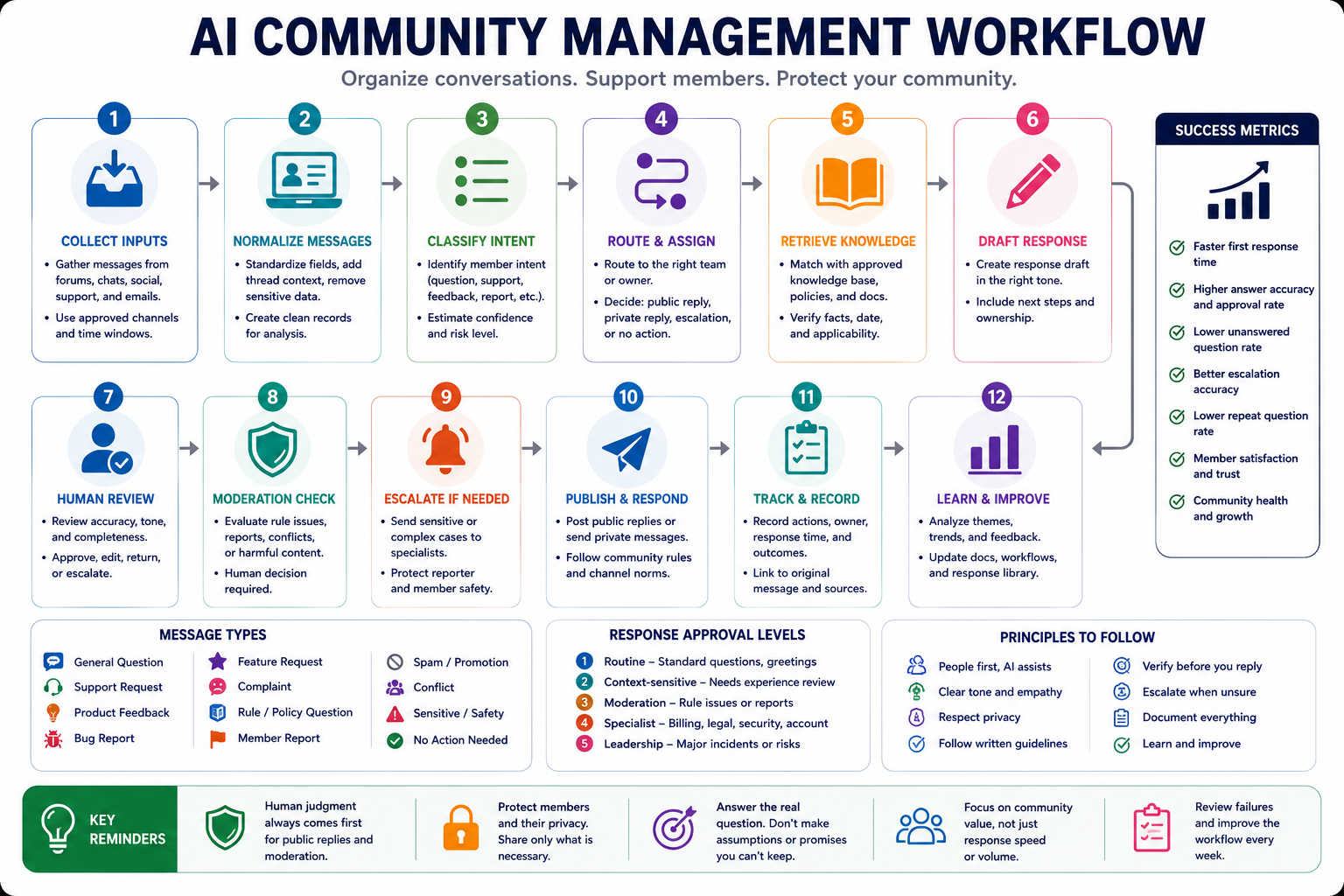
A practical AI community management workflow helps community teams organize conversations, identify unanswered questions, draft consistent responses, detect recurring themes, and escalate sensitive situations without removing human responsibility from public communication and moderation.
The goal is not to let AI speak for the community team without supervision. The goal is to reduce repetitive monitoring and summarization while keeping moderation decisions, sensitive replies, member relationships, policy enforcement, and final publishing under human control.
Why community management workflows fail
Community conversations move quickly and rarely arrive in a consistent format. A member may ask a product question inside a long discussion, report a bug as a complaint, share valuable feedback in a casual comment, or raise a sensitive issue that should not receive a public automated reply.
Common workflow failures include:
- Summarizing discussions without preserving important context.
- Answering questions with outdated or unapproved information.
- Using the same tone for support requests, criticism, conflict, and celebration.
- Publishing AI-generated replies without human review.
- Treating disagreement as a moderation violation.
- Failing to separate spam, abuse, support, feedback, and normal discussion.
- Exposing private member information inside public summaries.
- Escalating too many harmless messages or missing genuinely sensitive cases.
- Giving product, refund, legal, or account promises without authority.
- Creating summaries that highlight only the loudest members.
- Tracking response speed without measuring whether the reply solved the problem.
- Ignoring recurring questions that should become documentation or product improvements.
A useful community workflow should answer:
- What is the member trying to accomplish?
- Does the message require a public response, private response, moderation action, or no action?
- Who owns the correct response?
- Which approved source supports the answer?
- Does the situation require human judgment or escalation?
- What should the team learn from the conversation?
Step 1: Define the community operating rules
Do not connect AI to community conversations before documenting the community’s purpose, channels, response standards, moderation rules, and escalation owners.
| Community field | Question to define |
|---|---|
| Community purpose | Why does the community exist and what should members receive from it? |
| Member groups | Which customers, users, creators, learners, partners, or contributors participate? |
| Channels | Which forums, chat spaces, social platforms, groups, or support areas are included? |
| Community guidelines | Which behaviors are allowed, discouraged, restricted, or prohibited? |
| Response scope | Which questions may community managers answer directly? |
| Moderation authority | Who may hide, remove, lock, warn, restrict, or escalate? |
| Escalation owners | Who handles product, security, billing, legal, safety, or public-relations issues? |
| Tone standard | How should the team communicate in public and private? |
| Response targets | Which messages require fast handling and which may wait? |
| Data boundaries | Which member information may be processed, stored, summarized, or shared? |
The workflow should use these rules as fixed controls. AI should not create new moderation policies, invent support commitments, change the community tone, or decide penalties without authorization.
Separate community management from customer support
Some communities combine discussion, education, support, and product feedback. Define where each type of request belongs.
- Community discussion: Open conversation, ideas, experiences, and peer support.
- Customer support: Account-specific troubleshooting and service requests.
- Product feedback: Suggestions, feature requests, complaints, and usability observations.
- Moderation: Enforcement of community rules and protection of discussion quality.
- Announcements: Official updates published by authorized team members.
- Escalation: Sensitive situations that require specialists or leadership.
A public community thread should not become the place where private account information, payment details, internal investigations, or confidential support records are discussed.
Step 2: Collect conversations from approved channels
The workflow should process only the channels, message types, and time periods approved by the community team.
| Source | Useful information | Risk to check |
|---|---|---|
| Community forum | Questions, tutorials, discussions, accepted answers, and recurring themes | Old answers may no longer be accurate |
| Group chat | Fast questions, peer support, reactions, and emerging issues | Messages may lack context or include casual private details |
| Social comments | Public feedback, questions, complaints, and sentiment signals | Identity, sarcasm, and context may be difficult to interpret |
| Support queue | Confirmed product issues, account questions, and resolution records | Private customer data should not enter public summaries |
| Event chat | Questions, topic interest, reactions, and unanswered requests | Messages may be temporary or written without full context |
| Member surveys | Structured satisfaction, needs, and improvement feedback | Responses may contain confidential information |
| Moderator notes | Context, prior actions, warnings, and recurring patterns | Internal notes should not be exposed to members |
| Knowledge base | Approved answers, policies, tutorials, and official guidance | Articles may be outdated or apply only to certain plans |
Define a processing window
Use a clear time window for summaries and monitoring. For example:
- Urgent routing checks every hour
- Unanswered-question review twice per day
- Daily discussion summary
- Weekly feedback and recurring-theme report
- Monthly community health review
Do not mix messages from different periods without showing the dates. A short spike in discussion should not automatically be described as a long-term community trend.
Step 3: Apply privacy and access boundaries
Community conversations may include names, contact information, account details, screenshots, private experiences, or sensitive support context. Minimize the information provided to the AI system and preserve access controls.
- Exclude passwords, access codes, payment details, and authentication information.
- Remove private account identifiers when they are not required.
- Do not move private-channel messages into public summaries.
- Do not quote members outside the original context without approval.
- Separate internal moderator notes from member-visible records.
- Limit retention to the approved period.
- Use role-based access for moderation and escalation records.
- Remove personal details that are irrelevant to the operational purpose.
The system should preserve a reference to the original message when reviewers need context, but the generated working record should contain only the information necessary for classification, routing, or drafting.
Step 4: Normalize every relevant member message
Convert messages from different channels into a shared record before asking AI to summarize or respond.
| Field | Purpose |
|---|---|
| Message ID | Connects the record with the original conversation |
| Channel | Shows where the message appeared |
| Date and time | Provides timing and sequence context |
| Thread context | Preserves the relevant surrounding conversation |
| Member intent | Question, feedback, support, discussion, complaint, report, or other |
| Topic | Product, event, education, policy, account, billing, or community subject |
| Summary | States the request or contribution in plain language |
| Response status | Unanswered, drafted, answered, routed, resolved, or no action |
| Risk level | Routine, review required, urgent, or specialist escalation |
| Owner | Identifies who should handle the next step |
| Approved source | Knowledge-base article, policy, product record, or support reference |
| Confidence | Confirmed, likely, unclear, or conflicting |
Do not summarize a single comment without checking the surrounding thread when the meaning depends on previous messages, sarcasm, disagreement, or a quoted statement.
Step 5: Classify intent and route the message
The workflow should classify the operational need, not make assumptions about the member’s personality or motivation.
| Message type | Typical action |
|---|---|
| General question | Draft an answer from approved documentation |
| Peer discussion | Allow discussion unless facilitation is useful |
| Product support request | Route to support when account-specific investigation is required |
| Feature request | Record the use case and route to the feedback system |
| Bug report | Collect reproduction details and route to the product or support owner |
| Constructive criticism | Acknowledge, clarify, and route the underlying issue |
| Complaint | Respond carefully and move private details to an appropriate channel |
| Rule question | Answer using the current published community guideline |
| Member report | Send to a moderator without exposing the reporter publicly |
| Spam or promotion | Apply the documented moderation rule |
| Conflict between members | Route to human moderation with full context |
| Sensitive or high-risk situation | Do not automate a public reply; escalate immediately |
Use routing gates
| Condition | Workflow result |
|---|---|
| Approved answer exists and context is clear | Create a response draft |
| Answer requires private account data | Move to the support process |
| Policy interpretation is uncertain | Route to a moderator |
| Message contains conflicting information | Request human review before responding |
| Member is reporting another member | Protect the reporter and route privately |
| Public reply could worsen conflict | Pause automation and escalate |
| No response is required | Record the message without creating noise |
Step 6: Match questions with approved knowledge
Before drafting a factual answer, retrieve the current approved source. Do not rely on an AI model’s memory for product behavior, community policy, pricing, event timing, account rules, or support procedures.
| Answer field | Requirement |
|---|---|
| Member question | The exact question being answered |
| Approved source | The current document, policy, announcement, or support record |
| Source date | When the information was published or last reviewed |
| Applicable conditions | Plan, region, product version, event, or member type |
| Answer confidence | Confirmed, conditional, unclear, or unavailable |
| Next route | Community reply, support, moderator, specialist, or documentation update |
When the approved sources do not answer the question, say so internally and route the message. Do not create a plausible answer to avoid leaving the member waiting.
Step 7: Draft responses that fit the situation
A community response should acknowledge the member, address the real question, use the appropriate tone, and make the next step clear.
A practical response structure is:
- Acknowledge: Recognize the question, feedback, or concern without exaggeration.
- Answer: Provide the verified information directly.
- Clarify: State important limits, conditions, or missing context.
- Next step: Explain what the member or team should do next.
- Ownership: Show who will follow up when the issue is routed.
Adapt the tone to the message
| Situation | Tone guidance |
|---|---|
| Simple question | Clear, direct, friendly, and concise |
| New member introduction | Welcoming without sounding scripted |
| Constructive feedback | Appreciative, specific, and open to clarification |
| Frustrated member | Calm, factual, and focused on the next useful step |
| Public complaint | Respectful, non-defensive, and careful with private details |
| Incorrect claim | Correct the information without humiliating the member |
| Rule reminder | Neutral, consistent, and connected to the published guideline |
| Celebration or member success | Warm, specific, and community-focused |
Avoid unsupported commitments
| Risky response | Safer response |
|---|---|
| We will fix this today | I have routed this to the product team and will update the thread when the status is confirmed |
| Your refund will be approved | The support team will review the request under the current refund policy |
| This feature is coming next month | There is no approved release date available to share yet |
| You definitely found a bug | The behavior may indicate a bug, but the technical team needs the reproduction details to confirm it |
| That member broke the rules | A moderator is reviewing the reported conversation against the community guidelines |
Step 8: Apply response approval levels
Not every draft needs the same level of review. Define approval tiers based on risk and authority.
| Level | Example | Required review |
|---|---|---|
| Level 1: Routine | Welcome message or documented general question | Community manager review during the pilot |
| Level 2: Context-sensitive | Negative feedback, unclear question, or product limitation | Experienced community manager |
| Level 3: Moderation | Rule enforcement, conflict, member report, or repeated disruption | Authorized moderator |
| Level 4: Specialist | Billing, security, legal, privacy, account, or technical incident | Relevant specialist owner |
| Level 5: Leadership | Major public controversy, widespread outage, or serious reputational risk | Leadership and communications owner |
The AI system may recommend a level, but the workflow should allow reviewers to raise the level whenever context is uncertain.
Step 9: Separate moderation from automated replies
Moderation decisions affect member access, reputation, and trust. AI may organize evidence and highlight possible policy matches, but an authorized person should make the final decision.
| Moderation record | Required information |
|---|---|
| Reported content | The complete relevant message or thread |
| Applicable guideline | The exact published rule being reviewed |
| Context | Previous messages, edits, warnings, and surrounding discussion |
| Evidence status | Confirmed, incomplete, conflicting, or unavailable |
| Previous actions | Relevant prior moderation steps when access permits |
| Recommended route | No action, clarify, remind, warn, restrict, remove, or escalate |
| Decision owner | The authorized human moderator |
| Member communication | The approved explanation sent after the decision |
| Review or appeal path | The documented process when applicable |
Situations that should pause automation
- Threats, intimidation, or credible safety concerns
- Possible exposure of private or confidential information
- Account compromise or security reports
- Serious allegations involving members or staff
- Discrimination or targeted harassment reports
- Legal demands or regulatory complaints
- Major public incidents or widespread product failures
- Conflict involving incomplete or contradictory evidence
- Situations where a public reply could increase harm
These cases should move directly to the approved human escalation path rather than receiving a generated public response.
Step 10: Create useful community summaries
Community summaries should help managers understand what members discussed, needed, solved, and struggled with. They should not simply compress every message into a long paragraph.
A useful summary may include:
- Discussion themes: Topics that received meaningful participation.
- Unanswered questions: Questions still needing an owner.
- Resolved questions: Useful answers that may become documentation.
- Product feedback: Repeated use cases, requests, and usability concerns.
- Member wins: Examples of progress or successful peer support.
- Issues and risks: Emerging problems requiring attention.
- Moderation patterns: Repeated rule confusion or discussion friction.
- Content opportunities: Questions suitable for guides, events, or tutorials.
- Actions: Owners and next steps created from the discussion.
Avoid misleading theme counts
Ten comments may come from two highly active members rather than ten independent requests. Keep message count, unique-member count, channel, and time period separate.
| Summary field | Purpose |
|---|---|
| Theme | The common topic or need |
| Message count | Total relevant messages |
| Unique-member count | Number of different members involved |
| Channels | Where the theme appeared |
| Evidence examples | Representative messages with private details removed |
| Confidence | Strong pattern, possible pattern, or isolated case |
| Recommended action | Reply, document, investigate, improve, monitor, or no action |
Step 11: Convert recurring questions into reusable resources
When the same verified question appears repeatedly, the solution should not remain a repeated manual reply.
- Create or update a knowledge-base article.
- Add a pinned community explanation.
- Improve onboarding material.
- Create a short tutorial or demonstration.
- Clarify the community guideline.
- Improve product wording or interface guidance.
- Add the answer to an approved response library.
- Assign the underlying problem to the product or operations team.
Track whether the resource reduces future confusion. Publishing more documentation is not useful when members cannot find it or the explanation remains unclear.
Step 12: Publish, record, and close the loop
After approval, publish the response through the correct channel and record the outcome.
| Tracking field | Purpose |
|---|---|
| Original message | Preserves the member request and context |
| Classification | Records how the workflow understood the message |
| Route | Shows which team or owner handled it |
| Approved response | Preserves the final wording |
| Approver | Identifies who accepted responsibility |
| Response time | Measures operational speed |
| Resolution status | Answered, resolved, waiting, escalated, or closed |
| Member follow-up | Records whether the answer solved the need |
| Learning action | Documentation, product feedback, policy clarification, or workflow update |
A fast reply that fails to resolve the member’s question should not count as a successful outcome.
Measure whether the workflow improves the community
Message volume and response speed provide only a partial view. Measure accuracy, resolution, trust, workload, and community usefulness.
- Classification accuracy: Percentage of messages routed correctly.
- Draft approval rate: Percentage of AI drafts approved without major correction.
- Answer accuracy: Percentage of factual replies supported by current approved sources.
- First-response time: Time until a useful acknowledgement or answer.
- Resolution time: Time until the member’s actual need is resolved.
- Unanswered-question rate: Percentage of relevant questions receiving no owner.
- Escalation accuracy: Percentage of sensitive cases routed appropriately.
- False-escalation rate: Routine messages incorrectly treated as high risk.
- Member clarification rate: Percentage requiring another explanation because the first reply was unclear.
- Recurring-question rate: Frequency of repeated questions after documentation is published.
- Moderator correction rate: Percentage of recommended moderation actions changed by reviewers.
- Community usefulness: Whether members receive answers, peer support, resources, and productive discussion.
Review qualitative feedback alongside the numbers. Members may stop participating even while message-handling metrics appear efficient.
Copy-and-use prompts
Community message classification prompt
You are organizing community messages for human review and routing.

Community purpose:
[PURPOSE]

Community guidelines:
[GUIDELINES]

Available teams and owners:
[OWNERS]

Approved escalation rules:
[ESCALATION RULES]

Message and thread context:
[PASTE MESSAGE AND RELEVANT THREAD]

Return:

1. Message summary
2. Member’s explicit request
3. Possible intent:
   - general question
   - peer discussion
   - support request
   - product feedback
   - feature request
   - bug report
   - complaint
   - rule question
   - member report
   - spam or promotion
   - conflict
   - sensitive escalation
   - no action
4. Topic
5. Response required:
   - public
   - private
   - internal only
   - no response
6. Recommended owner
7. Relevant approved source
8. Risk level:
   - routine
   - human review
   - urgent
   - specialist escalation
9. Missing context
10. Confidence:
   - confirmed
   - likely
   - unclear
   - conflicting
11. Recommended next action

Rules:
- Do not judge the member’s personality or intent beyond the evidence
- Preserve disagreement without classifying it automatically as abuse
- Do not expose private information
- Do not invent policy violations
- Route uncertain moderation cases to a human
- Pause automated replies for sensitive cases
Community response drafting prompt
Draft a community response for human review.

Community tone:
[TONE GUIDE]

Member message:
[MEMBER MESSAGE]

Relevant context:
[THREAD CONTEXT]

Approved source:
[SOURCE]

Confirmed facts:
[FACTS]

Response owner:
[OWNER]

Required next step:
[NEXT STEP]

Create:

1. Public response draft
2. Optional private follow-up draft when required
3. Facts used
4. Source used
5. Statements requiring verification
6. Recommended approval level

Writing rules:
- Address the member’s actual question
- Be clear, respectful, and concise
- Do not sound defensive or dismissive
- Do not expose private account details
- Do not invent product behavior, policy, dates, or promises
- Do not blame the member or another team
- Do not claim that an issue is resolved without evidence
- Move private troubleshooting to the correct channel
- Explain the next step and owner clearly
- Do not publish automatically
Community discussion summary prompt
Create an operational summary of these community discussions.

Summary period:
[START DATE TO END DATE]

Channels:
[CHANNELS]

Community purpose:
[PURPOSE]

Messages:
[PASTE APPROVED MESSAGE RECORDS]

Create:

1. Main discussion themes
2. Message count for each theme
3. Unique-member count for each theme
4. Representative evidence with private details removed
5. Unanswered questions
6. Resolved questions worth documenting
7. Product feedback and use cases
8. Member wins and helpful peer contributions
9. Issues, blockers, and risks
10. Moderation patterns
11. Content or documentation opportunities
12. Recommended actions with owners
13. Confidence level for each claimed pattern

Rules:
- Do not let one highly active member appear as a community-wide trend
- Separate message count from unique-member count
- Do not expose private or sensitive information
- Do not quote members outside context
- Distinguish confirmed patterns from isolated examples
- Include positive, negative, and neutral themes
- Do not invent consensus
Community moderation review prompt
Prepare this reported community situation for an authorized moderator.

Published community guidelines:
[GUIDELINES]

Reported content:
[CONTENT]

Relevant thread context:
[CONTEXT]

Previous relevant actions:
[PREVIOUS ACTIONS]

Return:

1. Neutral summary of what occurred
2. Relevant guideline sections
3. Evidence supporting each possible guideline match
4. Missing or conflicting context
5. Current impact on the discussion or members
6. Immediate protection step when required
7. Possible routes:
   - no action
   - request clarification
   - reminder
   - formal warning
   - content action
   - access restriction
   - specialist escalation
8. Risks of each route
9. Recommended human reviewer
10. Member communication points
11. Final decision required from the moderator

Rules:
- Do not make the final moderation decision
- Do not infer character or motives
- Do not treat disagreement as misconduct automatically
- Do not reveal the identity of a reporter unnecessarily
- Consider the complete context
- Mark serious or sensitive cases for immediate human escalation
Community response quality-control prompt
Review this community response before publication.

Community rules:
[GUIDELINES]

Tone guide:
[TONE]

Member message and context:
[CONTEXT]

Approved source:
[SOURCE]

Draft response:
[DRAFT]

Check for:

1. Incorrect understanding of the member’s question
2. Missing thread context
3. Unsupported factual claims
4. Outdated product or policy information
5. Private information exposed publicly
6. Unauthorized promises, dates, refunds, or commitments
7. Defensive, dismissive, or accusatory language
8. False claims that an issue is resolved
9. Incorrect moderation language
10. Missing owner or next step
11. A public reply where private handling is safer
12. A routine reply where escalation is required
13. A response that could intensify conflict
14. Unnecessary length or scripted language

Return:
- Blocking corrections
- Important corrections
- Statements requiring verification
- Required approval level
- Final decision:
  - approved
  - minor revision
  - major revision
  - do not publish

Do not approve the response merely because it sounds friendly.
AI community management workflow checklist
- The community purpose and member groups are defined.
- Approved channels and processing periods are documented.
- Community guidelines are current and accessible.
- Response, moderation, and escalation authority are separated.
- Private and sensitive information is minimized.
- Messages include enough thread context for interpretation.
- Member intent is classified without judging personality.
- Questions are matched with current approved sources.
- Account-specific requests are routed privately.
- Product feedback and support requests are stored separately.
- Routine drafts use the approved community tone.
- Promises, dates, refunds, and policy claims are verified.
- Sensitive situations pause automated replies.
- Moderation recommendations receive human review.
- The reporter’s identity is protected when necessary.
- Public replies do not expose private details.
- Summaries separate message count from unique-member count.
- Community trends include evidence and confidence.
- Recurring questions create documentation actions.
- Each routed item has one accountable owner.
- Approved responses and outcomes are recorded.
- Resolution quality is measured alongside response speed.
- Workflow failures are reviewed regularly.
- Automation is expanded only after a controlled pilot.
Common mistakes to avoid
- Summarizing without context: Preserve the relevant thread before classifying.
- Automating public replies: Require review until quality and routing are proven.
- Using model memory as policy: Retrieve the current approved source.
- Confusing criticism with misconduct: Apply moderation rules to behavior, not disagreement.
- Exposing private details: Move account-specific handling into the correct private channel.
- Making unsupported promises: Confirm product, refund, timing, and policy claims.
- Counting messages as consensus: Track unique members and evidence strength.
- Measuring speed only: Measure resolution, accuracy, and member usefulness.
Final guidance
A dependable AI community management workflow should help the team see what members need, respond consistently, preserve context, identify useful patterns, and escalate situations that require human judgment.
Use AI to organize conversations, classify routine requests, retrieve approved knowledge, draft responses, and prepare summaries. Keep moderation decisions, sensitive communication, policy interpretation, member protection, and final publishing under human control.
Related guides
- Build an AI Outreach Personalization Workflow
- Build an AI Client Report Workflow for Agencies
- Build an AI Weekly Review Workflow for Operators
- Browse Practical AI Workflow Guides