
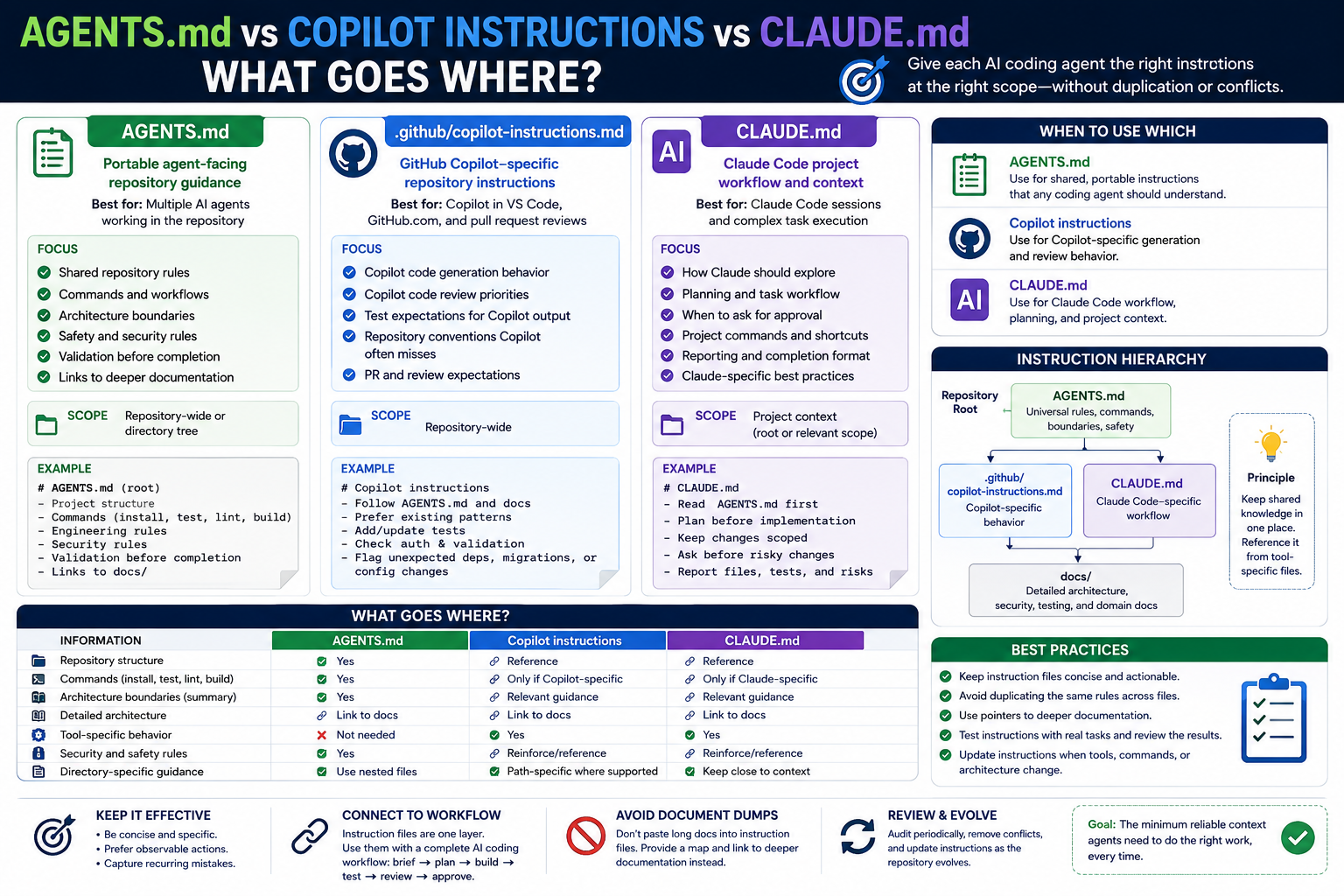
AI coding agents work better when they do not have to rediscover your repository rules in every conversation. Files such as AGENTS.md, .github/copilot-instructions.md, and CLAUDE.md let teams store persistent instructions about architecture, commands, conventions, testing, and workflow expectations.
The difficult part is deciding what belongs in each file. Copying the same long instruction manual into every format creates duplication, conflicting rules, stale documentation, and wasted context.
This guide provides a practical way to organize AI coding instructions across tools while keeping the repository readable for humans and agents.
What you will build
A maintainable repository instruction system that separates shared engineering rules, tool-specific behavior, directory-level guidance, and deeper documentation.
Best for
Developers and teams using Codex, GitHub Copilot, Claude Code, or multiple AI coding agents in the same repository.
The quick answer
If you use several AI coding tools, do not treat all instruction files as independent copies of the same document.
| File | Best use | Typical scope |
|---|---|---|
AGENTS.md |
Portable agent-facing repository guidance | Repository or directory tree |
.github/copilot-instructions.md |
GitHub Copilot-specific repository instructions | Repository-wide |
CLAUDE.md |
Claude Code project instructions and workflow context | Claude Code project context |
A practical multi-agent strategy is:
- Keep universal engineering rules in one shared source of truth.
- Use
AGENTS.mdas a concise agent-facing map when multiple agents can understand it. - Put Copilot-specific behavior in
.github/copilot-instructions.md. - Put Claude-specific workflow guidance in
CLAUDE.md. - Store detailed architecture and domain knowledge in normal documentation instead of forcing everything into instruction files.
The goal is not to maximize the number of instructions. The goal is to provide the minimum reliable context an agent needs to work correctly.
What are repository instruction files?
Repository instruction files provide persistent context to AI coding tools. Instead of repeating the same information in every prompt, a team can document how work should be performed inside the codebase.
Typical instructions include:
- How the repository is organized.
- Which package manager to use.
- How to run tests.
- How to run linting and type checks.
- Where new features normally belong.
- Which shared utilities should be reused.
- Which directories should not be edited casually.
- How authorization and validation are structured.
- What evidence should be included in a pull request.
- When the agent should stop and ask for a decision.
These files should supplement the repository rather than replace good architecture, tests, naming, documentation, and developer tooling.
1. What belongs in AGENTS.md?
AGENTS.md is useful for persistent instructions intended for coding agents working inside a repository or part of a repository.
A strong root AGENTS.md usually contains:
- A short repository map.
- The standard install command.
- The standard development command.
- Test, lint, type-check, and build commands.
- Important architectural boundaries.
- Required validation before completion.
- Rules about dependencies, migrations, configuration, and secrets.
- Links or pointers to deeper documentation.
Good AGENTS.md example
# Repository guide

## Project structure

- app/: application code
- tests/: automated tests
- docs/: architecture and engineering documentation
- scripts/: development and maintenance scripts

## Commands

Install:
npm ci

Development:
npm run dev

Tests:
npm test

Lint:
npm run lint

Type check:
npm run typecheck

Build:
npm run build

## Engineering rules

- Reuse existing services before creating new abstractions.
- Do not add dependencies unless the task requires them.
- Do not modify authentication or authorization behavior without explicit approval.
- Never commit credentials, tokens, or production data.
- Keep changes limited to the approved task.

## Before completing a task

Run:
1. relevant tests
2. lint
3. type check
4. build when applicable

Report any check that could not be completed.

## Documentation

Architecture: docs/architecture.md
Testing: docs/testing.md
Security: docs/security.md
Notice what is missing: pages of architecture history, every database table, every API endpoint, and every coding preference the team has ever discussed.
The instruction file should act more like a map than an encyclopedia.
2. What belongs in .github/copilot-instructions.md?
.github/copilot-instructions.md is the natural location for repository-wide guidance specifically intended for GitHub Copilot workflows.
Use it for instructions such as:
- Preferred testing framework.
- Repository-specific code review expectations.
- Patterns Copilot should reuse.
- How generated code should be validated.
- GitHub-specific pull request expectations.
- Common project conventions that improve Copilot responses.
Example
# GitHub Copilot repository instructions

Follow the architecture and commands documented in AGENTS.md.

When generating or modifying code:

- Prefer existing repository patterns.
- Add or update tests for behavior changes.
- Do not weaken existing tests to make a change pass.
- Preserve backwards compatibility unless the task explicitly changes it.
- Use the existing authorization and validation layers.
- Avoid unrelated refactoring.

When reviewing code:

- Compare the implementation with the original requirement.
- Check authorization and resource ownership.
- Look for invalid, empty, and boundary inputs.
- Identify missing negative tests.
- Flag unexpected dependency, migration, CI, or permission changes.
This approach avoids maintaining two complete copies of repository documentation. The Copilot file adds Copilot-specific behavior while the shared documentation remains authoritative.
3. What belongs in CLAUDE.md?
CLAUDE.md provides persistent project guidance for Claude Code. It can describe the project architecture, common commands, preferred workflows, and rules that Claude should apply while working on the repository.
Useful content includes:
- How Claude should explore the repository.
- Important project commands.
- Architecture constraints that are difficult to infer.
- How the team prefers tasks to be planned.
- When Claude should ask before making a change.
- Which documentation should be consulted for specific tasks.
- Project-specific testing and completion rules.
Example
# Claude Code project guidance

Read AGENTS.md before changing code.

For feature work:

1. Inspect the relevant implementation and tests.
2. Identify existing patterns.
3. Propose a short implementation plan.
4. Keep the change limited to the approved scope.
5. Add or update tests with the implementation.
6. Run focused validation before broader checks.
7. Summarize files changed, commands run, and unresolved risks.

Ask before:

- adding dependencies
- creating migrations
- modifying CI
- changing permissions
- changing public APIs
- deleting data
- performing broad refactors

Do not include secrets or production customer data in prompts, logs, fixtures, or examples.
The key principle is again the same: do not duplicate every repository fact merely because another instruction format exists.
AGENTS.md vs Copilot Instructions vs CLAUDE.md: what goes where?
| Information | AGENTS.md | Copilot instructions | CLAUDE.md |
|---|---|---|---|
| Repository structure | Yes | Reference shared source | Reference shared source |
| Install and test commands | Yes | Only when Copilot-specific detail is needed | Only when Claude-specific detail is needed |
| Architecture boundaries | Short summary | Relevant Copilot guidance | Relevant Claude guidance |
| Detailed architecture | Link to docs | Link or reference | Link or reference |
| Copilot review behavior | No need | Yes | No |
| Claude-specific workflow | No need | No | Yes |
| Universal security rules | Yes | Reference or reinforce | Reference or reinforce |
| Directory-specific conventions | Nested file where supported | Path-specific instructions where appropriate | Keep close to relevant context |
| Long domain documentation | No | No | No |
Create one source of truth for shared rules
The biggest maintenance mistake is copying the same rule into five places.
Imagine the repository originally uses:
npm testSix months later, the team changes its test workflow. Someone updates the README and AGENTS.md but forgets the Copilot and Claude files.
Now different agents receive different instructions.
A better hierarchy is:
Repository source of truth
        |
        +-- AGENTS.md
        |     |
        |     +-- concise agent map
        |
        +-- docs/
        |     +-- architecture.md
        |     +-- testing.md
        |     +-- security.md
        |     +-- deployment.md
        |
        +-- .github/copilot-instructions.md
        |     +-- Copilot-specific rules
        |
        +-- CLAUDE.md
              +-- Claude-specific workflow
Shared knowledge remains in normal repository documentation. Tool instruction files point agents toward the relevant source.
What should remain universal?
Some rules matter regardless of which AI agent performs the work.
- Never expose credentials or private production data.
- Follow the existing authorization model.
- Do not add dependencies without justification.
- Do not silently modify infrastructure.
- Keep changes within task scope.
- Run relevant tests after behavioral changes.
- Report validation that could not be completed.
- Prefer existing repository patterns.
- Do not weaken tests to make generated code pass.
- Require human review before important changes are merged.
These principles fit naturally in a shared repository instruction layer.
What should remain tool-specific?
Tool-specific files should primarily describe behavior that only makes sense for that tool.
Examples for GitHub Copilot
- How Copilot code review should prioritize findings.
- Repository-specific review criteria.
- Instructions related to Copilot-generated tests.
- Project conventions that Copilot repeatedly misunderstands.
Examples for Claude Code
- How Claude should plan complex tasks.
- Which project documents Claude should inspect first.
- Project-specific commands or workflow expectations.
- Situations where Claude should stop for human approval.
Examples for Codex
- Repository navigation guidance in
AGENTS.md. - Required validation commands.
- Directory-specific engineering conventions.
- Instructions for how completed work should be reported.
Use nested instructions for large repositories
A single root instruction file can become too generic for a monorepo or a large application.
Consider this repository:
/
├── AGENTS.md
├── apps/
│   ├── web/
│   │   ├── AGENTS.md
│   │   └── src/
│   └── api/
│       ├── AGENTS.md
│       └── src/
├── packages/
│   └── shared/
└── docs/
The root file can define universal rules:
- Repository commands.
- Security requirements.
- Dependency policy.
- General testing expectations.
The web application file can define:
- Component conventions.
- Frontend test commands.
- Accessibility requirements.
- Client-side state rules.
The API file can define:
- Service and controller boundaries.
- Database patterns.
- Authorization requirements.
- API test commands.
This keeps context close to the code that needs it.
Do not turn instruction files into documentation dumps
More instructions can make an agent worse rather than better.
A long file may contain:
- Outdated rules.
- Contradictory guidance.
- Rare edge cases presented as universal requirements.
- Architecture history that does not affect current work.
- Information already obvious from configuration files.
- Hundreds of lines that reduce attention on the current task.
Keep instructions concise and make deeper information discoverable.
Use pointers instead of copying documentation
Instead of placing this in an instruction file:
The complete authentication architecture is...

[400 lines of documentation]
Prefer:
Authentication changes are high risk.

Before modifying authentication or session behavior:
- read docs/security/authentication.md
- inspect the existing authorization tests
- do not change token or session behavior without explicit approval
The instruction tells the agent where knowledge exists and when to retrieve it.
A practical multi-agent repository structure
/
├── AGENTS.md
├── CLAUDE.md
├── README.md
│
├── .github/
│   ├── copilot-instructions.md
│   └── instructions/
│
├── docs/
│   ├── architecture.md
│   ├── testing.md
│   ├── security.md
│   ├── database.md
│   └── deployment.md
│
├── src/
└── tests/
Responsibility can then be divided clearly:
| Location | Responsibility |
|---|---|
| README.md | Human onboarding and project overview |
| AGENTS.md | Concise shared agent navigation and execution rules |
| CLAUDE.md | Claude-specific project workflow |
| .github/copilot-instructions.md | Copilot-specific repository guidance |
| docs/ | Detailed authoritative engineering knowledge |
| tests/ | Executable evidence of expected behavior |
Minimal AGENTS.md template
# Repository instructions

## Repository map

Main application:
Tests:
Documentation:
Scripts:

## Commands

Install:
Development:
Focused tests:
Full tests:
Lint:
Type check:
Build:

## Architecture

- Follow existing service boundaries.
- Reuse established utilities.
- See docs/architecture.md for details.

## Safety rules

- Do not commit secrets.
- Do not use production data in tests.
- Do not change permissions without approval.
- Do not add dependencies without justification.
- Do not modify unrelated files.

## Validation

Before completion:
- run relevant tests
- run lint
- run type checks
- run build when applicable

Report failures and skipped checks.

## Documentation

Architecture:
Testing:
Security:
Deployment:
Minimal Copilot instructions template
# Copilot instructions

Use AGENTS.md and repository documentation as the shared source of truth.

When generating code:
- follow existing repository patterns
- keep changes narrowly scoped
- add tests for behavior changes
- preserve existing public behavior unless instructed otherwise

When reviewing code:
- compare the diff with acceptance criteria
- prioritize correctness and security over style
- check authorization and validation
- identify missing negative and boundary tests
- flag unexpected dependencies, migrations, or configuration changes
Minimal CLAUDE.md template
# Claude project instructions

Use AGENTS.md for shared repository rules.

Before implementation:

1. Read the task.
2. Inspect relevant code and tests.
3. Find existing patterns.
4. Identify ambiguity.
5. Propose a concise plan for non-trivial work.

During implementation:

- keep scope limited
- reuse existing abstractions
- add or update tests
- validate incrementally

Ask before:

- adding dependencies
- creating migrations
- changing infrastructure
- changing permissions
- altering public APIs
- performing broad refactors

At completion report:

- files changed
- tests run
- other validation performed
- skipped checks
- remaining risks
Instructions that should usually be avoided
Avoid vague rules such as:
Always write perfect code.
Use best practices.
Make everything secure.
Never make mistakes.
Optimize everything.
Write comprehensive tests.
These statements sound useful but provide little actionable repository context.
Replace them with observable expectations:
For behavior changes:

- add tests covering the acceptance criteria
- include at least one relevant negative case
- run npm test
- run npm run lint
- report commands that fail or cannot be executed
Turn lessons from code review into instructions
Instruction files become valuable when they capture recurring repository-specific mistakes.
Suppose reviewers repeatedly find that generated API endpoints check authentication but forget resource ownership.
Add a focused rule:
For API mutations:

- authentication alone is not sufficient
- use the existing authorization service
- verify permission for the specific resource and action
- add a negative test using another user's resource
This is much more useful than adding another general statement about writing secure code.
Our AI-Generated Code Review workflow provides a structured process for discovering these recurring failure patterns.
Connect instruction files to your AI coding workflow
Repository instructions are only one layer of a reliable AI coding system.
A complete workflow still needs:
- A clear task brief.
- Acceptance criteria.
- Relevant repository context.
- An implementation plan for non-trivial work.
- Controlled code changes.
- Automated validation.
- Independent review.
- Human approval.
Use the AI Coding Workflow to connect these layers from task definition through pull request review.
Seven common instruction-file mistakes
1. Copying the same rules everywhere
Duplicated instructions eventually drift. Maintain shared facts in one place and reference them where practical.
2. Writing a thousand-line AGENTS.md
A giant instruction manual competes with the actual task and repository context. Keep the root file concise.
3. Documenting information the code already proves clearly
Instruction files should emphasize information that is difficult to infer, not describe every visible directory or syntax convention.
4. Keeping obsolete commands
A wrong test or build command is worse than no command because the agent may interpret failure as a code problem.
5. Hiding important rules inside paragraphs
Use short headings, lists, commands, and explicit stop conditions.
6. Mixing personal preferences with team rules
Repository instruction files should primarily contain conventions the team expects contributors to follow.
7. Never testing whether the instructions work
Give the agent representative tasks and check whether it finds the correct files, uses the expected commands, and respects boundaries.
How to audit your instruction files
- List every AI instruction file in the repository.
- Mark duplicated rules.
- Identify conflicting commands or conventions.
- Verify every command still works.
- Move deep documentation into normal docs.
- Keep only actionable repository context in agent files.
- Separate tool-specific behavior from shared engineering rules.
- Test the setup with a small coding task.
- Review the resulting diff and agent behavior.
- Update instructions based on real failures.
Repository instruction checklist
- Shared rules have a clear source of truth.
AGENTS.mdis concise and actionable.- Repository commands are current.
- Architecture details live in appropriate documentation.
- Copilot-specific instructions are separated where necessary.
- Claude-specific instructions are separated where necessary.
- Security and secret-handling rules are explicit.
- Required validation commands are documented.
- High-risk changes have stop or approval conditions.
- Large repositories use appropriately scoped guidance.
- Duplicated instructions have been minimized.
- Conflicting instructions have been removed.
- Instruction files are reviewed when tooling or architecture changes.
Frequently asked questions
Should I use AGENTS.md and CLAUDE.md together?
Yes, when multiple tools are part of the development workflow. Keep shared repository guidance centralized and use CLAUDE.md for instructions that specifically improve Claude Code’s work.
Should I copy AGENTS.md into copilot-instructions.md?
Usually not. Duplicating the full file increases maintenance risk. Keep shared information in its authoritative location and use the Copilot file for Copilot-specific guidance or concise reinforcement of critical rules.
How long should AGENTS.md be?
There is no universal ideal line count. It should be short enough that the important rules remain obvious and long enough to provide commands, boundaries, and navigation that the agent cannot reliably infer.
Should architecture documentation live in AGENTS.md?
Only a concise map or critical constraints usually belong there. Detailed architecture is easier to maintain in dedicated documentation that the instruction file can point toward.
Should instruction files contain code style rules?
Include important conventions that cannot be enforced automatically. Prefer formatters, linters, type systems, and automated tests for rules that machines can verify consistently.
Do instruction files replace code review?
No. They improve agent behavior but cannot guarantee that generated code is correct. Tests, automated checks, diff review, and human approval remain necessary.
Final takeaway
The best repository instruction system is not the one with the most files or the longest prompts. It is the one that gives each coding agent the right information at the right scope without creating conflicting sources of truth.
Use AGENTS.md for concise, portable agent guidance. Use .github/copilot-instructions.md for Copilot-specific repository behavior. Use CLAUDE.md for Claude Code project guidance. Keep deeper architecture, security, testing, and domain knowledge in maintainable repository documentation.
Give agents a map, executable checks, and clear boundaries—not a second copy of your entire engineering handbook.
Related guides
- AI Coding Workflow: From Task Brief to Tested Pull Request
- How to Review AI-Generated Code Without Missing Hidden Bugs
- AI Prompt Evaluation Workflow
- AI Privacy Review Checklist for Automation Projects