
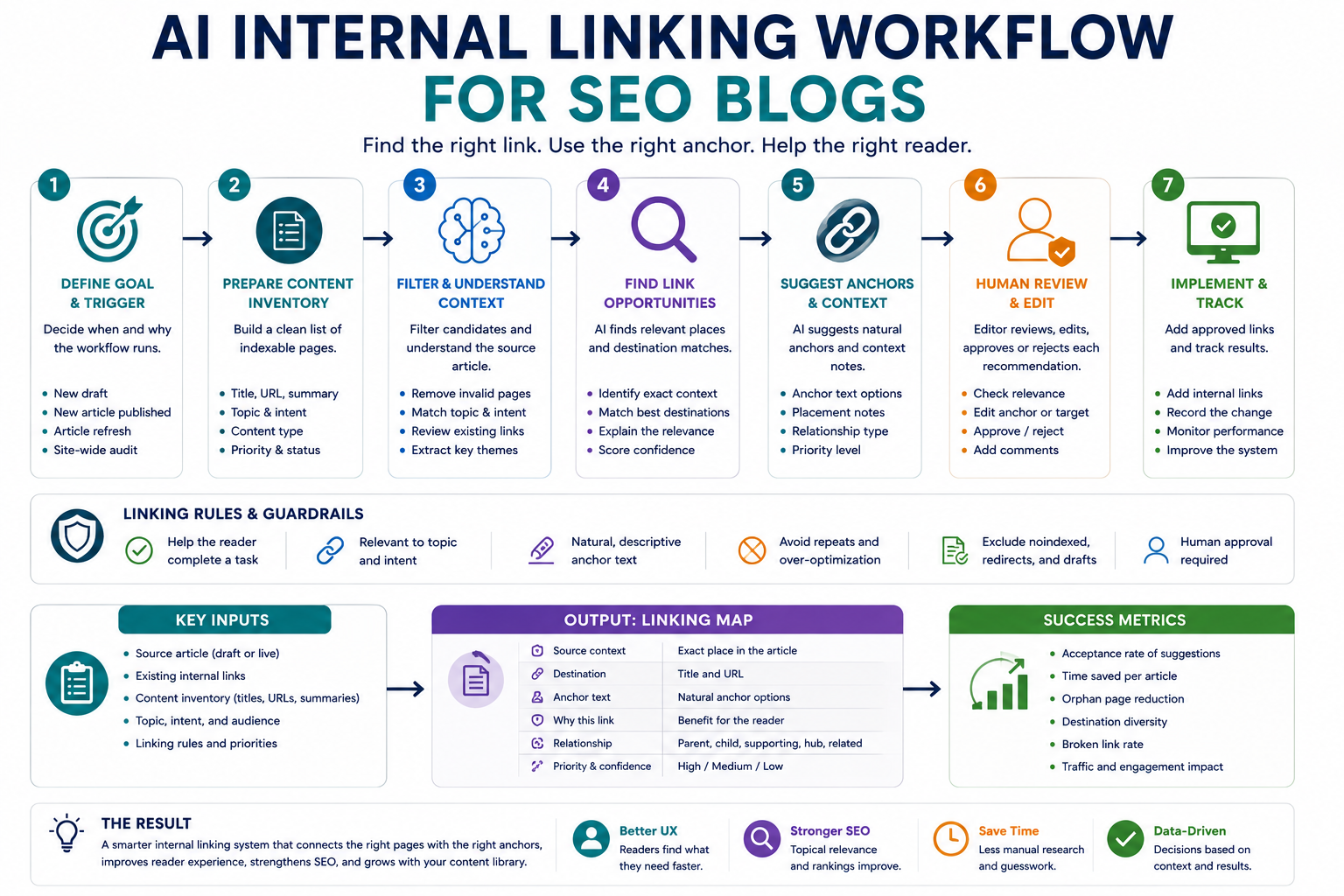
Internal linking becomes difficult as an SEO blog grows. Editors must remember which articles exist, decide which pages are contextually related, choose natural anchor text, and avoid linking repeatedly to the same destination. An AI internal linking workflow can make this process faster by turning the site’s content inventory into a structured list of link opportunities.
The goal is not to let AI insert links automatically without review. The goal is to help writers discover relevant source pages, match them with useful destination pages, suggest context-aware anchors, and produce a linking map that an editor can verify before publication.
Why internal linking needs a workflow
Internal links help readers move between related resources and help search engines understand how pages on a site are connected. However, adding links manually becomes inconsistent when a blog contains dozens or hundreds of articles.
Common problems include:
- New articles do not link to older relevant resources.
- Older articles are never updated to link to newer content.
- The same destination page receives repetitive anchor text.
- Links are added because keywords match, even when search intent does not.
- Several pages compete for the same topic without a clear primary page.
- Important cornerstone pages receive fewer links than minor articles.
- Editors link to pages that are outdated, redirected, noindexed, or unpublished.
A workflow solves these problems by requiring consistent inputs, explicit linking rules, structured recommendations, and editorial approval.
Step 1: Prepare a content inventory
The workflow needs a reliable list of pages before AI can recommend links. Create one row for every indexable article or topic page that may receive internal links.
| Field | Purpose |
|---|---|
| Page title | Identifies the published resource. |
| URL | Provides the exact destination. |
| Primary topic | Shows the main subject of the page. |
| Search intent | Distinguishes informational, comparison, template, and action-oriented pages. |
| Content type | Guide, workflow, template, category page, glossary, or review. |
| Target audience | Prevents links between pages written for unrelated readers. |
| Priority | Marks cornerstone or strategically important pages. |
| Publication status | Confirms that the destination is published and available. |
| Indexing status | Prevents recommendations to noindexed or excluded pages. |
| Last reviewed | Helps avoid linking to outdated content. |
Do not rely only on titles. Two pages can use similar words while serving different purposes. Include a one- or two-sentence summary of each page when possible.
Step 2: Define internal linking rules
Before asking AI for suggestions, establish rules that every recommendation must follow.
- The destination must be published and accessible.
- The link must help the reader understand or complete the current task.
- The source paragraph must provide enough context for the link.
- The destination must match the surrounding topic and search intent.
- The anchor should describe the destination naturally.
- The same destination should not be inserted repeatedly without a clear reason.
- The workflow should not create links merely because two pages share a keyword.
- Redirected, outdated, duplicate, or noindexed destinations should be excluded.
- Existing links must be checked before suggesting another one.
- A human editor must approve the final placement.
Step 3: Build the AI internal linking workflow
1. Choose the trigger
The workflow can begin when a new draft is ready for editing, when an article is updated, or during a scheduled content audit. These triggers produce different linking opportunities.
| Trigger | Main task |
|---|---|
| New draft | Find existing pages the new article should link to. |
| New article published | Find older pages that should now link to the new article. |
| Article refresh | Replace weak links and add relevant newer resources. |
| Site-wide audit | Find orphan pages, weak topic clusters, and overused destinations. |
2. Provide the source article
The source input should include the draft or published article, title, URL when available, primary topic, target reader, search intent, and existing internal links.
Including existing links is important. Without them, the model may recommend duplicate links or repeat the same destination in nearby sections.
3. Filter the destination inventory
Do not send every page on the site into one unrestricted prompt. First filter the inventory using predictable rules.
- Remove drafts, private pages, and noindexed pages.
- Remove the source page itself.
- Remove broken or redirected destinations unless the canonical target is substituted.
- Prioritize matching categories, topics, audiences, and content types.
- Include important cornerstone pages even when their wording differs.
This reduces noise and gives the model a smaller set of valid candidates.
4. Ask AI to identify contextual link locations
The model should first identify the exact sentence or paragraph where another resource would help the reader. Only then should it choose a destination.
This order matters. Starting with a destination page and forcing it into the article often creates unnatural links.
5. Require structured recommendations
Each recommendation should include enough information for an editor to approve or reject it quickly.
- Source section
- Exact source sentence or paragraph
- Destination title
- Destination URL
- Suggested anchor text
- Reason the link helps the reader
- Relationship type
- Priority
- Confidence
- Conflict or duplication warning
6. Review recommendations manually
An editor should confirm that the suggested destination is the best page, the anchor reads naturally, the surrounding paragraph supports the link, and the recommendation does not create keyword cannibalization or repetitive linking.
7. Add approved links and record the change
After approval, insert the link and record the source URL, destination URL, anchor, date added, and reviewer. This makes later audits easier and creates a history of important linking decisions.
Example internal linking map
Assume a blog has a new article about building an AI content QA workflow. The inventory contains related pages about AI automation, internal linking, prompt templates, and tool evaluation.
| Source context | Destination | Suggested anchor | Relationship | Priority |
|---|---|---|---|---|
| A section explaining reusable review prompts | Reusable AI Prompt Templates for Repeatable Work | reusable AI prompt templates | Supporting resource | High |
| A section about adding checks to a broader process | How to Build an AI Automation Workflow for Repetitive Tasks | AI automation workflow | Parent workflow | High |
| A section discussing internal link checks | Build an AI Internal Linking Workflow for SEO Blogs | internal linking workflow | Related workflow | Medium |
| A sentence mentioning general workflow resources | Workflows category page | practical AI workflow guides | Hub page | Low |
The map is a review document, not an instruction to add every possible link. The editor should choose only the recommendations that improve the article.
Anchor text rules for AI suggestions
Anchor text should help the reader predict what the linked page contains. It should fit the sentence naturally and avoid unnecessary repetition.
| Weak anchor | Better anchor | Reason |
|---|---|---|
| Click here | AI automation workflow | Describes the destination. |
| Read more | reusable AI prompt templates | Explains what the reader will find. |
| AI workflow AI workflow guide | practical AI workflow guide | Avoids unnatural repetition. |
| Best AI tools | how to evaluate an AI tool | Matches informational intent more accurately. |
Do not force the exact same keyword-rich anchor every time. Use descriptive variations that remain accurate to the destination.
Quality-control checks
Before adding a suggested internal link, check the following:
- The destination is live and returns the expected page.
- The destination is indexable and canonical.
- The destination is still accurate and useful.
- The link adds value at this exact point in the article.
- The anchor describes the destination honestly.
- The same URL is not already linked nearby.
- The recommendation does not interrupt the reader’s flow.
- The destination is the strongest page for the topic.
- The link does not point to a competing or duplicate version of the same page.
- The article does not become overloaded with internal links.
Use a simple priority model
- High: Directly helps the reader complete the task or connects to a cornerstone page.
- Medium: Adds useful supporting context but is not essential.
- Low: Relevant but optional, especially when the article already has several links.
- Reject: Weak relevance, repetitive anchor, outdated destination, or forced placement.
Measure the workflow after launch
Do not measure success only by the number of links added. Track whether recommendations are accurate and whether editors actually accept them.
- Acceptance rate: Percentage of AI recommendations approved.
- Edit rate: Percentage requiring anchor or destination changes.
- Rejection rate: Percentage considered irrelevant or unsafe.
- Time per article: Time required to identify and approve links.
- Orphan-page reduction: Number of important pages gaining relevant inbound links.
- Broken-link rate: Number of approved links later found to be invalid.
- Destination diversity: Whether the workflow repeatedly favors only a few pages.
Review rejected recommendations. They often reveal weak inventory data, unclear page summaries, poor filtering rules, or prompts that reward keyword overlap instead of contextual relevance.
Copy-and-use prompts
Internal link opportunity prompt
You are reviewing an SEO article for useful internal linking opportunities.

Source article title:
[TITLE]

Source URL:
[URL OR DRAFT]

Primary topic:
[TOPIC]

Target audience:
[AUDIENCE]

Search intent:
[INTENT]

Existing internal links:
[LIST EXISTING DESTINATION URLS]

Article:
[PASTE ARTICLE]

Approved destination inventory:
[PASTE TITLES, URLS, SUMMARIES, CONTENT TYPES, AND PRIORITIES]

Find only links that genuinely help the reader.

For each recommendation, return:
1. Exact source section
2. Exact sentence or paragraph
3. Destination title
4. Destination URL
5. Suggested anchor text
6. Why the destination is useful here
7. Relationship type: parent, child, supporting, related, or hub
8. Priority: high, medium, or low
9. Confidence: high, medium, or low
10. Duplication or conflict warning

Rules:
- Do not recommend unpublished, noindexed, redirected, or outdated pages
- Do not recommend the source page itself
- Do not repeat an existing destination unless there is a strong reason
- Do not rely only on keyword overlap
- Do not force a link into an unrelated sentence
- Use natural and descriptive anchor text
- Return no recommendation when there is no useful match
Reverse internal linking prompt
A new article has been published.

New article:
Title: [TITLE]
URL: [URL]
Summary: [SUMMARY]
Primary topic: [TOPIC]
Search intent: [INTENT]
Target audience: [AUDIENCE]

Existing article inventory:
[PASTE TITLES, URLS, AND SUMMARIES]

Identify older articles that could naturally link to this new page.

For each recommendation, return:
1. Source article title
2. Source URL
3. Likely section or context
4. Suggested anchor text
5. Why the new article helps the reader
6. Priority
7. Human review note

Reject recommendations based only on shared keywords.
Do not invent text that is not present in the source article.
Mark cases that require opening the full article before approval.
Link-map review prompt
Review this proposed internal linking map as an SEO editor.

Linking map:
[PASTE RECOMMENDATIONS]

Check for:
1. Weak topical relevance
2. Search intent mismatch
3. Repetitive destinations
4. Repetitive or unnatural anchors
5. Links to outdated or low-value pages
6. Missing cornerstone pages
7. Possible topic cannibalization
8. Forced placements
9. Duplicate links already present
10. Recommendations requiring manual page verification

Return:
- Approved recommendations
- Recommendations needing edits
- Rejected recommendations
- Missing high-priority opportunities
- Final editorial checklist

Do not approve a link only because the source and destination share a keyword.
AI internal linking workflow checklist
- The content inventory contains only valid destinations.
- Every page has a topic, summary, intent, and priority.
- The workflow checks existing links before suggesting new ones.
- Rules filter drafts, noindexed pages, redirects, and duplicates.
- Recommendations identify an exact source location.
- Every suggestion includes a destination and natural anchor.
- Keyword overlap alone is not treated as relevance.
- Cornerstone pages are prioritized where useful.
- A human editor approves every link.
- Approved changes are recorded for later auditing.
- Acceptance, edit, and rejection rates are measured.
- Older content is reviewed when new articles are published.
Common mistakes to avoid
- Sending AI an incomplete inventory: The model cannot recommend pages it does not know exist.
- Using titles without summaries: Similar titles may serve different search intents.
- Automating insertion immediately: Review the placement and anchor first.
- Overusing exact-match anchors: Write naturally for the reader.
- Linking every related phrase: Add only links that improve the article.
- Ignoring reverse links: Older pages may need to link to newly published resources.
- Favoring the same destinations repeatedly: Review topic coverage and priority rules.
- Keeping outdated recommendations: Refresh the inventory and audit links regularly.
Final guidance
An effective AI internal linking workflow does not replace editorial judgment. It organizes the discovery process so editors can find stronger connections across a growing content library without relying on memory alone.
Start with a clean inventory, filter invalid destinations, require contextual evidence for every suggestion, and approve only the links that genuinely help the reader. Quality matters more than the number of links added.
Related guides
- Build an AI Content QA Workflow for Published Content
- How to Build an AI Automation Workflow for Repetitive Tasks
- Browse Practical AI Workflow Guides
- Explore Writoria’s AI Automation Guides