
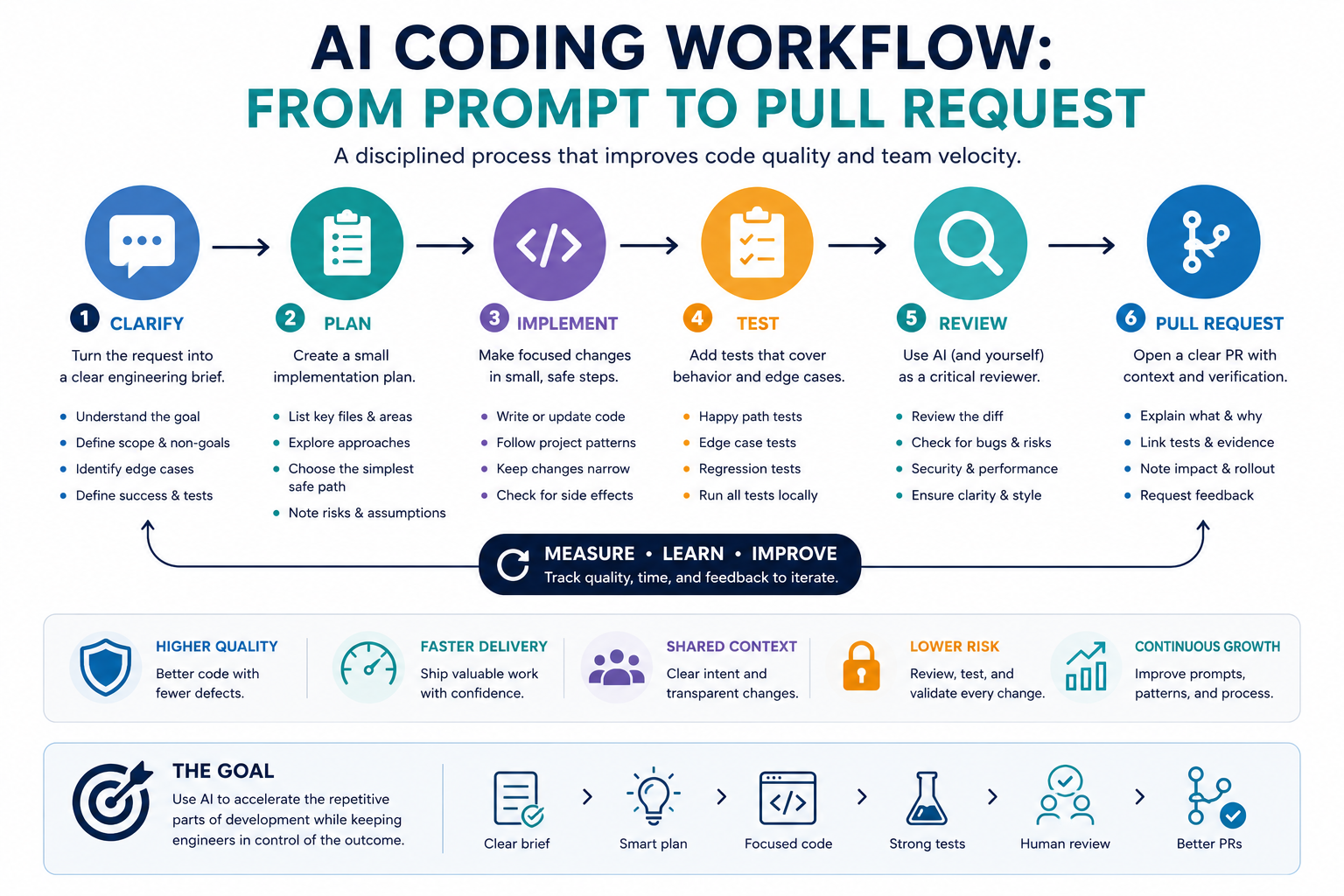
AI coding tools can speed up software work, but speed alone does not make a change safe or maintainable. A reliable AI coding workflow turns an initial request into a clear engineering brief, a small implementation plan, reviewed code, tested behavior, and a pull request that another developer can understand.
This guide shows how to move from prompt to pull request without treating AI-generated code as automatically correct. The model can help analyze requirements, inspect likely files, draft focused changes, propose tests, and review a diff. The developer remains responsible for architecture, security, correctness, and the final merge decision.
The prompt-to-pull-request workflow
A disciplined AI coding workflow separates software work into stages. Each stage has a defined input, expected output, and human checkpoint.
| Stage | AI contribution | Developer responsibility |
|---|---|---|
| Requirements | Restate the request and identify ambiguity | Confirm intended behavior and non-goals |
| Repository context | Summarize relevant files and dependencies | Provide accurate project context and constraints |
| Planning | Propose a minimal implementation path | Reject unnecessary refactors and risky assumptions |
| Implementation | Draft focused edits | Inspect every changed line |
| Testing | Suggest test cases and draft tests | Run tests and verify real behavior |
| Review | Analyze the diff for possible issues | Decide which findings are valid |
| Pull request | Draft the summary and verification notes | Confirm accuracy and submit the PR |
Step 1: Turn the request into an engineering brief
Do not begin by asking the model to write code. First convert the request into a brief that describes the expected behavior and boundaries of the change.
A useful engineering brief includes:
- Problem: What is currently wrong or missing?
- Desired behavior: What should happen after the change?
- User impact: What will a user or system observe?
- Non-goals: What should not be changed?
- Constraints: Framework, version, performance, security, or compatibility limits.
- Edge cases: Missing data, invalid input, permissions, timeouts, and duplicate actions.
- Acceptance criteria: How will the team know the task is complete?
For example, “add a password reset feature” is too broad. A stronger brief specifies whether the project already has authentication, how reset tokens expire, whether email delivery exists, what happens when an account is unknown, and which user-facing states must be shown.
Step 2: Give the AI relevant repository context
AI-generated code becomes unreliable when the model guesses the project structure. Provide only the context needed for the task, but make that context accurate.
- Programming language and framework
- Relevant package and runtime versions
- Directory structure around the affected feature
- Existing functions, components, services, or data models
- Current tests covering related behavior
- Error-handling and logging conventions
- Formatting, linting, and type-checking rules
- Security or privacy requirements
Do not paste secrets, private keys, credentials, production data, or confidential customer information into an AI tool. Replace sensitive values with safe placeholders and follow your organization’s approved data-handling policy.
Step 3: Ask for the smallest safe implementation plan
The plan should explain what must be inspected and changed before producing code. A strong plan identifies likely files, dependencies, tests, failure cases, and open questions.
Reject plans that:
- Rewrite unrelated parts of the application.
- Add a new dependency without explaining why.
- Change public interfaces unnecessarily.
- Ignore backward compatibility.
- Assume database fields, API responses, or environment variables that do not exist.
- Combine a feature change with broad cleanup work.
A useful plan is usually small enough to review before implementation. If the model cannot explain the change clearly, it probably does not yet have enough context to write the code safely.
Step 4: Implement the change as small, reviewable diffs
Ask the AI to change one focused part of the system at a time. Small diffs are easier to understand, test, revert, and review.
After every generated edit, inspect:
- Files changed outside the agreed scope
- Duplicated logic
- Unnecessary abstractions
- Hard-coded values
- Missing validation
- Weak error handling
- Incorrect assumptions about data types or null values
- Logging of sensitive information
- Dependencies that were added without approval
- Comments that describe behavior inaccurately
Do not continue stacking new AI-generated edits on top of code you have not understood. Review and test each meaningful change before requesting the next one.
Step 5: Add tests before polishing
Tests should verify behavior rather than merely increase coverage. Ask the model to identify the most important normal path, edge cases, failure cases, and regression risks.
| Test type | What it should verify |
|---|---|
| Normal path | The requested feature works with valid input. |
| Invalid input | The system rejects or handles malformed data safely. |
| Boundary case | Empty, minimum, maximum, or unusually large values behave correctly. |
| Permission case | Unauthorized users cannot perform protected actions. |
| Failure case | External service, database, or network failures are handled properly. |
| Regression case | Existing behavior affected by the change still works. |
Run the project’s actual test, lint, formatting, and type-checking commands. A model claiming that code “should work” is not evidence that it works in your repository.
Step 6: Use AI to review the diff
Once the implementation and tests are complete, give the model the final diff and ask it to review the change as a skeptical senior engineer.
The review should look for:
- Incorrect behavior
- Missing edge cases
- Security vulnerabilities
- Authorization mistakes
- Data loss or race conditions
- Performance regressions
- Broken public interfaces
- Insufficient tests
- Unclear naming
- Unnecessary complexity
Require the AI to identify the exact file, function, or changed line related to each concern. General comments such as “consider improving security” are not useful without evidence.
Treat AI review findings as hypotheses. Verify each one against the codebase, documentation, and runtime behavior before changing the implementation.
Step 7: Prepare a clear pull request
A pull request should help another developer understand why the change exists, how it works, and how it was tested. Do not submit an unedited AI-generated description.
A practical PR description contains:
- Problem: The issue being solved.
- Solution: The approach used.
- Scope: What was changed and what was intentionally left unchanged.
- User impact: Visible behavior or operational effect.
- Testing: Commands run and cases verified.
- Risks: Known limitations or areas reviewers should inspect.
- Deployment notes: Migrations, configuration, feature flags, or rollback requirements.
Keep commits understandable. Avoid combining generated formatting changes, unrelated refactors, dependency upgrades, and the requested feature in one pull request.
Example workflow: adding server-side validation
Imagine a form currently validates email addresses only in the browser. The task is to add server-side validation without changing the public API response format.
| Stage | Expected result |
|---|---|
| Brief | Reject invalid email input on the server while preserving existing response fields. |
| Context | Provide the route handler, validation utilities, response schema, and related tests. |
| Plan | Reuse the existing validator, add one route-level check, and extend the current test file. |
| Implementation | Make a narrow change without modifying unrelated endpoints. |
| Tests | Cover valid input, malformed email, missing value, and unchanged response shape. |
| Review | Check duplicate validation, error information leakage, and compatibility. |
| PR | Explain the behavior change, tests run, and absence of migration requirements. |
Copy-and-use prompts
Engineering brief prompt
You are helping me clarify a software change before implementation.

Task request:
[PASTE REQUEST]

Project context:
[LANGUAGE, FRAMEWORK, RELEVANT VERSIONS]

Known constraints:
[CONSTRAINTS]

Convert the request into an engineering brief containing:

1. Problem statement
2. Desired behavior
3. User-visible impact
4. Non-goals
5. Relevant files or system areas to inspect
6. Edge cases
7. Security and privacy considerations
8. Acceptance criteria
9. Open questions that must be answered before coding

Do not write code yet.
Do not invent repository details.
Clearly label every assumption.
Implementation plan prompt
Create the smallest safe implementation plan for this task.

Engineering brief:
[PASTE BRIEF]

Relevant repository context:
[PASTE FILE TREE, INTERFACES, OR CODE EXCERPTS]

Project rules:
[TEST, STYLE, TYPE, SECURITY, AND COMPATIBILITY RULES]

Return:

1. Files to inspect
2. Files likely to change
3. Step-by-step implementation plan
4. Existing code that should be reused
5. Tests to add or update
6. Possible failure cases
7. Security concerns
8. Questions that remain unanswered
9. Changes that should explicitly remain out of scope

Do not propose a broad refactor unless it is required.
Do not write implementation code yet.
Diff review prompt
Review this code diff as a skeptical senior engineer.

Task and acceptance criteria:
[PASTE BRIEF]

Diff:
[PASTE DIFF]

Review for:

1. Incorrect behavior
2. Missing edge cases
3. Security or authorization problems
4. Data loss or race conditions
5. Error-handling weaknesses
6. Performance regressions
7. Compatibility issues
8. Missing or weak tests
9. Unnecessary complexity
10. Changes outside the requested scope

For every finding, include:
- Severity: critical, high, medium, or low
- Exact file and code location
- Why it is a problem
- A realistic failure scenario
- Recommended correction
- Whether the finding requires human verification

Do not approve the change.
Do not invent issues without evidence in the diff.
Pull request description prompt
Draft a pull request description from the information below.

Task:
[PASTE TASK]

Implementation summary:
[PASTE SUMMARY]

Tests run:
[PASTE COMMANDS AND RESULTS]

Known risks or limitations:
[PASTE RISKS]

Deployment requirements:
[PASTE OR WRITE NONE]

Use this structure:

## Problem
## Solution
## Scope
## User impact
## Testing
## Risks and limitations
## Deployment and rollback
## Reviewer checklist

Use precise language.
Do not claim that tests passed unless the provided results confirm it.
Do not add features or changes that are not listed.
Prompt-to-PR checklist
- The task has a clear engineering brief.
- Ambiguous requirements were resolved before coding.
- The model received accurate repository context.
- No secrets or private production data were shared.
- The implementation plan is narrow and reviewable.
- Every generated change was inspected by a developer.
- Normal, edge, failure, and regression cases were tested.
- Linting, formatting, type checks, and project tests were run.
- The final diff was reviewed for security and unintended scope.
- The pull request explains behavior, testing, risks, and deployment needs.
- A qualified human reviewer makes the final merge decision.
Common mistakes to avoid
- Starting with code: Clarify the requirement first.
- Pasting the entire repository: Provide only relevant and approved context.
- Accepting broad refactors: Keep the change focused on the task.
- Trusting generated tests blindly: Confirm they test real behavior and can fail correctly.
- Skipping the diff: Review every changed line before committing.
- Using AI review as approval: Verify findings and retain human responsibility.
- Submitting an inaccurate PR description: Edit it to match the actual implementation and test results.
Final guidance
A reliable AI coding workflow does not remove engineering judgment. It gives that judgment a clearer structure. The model helps turn requirements into plans, draft focused code, identify tests, and inspect diffs, while the developer verifies every important decision.
The safest path is incremental: understand the task, provide relevant context, create a small plan, make narrow edits, run real tests, inspect the diff, and document the change clearly in the pull request.
Related guides
- How to Build an AI Automation Workflow for Repetitive Tasks
- Reusable AI Prompt Templates for Repeatable Work
- Explore Writoria’s AI Coding Guides
- Browse Practical AI Workflow Guides