
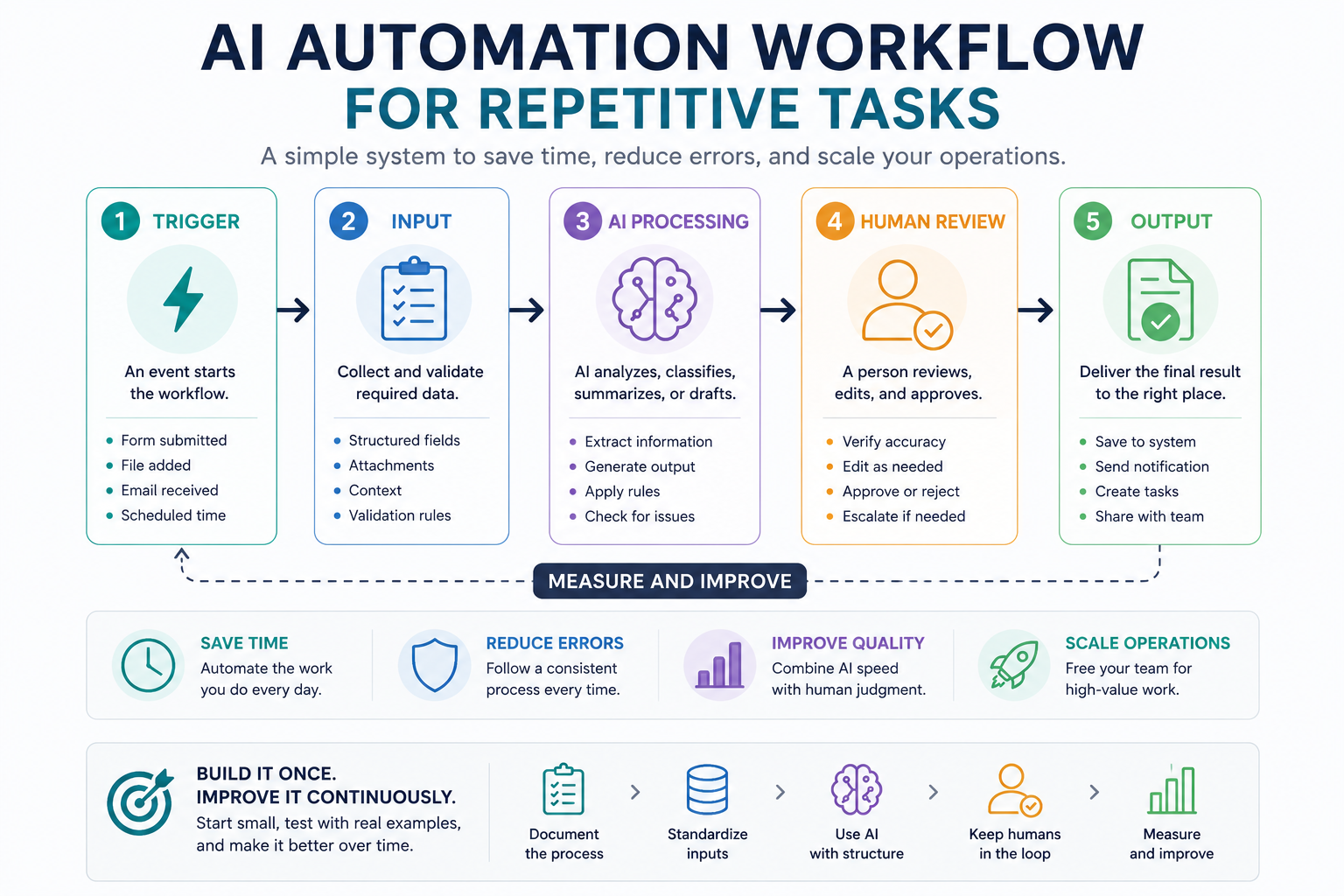
Repetitive work is often the best place to begin with AI automation. Tasks such as summarizing meeting notes, preparing reports, classifying requests, drafting routine responses, and converting information into checklists follow recognizable patterns that can be documented and improved.
This guide explains how to build an AI automation workflow for repetitive tasks without creating a fragile system that produces unchecked results. You will map the current process, decide where AI belongs, define review rules, test realistic examples, and measure whether the workflow actually saves time.
Choose the right repetitive task
Do not start with the most complicated process in your business. Start with a task that happens frequently, uses similar inputs, produces a predictable output, and can be reviewed quickly.
Good first candidates include:
- Summarizing meeting notes into decisions and action items.
- Classifying support requests by topic and urgency.
- Turning research notes into a structured outline.
- Preparing a weekly activity report from standard inputs.
- Drafting routine follow-up emails.
- Extracting fields from consistently formatted documents.
- Checking articles against an editorial checklist.
- Converting call transcripts into CRM notes.
Avoid choosing a task only because it is time-consuming. A suitable automation candidate should also be consistent enough to describe, test, and review.
Use a simple suitability score
| Factor | Low suitability | High suitability |
|---|---|---|
| Frequency | Happens occasionally | Happens daily or weekly |
| Input consistency | Every case is completely different | Inputs follow a recognizable structure |
| Output clarity | Success is subjective or unclear | The required output can be described precisely |
| Review effort | Requires specialist investigation | Can be checked quickly by a responsible person |
| Risk | Errors could cause serious harm | Errors are reversible and easy to detect |
The strongest first project is usually frequent, predictable, easy to verify, and low risk.
Map the current manual process
Before adding AI, write down how the work is completed today. Automation should improve a known process rather than hide an unclear one.
Document the process using the following fields:
- Trigger: What starts the task?
- Input: What information is received?
- Preparation: What must be cleaned, organized, or checked?
- Decision: What judgment is currently made?
- Output: What final result is produced?
- Reviewer: Who approves or corrects the result?
- Destination: Where does the completed work go?
For example, a manual meeting-summary process might look like this:
- A meeting transcript is saved.
- A team member reads the transcript.
- Important decisions are identified.
- Action items and owners are extracted.
- A summary is written.
- The summary is checked by the meeting organizer.
- The approved version is shared with the team.
This map reveals which steps are predictable, which require language processing, and which still need human responsibility.
Design the AI automation workflow
1. Define a clear trigger
The trigger is the event that starts the workflow. It might be a new form submission, an uploaded document, an incoming email, a completed meeting transcript, a new spreadsheet row, or a scheduled weekly time.
A trigger should be specific. “When work arrives” is vague. “When a new transcript is added to the meeting-notes folder” is testable.
2. Standardize the input
AI performance becomes less reliable when required context is missing or formatted differently every time. Define the fields the workflow must receive before it continues.
A meeting-summary workflow might require:
- Meeting title
- Date
- Participants
- Transcript
- Project name
- Preferred summary format
- Person responsible for review
When essential fields are missing, the workflow should stop or request clarification instead of asking the model to guess.
3. Separate rules from AI judgment
Not every step needs AI. Fixed conditions should remain ordinary automation rules because they are easier to test and more predictable.
| Use standard rules for | Use AI for |
|---|---|
| Checking whether a required field is empty | Summarizing unstructured text |
| Routing work based on a known status | Classifying meaning or intent |
| Calculating dates or totals | Drafting natural-language responses |
| Renaming and moving files | Extracting themes from documents |
| Sending approved output to a destination | Identifying possible risks or missing context |
This separation makes errors easier to locate. When something fails, you can determine whether the problem came from the input, a rule, the prompt, the model output, or the review process.
4. Require structured output
Do not ask for an unrestricted paragraph when the result must move into another part of the workflow. Define the required output fields.
For a meeting summary, the model could return:
- Executive summary
- Decisions made
- Action items
- Owner of each action
- Due date
- Open questions
- Missing information
- Confidence or review flag
Structured fields make the result easier to inspect, compare, store, and route.
5. Add validation rules
Before the result reaches a person or another tool, run simple checks. Validation rules might confirm that required sections exist, assigned owners appear in the participant list, dates use the correct format, and the output does not contain empty fields.
Validation does not prove that every statement is correct, but it can catch predictable formatting and completeness problems.
6. Create a human review checkpoint
A person should review outputs that affect customers, public content, payments, contracts, hiring, privacy, security, or important operational decisions.
The reviewer should be able to:
- Approve the output.
- Edit and approve it.
- Reject it.
- Return it for another AI pass.
- Escalate it to a specialist.
Human review should be a defined workflow stage, not an informal promise that someone will “check it later.”
7. Define the final destination
After approval, decide where the result belongs. It may become a draft email, task, CRM note, database record, document, editorial revision, or team notification.
Whenever possible, keep the AI-generated version and the final approved version. This creates a useful record for measuring corrections and improving the workflow.
Practical example: meeting notes to action items
Here is a complete beginner-friendly workflow for converting a meeting transcript into an approved action list.
| Stage | Action | Owner |
|---|---|---|
| Trigger | A new transcript is added to the designated folder. | Automation |
| Input check | Confirm meeting title, date, participants, and transcript are present. | Automation rule |
| AI processing | Extract decisions, action items, owners, dates, and unanswered questions. | AI |
| Validation | Check required fields and flag unidentified owners or dates. | Automation rule |
| Review | Compare the summary with the transcript and correct mistakes. | Meeting organizer |
| Output | Create approved tasks and share the meeting summary. | Automation after approval |
| Measurement | Record processing time, review time, and number of corrections. | Workflow owner |
Test the workflow before full automation
Do not connect the workflow directly to customers or production systems after testing only one ideal example. Use a small pilot with realistic and difficult cases.
Include normal cases
- A complete and clearly formatted input.
- A typical request the team handles frequently.
- A case with an obvious expected result.
Include edge cases
- Missing information.
- Conflicting instructions.
- Unusual formatting.
- Very long input.
- Names or dates that are unclear.
- A request outside the intended workflow scope.
- Content that should be escalated rather than processed automatically.
Record what happened during each test. A useful test log includes the input, expected result, actual result, correction required, severity of the error, and action taken to improve the workflow.
Measure whether the automation is useful
A workflow is not successful merely because it runs. It should reduce effort or improve consistency without introducing unacceptable risk.
Track a small set of practical metrics:
- Processing time: How long the automated stage takes.
- Review time: How long a human spends checking the result.
- Correction rate: How often the output requires changes.
- Rejection rate: How often the output cannot be used.
- Completion rate: How often the workflow reaches the intended destination.
- Time saved: Manual time minus automation and review time.
If automation saves five minutes but creates fifteen minutes of review and correction work, simplify or redesign it before expanding.
Copy-and-use workflow prompt
You are completing one controlled step in a repeatable business workflow.

Workflow:
[WORKFLOW NAME]

Goal:
[DESCRIBE THE REQUIRED BUSINESS OUTCOME]

Input:
[PASTE OR INSERT THE INPUT]

Allowed tasks:
- [TASK 1]
- [TASK 2]
- [TASK 3]

Do not:
- Invent missing facts
- Assume an owner or deadline that is not stated
- Make commitments on behalf of the business
- Hide uncertainty
- Continue when required information is missing

Return the result using this structure:

1. Summary
2. Classification
3. Extracted information
4. Recommended next action
5. Missing information
6. Risks or uncertainties
7. Human review required: yes or no
8. Reason for review decision

Quality checks:
- Use only information supported by the input
- Preserve names, numbers, and dates accurately
- Clearly label uncertain information
- Keep the output concise and actionable
Workflow review prompt
Review this proposed AI automation workflow.

Task:
[REPETITIVE TASK]

Trigger:
[TRIGGER]

Input:
[REQUIRED INPUT]

AI step:
[WHAT THE AI DOES]

Validation rules:
[LIST RULES]

Human review:
[WHO REVIEWS AND WHEN]

Final output:
[OUTPUT AND DESTINATION]

Evaluate:
1. Whether the task is suitable for automation
2. Missing inputs
3. Steps that should use fixed rules instead of AI
4. Risks and failure cases
5. Whether human review is placed correctly
6. How the output should be tested
7. Metrics that should be tracked

Return:
- Overall recommendation
- Blocking issues
- Required improvements
- Pilot plan
- Launch checklist
AI automation launch checklist
- The workflow handles one clearly defined repetitive task.
- The current manual process has been documented.
- The trigger is specific and testable.
- Required input fields are defined.
- Missing information causes the workflow to stop or request clarification.
- Fixed rules and AI judgment are separated.
- The required output structure is documented.
- Validation rules check predictable errors.
- A human reviewer is assigned.
- High-risk cases are escalated.
- Normal and edge cases have been tested.
- Processing time and correction rate are measured.
- The workflow can be paused or rolled back.
Common mistakes to avoid
- Automating an unclear process: Document and simplify it first.
- Using one large prompt for everything: Separate complex work into focused stages.
- Allowing the model to fill missing information: Require clarification or escalation.
- Sending output automatically: Add approval before important actions.
- Testing only perfect inputs: Include missing, conflicting, and unusual cases.
- Measuring only speed: Track review effort, errors, and rejected outputs.
- Expanding too quickly: Stabilize one workflow before adding more tasks.
Final guidance
A dependable AI automation workflow is not simply a prompt connected to a tool. It is a controlled process with defined inputs, clear responsibilities, validation rules, human review, measurable results, and a way to handle failure.
Start with one repetitive and low-risk task. Run a small pilot, review every result, record recurring failures, and improve the process before increasing automation. This approach produces systems that support real work instead of creating more work to supervise.
Related guides
- The No-Code AI Automation Stack for Small Teams
- Reusable AI Prompt Templates for Repeatable Work
- Explore Writoria’s AI Automation Guides
- Browse Practical AI Workflow Guides