
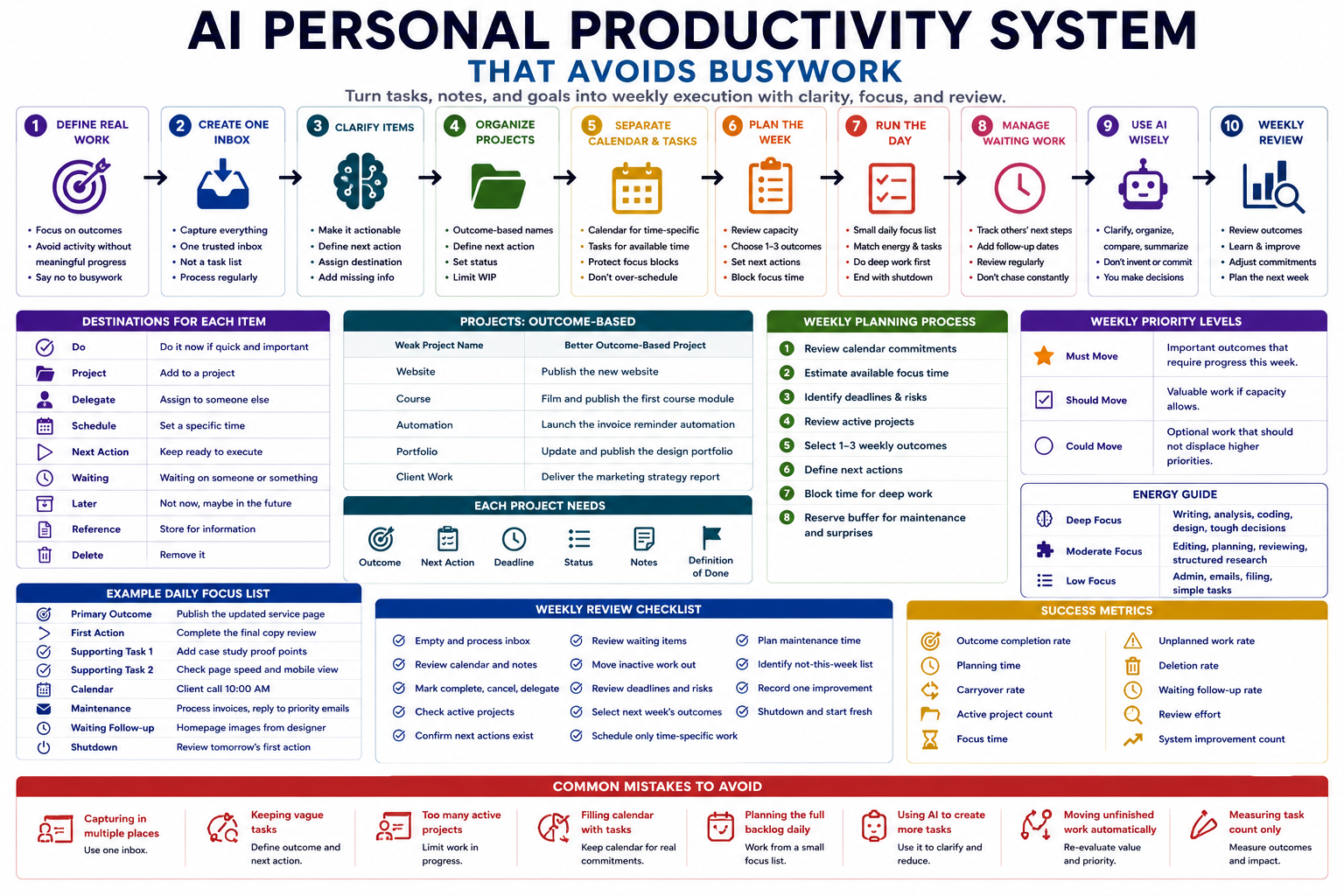
Personal productivity systems often fail because they create more planning, sorting, tagging, and reviewing than useful work. An AI personal productivity system should reduce this administrative burden by turning scattered tasks, notes, commitments, and goals into a small number of clear weekly priorities.
The goal is not to let AI control your calendar or fill every available hour. The goal is to use AI for clarification, organization, and comparison while you retain responsibility for priorities, workload, commitments, and the final weekly plan.
Why productivity systems create busywork
A productivity system becomes counterproductive when maintaining the system takes more attention than completing the work it was designed to support.
Common warning signs include:
- Tasks are copied between several apps.
- The same item appears in notes, email, calendar, and a task manager.
- Priorities change every time the list is reviewed.
- Large projects are written as vague one-line tasks.
- The daily plan contains more work than the available time.
- Low-value administrative tasks are completed before important work.
- AI generates long plans that are never followed.
- The system rewards checking boxes instead of producing meaningful outcomes.
- Planning sessions repeatedly reorganize unfinished work.
A useful system should make it easier to answer three questions:
- What outcome matters now?
- What is the next physical action?
- What should not receive attention this week?
Step 1: Define what counts as real work
Before building the system, separate meaningful progress from activity that only creates the feeling of being organized.
| Work type | Description | Example |
|---|---|---|
| Outcome work | Produces a valuable result | Publish the client report |
| Project work | Moves a multi-step outcome forward | Analyze the survey responses |
| Maintenance work | Keeps responsibilities operating | Process invoices or answer important messages |
| Coordination work | Unblocks another person or dependency | Confirm the launch date with the designer |
| System work | Maintains the productivity process | Review the task inbox |
| Busywork | Creates activity without meaningful progress | Repeatedly reorganize tags and folders |
System work is necessary, but it should remain small. A weekly planning process that takes two hours to manage ten hours of work is too heavy for most solo operators.
Step 2: Create one trusted capture inbox
Ideas and commitments may arrive through email, messages, meeting notes, documents, browser tabs, voice notes, and your own thoughts. The system needs one primary place where unprocessed items are collected.
The inbox can contain:
- Tasks you agreed to complete
- Ideas worth reviewing later
- Notes from meetings or calls
- Links requiring action
- Requests from clients or collaborators
- Problems that need a decision
- Possible projects
- Personal reminders
The inbox is not the task list. It is a temporary holding area. Items should remain there only until the next clarification session.
Use AI for capture cleanup, not automatic commitment
AI can extract possible tasks, decisions, dates, people, and open questions from notes. However, it should not automatically add every sentence to the active plan.
For each extracted item, the system should ask:
- Is this actually actionable?
- Did I make a real commitment?
- Does it belong to an existing project?
- Is a deadline stated or merely assumed?
- Does another person own the next step?
- Should this be deleted, stored, delegated, delayed, or scheduled?
Step 3: Clarify every captured item
Vague tasks create resistance because they require a new decision every time you read them. Convert each item into a clear outcome or next action.
| Vague item | Clear outcome or next action |
|---|---|
| Website | Write the homepage positioning draft |
| Taxes | Download the missing bank statement |
| Newsletter | Choose the topic for Friday’s newsletter |
| Client project | Send the revised proposal to the client |
| Research AI tools | Compare three tools against the approved criteria |
| Improve workflow | Record the five most common support-ticket failures |
A next action should begin with a visible verb and be small enough to start without another planning session.
Choose one destination for every item
- Do: Complete immediately when it is genuinely quick and important.
- Project: Add to a multi-step outcome.
- Delegate: Assign it and track the response.
- Schedule: Place it on the calendar when it must happen at a specific time.
- Next action: Keep it available for execution.
- Waiting: Track something another person must complete.
- Later: Keep it outside the active weekly plan.
- Reference: Store information that requires no action.
- Delete: Remove it when it has no current value.
Step 4: Organize projects around outcomes
A project is any outcome requiring more than one action. Project lists should describe a completed result rather than a topic.
| Weak project name | Outcome-based project |
|---|---|
| Portfolio | Publish the updated design portfolio |
| Automation | Launch the invoice-reminder automation pilot |
| Course | Complete and upload the first course module |
| Client onboarding | Document and test the new client onboarding process |
Each active project should contain:
- Desired outcome
- Reason it matters
- Deadline when real
- Current status
- Next action
- Waiting items
- Relevant notes or links
- Definition of done
Limit the number of active projects
Too many active projects create hidden switching costs. Keep projects active only when you expect to move them forward during the current planning period.
Other valid states include:
- Active: Receiving attention now.
- Waiting: Blocked by another person or event.
- Scheduled: Planned for a future period.
- Paused: Intentionally not receiving attention.
- Completed: Outcome achieved.
- Cancelled: No longer worth completing.
Step 5: Separate calendar commitments from task options
The calendar should contain work that must happen at a specific time or on a specific day. Do not use it as a storage place for every possible task.
Calendar items include:
- Meetings and appointments
- True deadlines
- Time-sensitive actions
- Protected focus blocks
- Travel and preparation time
- Scheduled review sessions
The task list contains actions that can be completed when time, energy, and context allow. Keeping these systems separate prevents the calendar from becoming an unrealistic daily wish list.
Step 6: Build a capacity-based weekly plan
A weekly plan should reflect available capacity, not the total amount of unfinished work. Begin by reviewing existing calendar commitments and estimating the time realistically available for focused execution.
Use this sequence:
- Review fixed calendar commitments.
- Estimate available focus time.
- Identify important deadlines and risks.
- Review active projects.
- Select a small number of weekly outcomes.
- Define the next action for each outcome.
- Block time for the most demanding work.
- Reserve capacity for maintenance and unexpected work.
Use three weekly priority levels
- Must move: Important outcome that requires progress this week.
- Should move: Valuable work to complete when capacity remains.
- Could move: Optional work that should not displace higher priorities.
A weekly plan containing ten “must” priorities has no real priority. For many solo operators, one to three major weekly outcomes are more realistic.
Use an effort and impact check
| Question | Why it matters |
|---|---|
| What outcome does this task support? | Prevents activity without purpose. |
| What happens if it is delayed? | Separates urgency from discomfort. |
| How much focused time will it require? | Protects the plan from overcommitment. |
| Does another task need to happen first? | Reveals dependencies. |
| Can it be deleted, shortened, or delegated? | Reduces unnecessary workload. |
| Is this the best use of this week’s limited capacity? | Forces a real trade-off. |
Step 7: Run each day from a small focus list
The daily plan should not reproduce the entire task database. It should show the small number of actions that fit the day’s available time and energy.
A practical daily view can contain:
- One primary outcome
- One or two supporting tasks
- Fixed calendar commitments
- One maintenance block
- Waiting items requiring follow-up
- A short shutdown note
Choose work by energy as well as priority
Not every hour supports the same type of work. Label tasks using simple energy or attention requirements:
- Deep focus: Writing, analysis, coding, design, or difficult decisions.
- Moderate focus: Editing, planning, reviewing, or structured research.
- Low focus: Filing, scheduling, routine replies, or simple administration.
AI can suggest a sequence, but you should adjust it based on your actual energy, health, commitments, and environment.
Step 8: Create clear waiting and follow-up lists
Tasks owned by another person should not remain mixed with your executable actions. Move them to a waiting list containing:
- Person responsible
- Expected result
- Date requested
- Expected response date
- Related project
- Next follow-up date
This prevents blocked work from appearing repeatedly on the daily task list while still protecting commitments from being forgotten.
Step 9: Use AI for preparation, not constant interruption
AI is most useful when it processes information at planned checkpoints instead of interrupting work throughout the day.
Useful AI tasks include:
- Extracting actions and open questions from notes
- Converting vague items into possible next actions
- Grouping tasks by project or context
- Identifying duplicate or overlapping tasks
- Comparing planned workload with available time
- Preparing a weekly review summary
- Highlighting blocked projects
- Drafting a realistic daily focus list
Avoid using AI to:
- Automatically accept every extracted task.
- Invent deadlines that were never agreed.
- Fill every free calendar space.
- Turn optional ideas into active commitments.
- Prioritize work without knowing your responsibilities.
- Replace difficult decisions with arbitrary scores.
- Create detailed plans for projects you have not approved.
Step 10: Run a short weekly review
The weekly review restores trust in the system. It should be long enough to update commitments and short enough that you will continue doing it.
- Empty the capture inbox.
- Review the previous and upcoming calendar.
- Mark completed, cancelled, and delegated work.
- Check every active project for a next action.
- Review waiting items and follow-ups.
- Move inactive work out of the active list.
- Review deadlines, risks, and capacity.
- Select the next week’s main outcomes.
- Schedule only genuinely time-specific work.
- Record one improvement for the system.
Use a weekly outcome review
| Review question | Purpose |
|---|---|
| What meaningful outcomes moved forward? | Measures progress beyond completed tasks. |
| What remained unfinished? | Reveals planning or execution problems. |
| What created unexpected work? | Improves future capacity estimates. |
| Which tasks required unnecessary effort? | Identifies deletion, delegation, or automation opportunities. |
| Which commitments should be renegotiated? | Prevents silent overload. |
| What should not continue next week? | Creates space for priorities. |
Example weekly execution plan
| Planning field | Example |
|---|---|
| Weekly outcome 1 | Publish the updated service page |
| Next action | Complete the final copy review |
| Weekly outcome 2 | Deliver the client research brief |
| Next action | Summarize the interview findings |
| Maintenance | Process invoices and reply to priority messages |
| Waiting | Homepage images from the designer |
| Not this week | Reorganize the full archive and test a new notes app |
| Capacity rule | No new project added unless another active project is paused |
Measure whether the system reduces busywork
Do not measure productivity only by the number of tasks completed. Track whether the system helps important work move forward with less planning overhead.
- Weekly outcome completion: Percentage of selected outcomes completed or meaningfully advanced.
- Planning time: Time spent organizing rather than executing.
- Carryover rate: Percentage of tasks repeatedly moved to another day or week.
- Active-project count: Number of projects competing for attention.
- Focus time: Time spent on meaningful uninterrupted work.
- Unplanned-work rate: Percentage of capacity consumed by unexpected requests.
- Deletion rate: Tasks removed because they no longer create value.
- Waiting visibility: Whether blocked commitments receive timely follow-up.
- Review effort: Time required to maintain the system.
A system that requires less maintenance while producing clearer weekly execution is improving, even when the total number of tasks completed decreases.
Copy-and-use prompts
Task clarification prompt
You are helping me clarify captured tasks and notes.

Captured items:
[PASTE ITEMS]

Current projects:
[LIST PROJECTS]

Known commitments and deadlines:
[LIST COMMITMENTS]

For each item, return:

1. Original item
2. Is it actionable: yes or no
3. Desired outcome
4. Next physical action
5. Related project
6. Owner
7. Real deadline, if explicitly stated
8. Destination:
   - do
   - project
   - delegate
   - schedule
   - next action
   - waiting
   - later
   - reference
   - delete
9. Missing information
10. Human decision required

Rules:
- Do not invent deadlines
- Do not turn ideas into commitments automatically
- Do not assign work to another person unless stated
- Keep next actions specific and visible
- Flag vague or conflicting items for clarification
Weekly planning prompt
You are helping me prepare a realistic weekly execution plan.

Available focus time:
[HOURS]

Fixed calendar commitments:
[CALENDAR]

Active projects:
[PROJECTS]

Deadlines:
[DEADLINES]

Task list:
[TASKS]

Waiting items:
[WAITING]

Maintenance responsibilities:
[MAINTENANCE]

Personal constraints:
[CONSTRAINTS]

Create:

1. One to three must-move weekly outcomes
2. Supporting should-move work
3. Optional could-move work
4. Next action for each selected outcome
5. Suggested focus blocks
6. Maintenance block
7. Follow-ups required
8. Work that should be delayed, delegated, shortened, or deleted
9. Capacity risks
10. A not-this-week list

Rules:
- Do not fill every available hour
- Preserve buffer for unexpected work
- Do not schedule tasks without a time-specific reason
- Do not prioritize by urgency language alone
- Prefer meaningful outcomes over task volume
Daily focus prompt
Create a realistic daily focus list.

Today’s calendar:
[CALENDAR]

Weekly outcomes:
[OUTCOMES]

Available time:
[TIME]

Current energy:
[HIGH, MEDIUM, OR LOW]

Tasks:
[TASKS]

Waiting or blocked work:
[WAITING]

Return:

1. Primary outcome for today
2. First visible action
3. One or two supporting tasks
4. Suggested order
5. Tasks that do not fit today
6. Follow-up required
7. Shutdown checkpoint

Do not reproduce the entire task list.
Do not schedule more work than the available time.
Match difficult work to available focus and energy.
Weekly review prompt
Review this completed week and prepare the next planning session.

Planned outcomes:
[PLANNED]

Completed work:
[COMPLETED]

Unfinished work:
[UNFINISHED]

Unexpected work:
[UNEXPECTED]

Calendar:
[CALENDAR]

Active projects:
[PROJECTS]

Waiting items:
[WAITING]

Notes:
[NOTES]

Return:

1. Outcomes completed or advanced
2. Work that did not move
3. Reasons for carryover
4. Projects missing a clear next action
5. Waiting items requiring follow-up
6. Commitments that should be renegotiated
7. Tasks to delete, delegate, shorten, or postpone
8. Capacity lessons
9. Repeated busywork patterns
10. One recommended system improvement

Do not automatically move every unfinished task into next week.
Separate planning failure, execution failure, dependency, and changed priority.
AI personal productivity system checklist
- There is one primary capture inbox.
- The inbox is processed rather than used as a permanent task list.
- Vague items are converted into outcomes or next actions.
- Ideas are not treated as automatic commitments.
- Projects are named by completed outcomes.
- Every active project has a visible next action.
- The number of active projects is limited.
- Calendar commitments are separated from task options.
- Weekly plans reflect available capacity.
- Only a small number of outcomes receive must-move status.
- Daily lists remain shorter than the full task database.
- Waiting work is tracked separately.
- AI does not invent owners, deadlines, or commitments.
- Planning includes work to delete, delay, or delegate.
- The weekly review checks outcomes rather than task count alone.
- System-maintenance time is measured.
- Repeated carryover is treated as a signal to change the plan.
Common mistakes to avoid
- Capturing in several places: Use one primary inbox.
- Keeping vague tasks: Define the outcome and next action.
- Activating every project: Limit work in progress.
- Filling the calendar with tasks: Reserve it for real time commitments and focus blocks.
- Planning the full backlog every day: Work from a small daily focus list.
- Using AI to create more tasks: Use it to clarify, reduce, and compare.
- Moving unfinished work automatically: Re-evaluate its value and priority.
- Measuring task count: Measure meaningful outcomes and planning overhead.
Final guidance
A dependable AI personal productivity system should make work clearer, not make the planning system more impressive. It should help you capture commitments, define outcomes, choose realistic weekly priorities, protect focus time, and remove work that no longer deserves attention.
Start with one inbox, a limited active-project list, one to three weekly outcomes, and a short review. Add AI only where it reduces clarification and planning effort. Remove any feature that increases system maintenance without improving execution.
Related guides
- How to Build an AI Automation Workflow for Repetitive Tasks
- Build an AI Decision Brief Workflow for Managers
- Browse Practical AI Workflow Guides
- Explore AI Prompt Templates and SOPs